Choose your controller based on the console and controls used in the specific party mini-game. Single Joy-Con controllers may be suitable for supported Switch games, while compatible full-size gamepads can be used with supported PS5, Xbox and PC games. Before you buy, check the game mode, required features and local player count. On Switch 2, the original Joy-Con and Joy-Con 2 differ in areas such as compatibility and charging.
Who is this choice relevant to?
A group playing Switch mini-games
If you want to join in from a seat off to the side, check whether the game requires individual Joy-Con controllers, Joy-Con 2 or a full-size gamepad. Nintendo says that Joy-Con 2 can be used horizontally as individual controllers in supported play styles. They are not compatible with the original Switch.
A group with guests taking turns
When guests join in spontaneously, it’s worth checking how many controllers the chosen local game mode actually supports and how many suitable devices you already have. Nintendo notes that the number of supported players in Super Mario Party Jamboree depends on the game mode.
A PS5, Xbox or PC gaming group
If you’re playing party games on PS5, Xbox or PC, look for a gamepad that’s compatible with both your device and the specific game. PlayStation and Microsoft list controllers for their respective platforms, but that doesn’t mean those controllers will work with every Switch mini-game.
What should you look for when buying?
Start by checking your console and game mode, then the type of controller you need, and finally the connection and power requirements.
| What you’re looking for |
What to check |
Who is it important to? |
| Console and game mode |
Check the console generation, specific game and mode, as well as any required system versions. A controller connecting to the platform doesn’t automatically mean it’s suitable for every mini-game. |
If I’m looking for an extra controller for a specific Switch game, it needs to support the right type of input. Around 36 % of consumers prioritise compatibility with their console, game and mode. |
| Motion controls from your seat |
Check whether the mini-game requires motion controls, how much space you have next to your seat and whether you’re using the right wrist strap when playing with separate Joy-Con controllers. Nintendo outlines differences between the features of Joy-Con and Joy-Con 2. |
If I want to make movements from the side, I need enough space and a controller I can hold securely. Around 29 % of consumers prioritise motion-controlled mini-games. |
| More players joining in |
Match the number of players to the local player count for the chosen mode and the inputs required for each person. According to Nintendo, the player count in Super Mario Party Jamboree depends on the mode. |
If guests might join in spontaneously, I want to know whether there are enough suitable controls for everyone. Around 21 % of consumers prioritise having extra player slots. |
| Wireless use and power |
Check how the controller pairs with your device and whether it needs charging, batteries or suitable charging accessories. Nintendo describes a separate charging method for original Joy-Con controllers on Switch 2. |
If I’m sitting off to the side, I want to play without an inconvenient cable and plan for charging. Around 14 % of consumers focus mainly on easy wireless use and power. |
Common buying mistakes
-
Assuming Joy-Con and Joy-Con 2 are interchangeable
Joy-Con 2 don’t work with the original Switch. Original Joy-Con can be used wirelessly with Switch 2, but they can’t be charged directly on the console.
Before you buy, check your console generation, the sensors required by the game and the charging options available.
-
Assuming motion controls work with every mini-game
A motion sensor doesn’t prove that a controller can replicate the specific inputs needed for a Joy-Con mini-game. The space available around your seat may also matter.
Check the controller type and controls required for your chosen game mode, and make sure you have enough room for the movements involved.
-
Buying an extra controller without checking the player count
The maximum number of local players can vary between modes in the same party game. A mode may also require a different type of controller for each player.
Match the number of players to the specific mode and the suitable controllers you already have.
-
Confusing similarly named controller versions
8BitDo lists Switch compatibility for the Ultimate 2C Bluetooth, while the similarly named Ultimate 2C Wireless is listed for Windows and Android.
Check the full version name and the manufacturer’s platform information, rather than relying on the product name alone.
A guide to relevant brands
Nintendo
Depending on the game, Switch and Switch 2 players can choose from Joy-Con, Joy-Con 2 or a full-size Pro Controller.
- Nintendo describes using Joy-Con 2 as individual controllers in supported play styles. Original Joy-Con can be used wirelessly with Switch 2.
- Joy-Con 2 don’t work with the original Switch and don’t have the IR Motion Camera found on the original right Joy-Con. A Pro Controller won’t necessarily work with every Joy-Con mini-game.
Sony / PlayStation
The DualSense is an option for supported local PS5 games. Compatibility with PCs and mobile devices depends on the device and game.
- PlayStation explains how to pair additional DualSense controllers wirelessly with a PS5.
- According to PlayStation, support for other devices and individual features depends on the game, device and connection method. The DualSense isn’t a confirmed replacement for Switch mini-games that require Joy-Con-specific controls.
Microsoft / Xbox
The Xbox Wireless Controller is an option for compatible Xbox and Windows games that require a full-size gamepad for each player.
- Microsoft lists Xbox consoles and Windows as supported platforms. For Windows, it describes connections via USB, Bluetooth or Xbox Wireless, with an adapter where needed.
- The platform information doesn’t confirm support for Switch mini-games.
8BitDo
The Ultimate 2C Bluetooth is a third-party gamepad for supported Switch and Switch 2 games.
- 8BitDo lists Bluetooth and motion controls. According to the manufacturer, Switch 2 requires a certain system version.
- Gamepad support doesn’t confirm that it’s suitable for every Joy-Con-specific mini-game. According to 8BitDo, the similarly named Ultimate 2C Wireless version is for Windows and Android.
Joybuy products for supported games
These products include individual Joy-Con for supported Switch games, as well as full-size gamepads for compatible Switch and PS5 games. The key thing is whether the specific game mode supports the controller type you’re considering.
 No image available
Nintendo Switch 2 Joy-Con 2 pair, blue/light yellow
For extra controls in supported Switch 2 play styles where Joy-Con can be used individually.
Includes a left and right Joy-Con 2, plus matching wrist straps. Not compatible with the original Nintendo Switch.
Joybuy
 No image available
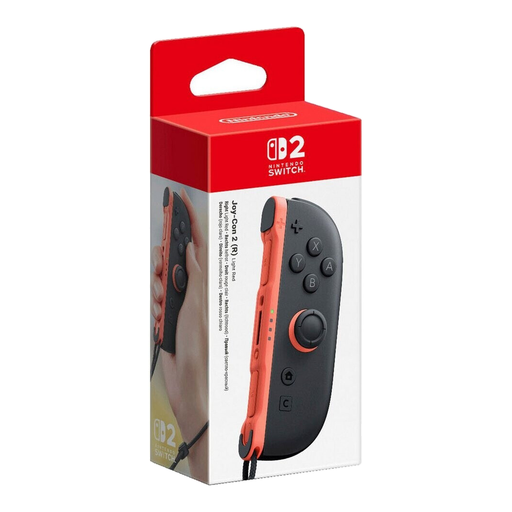
Nintendo Switch 2 right Joy-Con 2, light red
For use as an individual controller in supported Switch 2 play styles when you need an extra right-hand control.
Listed with motion controls, Bluetooth and a wrist strap. Not compatible with the original Nintendo Switch.
Joybuy
 No image available
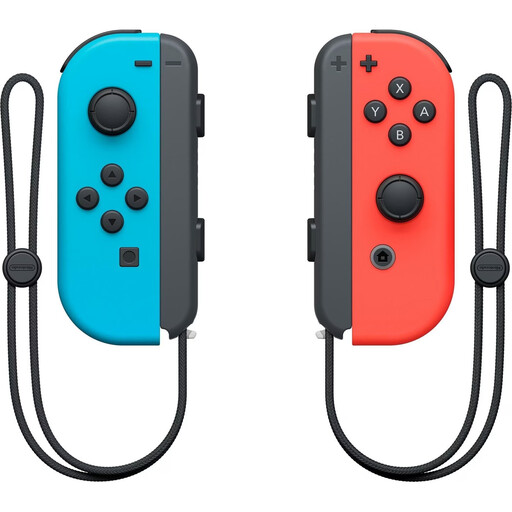
Nintendo Switch Joy-Con pair, neon red/neon blue
For Switch games that require separate Joy-Con controllers or the features of the original right Joy-Con.
The pair includes a left and a right Joy-Con. The original right Joy-Con has an IR Motion Camera. To use them wirelessly with Switch 2, you’ll need a Switch console or suitable charging accessories to charge them.
Joybuy
 No image available
Sony DualSense wireless controller
For supported local PS5 games that require a full-size wireless gamepad.
PC, Mac and Android are also listed as compatible platforms. Support for individual features depends on the game, device and connection method; it’s not a confirmed replacement for Switch mini-games that require Joy-Con-specific controls.
Joybuy
 No image available
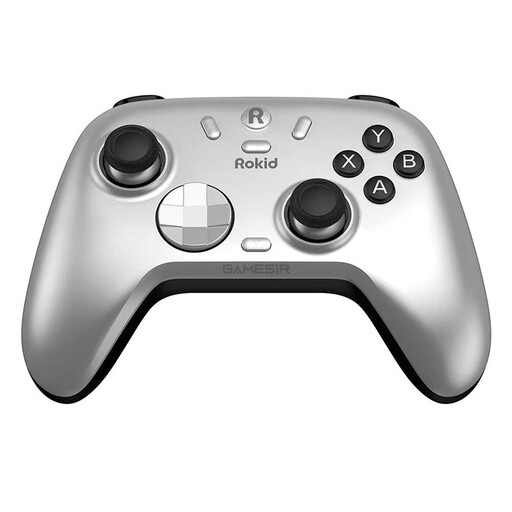
Rokid × GameSir controller
For Switch games that support a full-size gamepad; don’t assume it can replace a Joy-Con for every Joy-Con-specific mini-game.
Bluetooth, a wireless dongle and a wired connection are listed as connection options. Hall effect sticks and Hall effect triggers are also included.
Joybuy
Frequently asked questions
Can two people play from the sofa with one pair of Joy-Con 2?
Yes. In supported games and play styles, each Joy-Con 2 can be held horizontally and used as an individual controller. But that doesn’t guarantee two player slots in every mini-game: Nintendo notes that the number of players in Super Mario Party Jamboree depends on the mode you choose.
How do I get separate Joy-Con ready for a game?
Pair the controllers before you start, check their battery levels and attach the matching wrist strap to each one when using them wirelessly on their own. For charging original Joy-Con with Switch 2, Nintendo lists a Switch console or suitable charging accessories.
Do I need an online subscription for local mini-games?
Not necessarily: playing together on one console is different from the requirements for an online mode. For online play in Super Mario Party Jamboree, Nintendo requires a Nintendo Switch Online membership and a copy of the game for each console. Local player counts are listed separately for each game mode.
What rights do I have when buying a controller online in Germany?
For a qualifying distance-selling contract, you generally have a right to cancel. Section 355 of the German Civil Code (BGB) sets a 14-day period; when it starts and any exceptions depend on the legal requirements in each case. Under § 438 BGB, the German Federal Ministry of Justice and the Federal Office of Justice state that the limitation period for ordinary claims relating to defects is generally two years from delivery. Your statutory rights relating to defects are separate from any voluntary manufacturer’s warranty.


