Choose extra controllers to suit your console and the controls used by the specific mini-game. Joy-Con can be shared in supported Switch games, while PS5, Xbox or PC sessions require compatible full-size controllers. Also check the game mode and player count, how much room you’ll need to move around, and the charging and connection options. A pair of controllers doesn’t automatically mean two extra players can join in.
Which controllers suit which players
Switch sessions with a changing group of guests
If you want to add to your existing Joy-Con or use them individually, check the exact Switch model you have and whether the game supports this way of playing. Nintendo describes Joy-Con as controllers that can be used individually.
Mini-games in a compact living room
If you have limited space, check whether your chosen mini-game uses motion controls or can be played with buttons. For motion-controlled games, it’s also important to follow the game’s guidance on using wrist straps.
Sessions on PS5, Xbox or PC
These sessions call for extra full-size controllers. Check that the platform and connection are compatible with the specific game: PlayStation says you can use up to four controllers at once with a PS5; Microsoft lists USB, Bluetooth and the Xbox Wireless Adapter as connection options for Windows.
What to look for when buying
First, check which controllers and controls your game supports. Then compare the player count, room to move and charging options you’ll need.
| What matters |
What to check before buying |
Who it matters most to |
| Compatibility |
Check the console or operating system, game mode, and supported controller or control type. |
If I’m looking for a controller for my console, it needs to support the controls used by the specific mini-game too. Around 29% of consumers put the same emphasis on compatibility when choosing a controller. |
| Room to move |
Consider how much movement the game requires and how much space you’ll need; use the wrist straps with Joy-Con if the game requires them. |
If we’re planning motion-controlled games in my small living room, I want to know whether there’ll be enough room. Around 29% of consumers pay particular attention to whether the control type suits the space available. |
| Player count |
Check the number of players supported in the chosen offline mode and how many controllers each person needs. |
If several guests will be playing at once, I want to know in advance how many controllers the mode actually requires. Around 24% of consumers prioritise the number of players who can join in at the same time. |
| Charging and connections |
Check that the charging options, USB ports and supported connection types are compatible with your platform and setup. |
If I want to have extra controllers ready, each one needs to connect to and charge with the equipment I have. Around 18% of consumers put connections and power supply first. |
Avoid common buying mistakes
-
Assuming Joy-Con, Joy-Con 2 and charging options are interchangeable
Nintendo says older Joy-Con can be used wirelessly with the Switch 2, but can’t be attached directly to or charged on the console.
Before buying, check which generation of Switch you have and how you’ll charge your existing or extra controllers.
If you don’t have a Nintendo Switch available for charging, you may need a compatible charger for older Joy-Con.
-
Assuming the number of connected controllers tells you how many people can play
The number of people who can play at once also depends on the game and mode. Nintendo gives different player counts for local modes in Super Mario Party Jamboree.
Before buying, check the offline player count and how many controllers each person needs for the mode you’re planning to play.
-
Mixing up the 8BitDo Ultimate 2C Bluetooth and Ultimate 2C Wireless
8BitDo lists the Bluetooth model for Switch, while the similarly named Wireless model is listed for Windows and Android.
Compare the full model name and platform details for the exact version with your game and device.
A controller for the wrong platform could mean you need to buy another one.
Brands to help you choose
Nintendo
Joy-Con and Joy-Con 2 are options for supported local Switch mini-games that use individual controllers or motion controls.
- Nintendo describes Joy-Con as controllers that can be used individually; a pair of Joy-Con 2 is designed for Switch 2.
- According to Nintendo, Joy-Con 2 are designed for Switch 2 only. Older Joy-Con can’t be attached directly to or charged on the Switch 2.
Sony
The DualSense is an extra full-size controller for supported PS5 games.
- PlayStation says you can use up to four controllers at once with a PS5.
- Game support and features on other devices depend on the game and device.
Microsoft
The Xbox Wireless Controller is an option for games that support it on Xbox or Windows PC.
- Microsoft lists USB, Bluetooth and the Xbox Wireless Adapter as connection options for Windows.
- Check that the specific game supports it and that you already have any connection accessories you need.
8BitDo
The Ultimate 2C Bluetooth is a controller option for supported Switch games.
- 8BitDo lists motion sensors for the Ultimate 2C Bluetooth and support for Switch 2 from system version 20.1.1.
- According to the manufacturer, the similarly named Ultimate 2C Wireless is designed for Windows and Android; the two versions aren’t interchangeable.
Controllers at Joybuy
Here you’ll find extra controllers for local sessions on Nintendo Switch and Switch 2, Xbox or Windows PC, as well as PS5. What matters is whether the specific game supports the controller and its control type.
 No image available
Nintendo Switch 2 Joy-Con 2 2-Piece Set, Blue/Light Yellow
For extra local sessions with compatible Switch 2 games; the set includes two Joy-Con 2 and, according to Nintendo, is designed for Switch 2 only.
Use the wrist straps for motion-intensive games and make sure there’s enough room to move.
View at Joybuy
 No image available
Microsoft Xbox Wireless Controller, Deep Pink (Xbox One/Xbox Series X/S/PC)
An option for supported Xbox or Windows PC games when you need an extra full-size controller.
Before buying, check that the specific mini-game supports the controller and that it can connect to your device.
View at Joybuy
 No image available
Nintendo Switch Pro Controller, Black
For Switch games with button controls, if you’re looking for an extra controller rather than individual Joy-Con.
Check that the local game mode you’ve chosen supports this controller.
View at Joybuy
 No image available
PlayStation DualSense Wireless Controller, Midnight Black, including USB cable
For a supported local PS5 game when you need another full-size controller.
Whether a specific mini-game supports the controller depends on the game.
View at Joybuy
 No image available
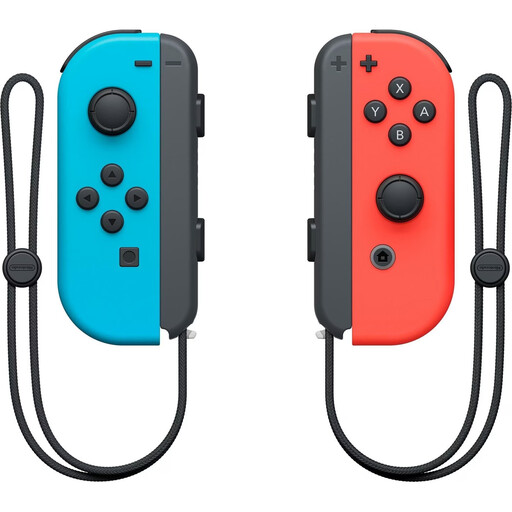
Nintendo Switch Joy-Con controller pair, Neon Red/Neon Blue
For supported Switch mini-games that let you use individual Joy-Con.
Use the wrist straps for motion-controlled games and make sure there’s enough room to move. According to Nintendo, older Joy-Con can’t be attached directly to or charged on a Switch 2; you’ll need a Nintendo Switch or compatible charging accessories to charge them.
View at Joybuy
Frequently asked questions
Does a pair of Joy-Con automatically let two extra guests join in?
No, it depends on the game and the mode you choose. Nintendo describes sharing a pair of Joy-Con in supported games; in Super Mario Party Jamboree, the offline player count varies by mode.
Can I use older Joy-Con with a Switch 2 and charge them on it?
According to Nintendo, older Joy-Con can be used wirelessly with a Switch 2, but can’t be attached directly to or charged on it. You’ll need a Nintendo Switch or compatible charging accessories to charge them.
What should I bear in mind with motion-controlled mini-games?
Check the controls for the game you’ve chosen and make sure there’s enough room to move. When you start Super Mario Party Jamboree with Joy-Con or Joy-Con 2, Nintendo prompts you to attach the wrist straps.
Do I need an online subscription to play locally?
Nintendo’s membership requirement relates to the online mode in Super Mario Party Jamboree; it isn’t a general requirement for local play on one console. Nintendo also specifies one game per console for the online mode described.


