Which option is right for you?

Photographers using a fixed tripod setup

If you don’t want to touch your camera while taking repeated close-ups of pasta, first check your camera model, connection and distance from where you’ll be releasing the shutter. Nikon describes the MC-DC2 wired remote release as a way to avoid touching the camera when shooting with a tripod.

Food styling at a small table

If you rearrange the pasta, plates or props between shots, a wireless remote can save you a trip back to the camera. Make sure it’s specifically compatible with your camera model; Canon and Sony both list model-specific requirements for their remote controls.

Photographers using a smartphone or camera app

If your smartphone is the camera, check whether its camera software supports a Bluetooth shutter release. To control a separate camera remotely, you’ll need a suitable app and a model that supports the app features you want; Canon describes this option for compatible cameras.

What should you look for?

First decide whether you’ll be using a smartphone or a separate camera. Then choose between the self-timer, a suitable wired release, a compatible wireless remote or a supported app, depending on how you work at the table.

Consideration What to check before buying Who is this important for?
Compatibility Check the full camera model against the accessories list; for wired releases, check the connection and whether an adapter may be needed. If I want to avoid buying a plug or wireless control that won’t work with my camera. Around 36% of consumers prioritise finding the right connection or wireless standard.
Releasing the shutter from a fixed setup Check whether the self-timer is enough; for frequent shots, consider the cable length and how to route the cable safely. If I want my camera to stay in place and don’t want to touch it when taking a shot. Around 29% of consumers prioritise this when using a fixed setup.
Freedom to move around the table Check that the specific remote is supported and find out how it needs to be paired with your camera model. If I want to rearrange the pasta and props and take a shot while standing beside the setup. Around 21% of consumers prioritise this.
Control via smartphone Decide which device you’ll be using to take the photo, then check the app’s features or whether your smartphone’s camera software supports the control. If I want to control my camera from a mobile device or take photos directly with my smartphone. Around 14% of consumers prioritise this.

Common buying and usage mistakes

  • Assuming Bluetooth means universal camera compatibility

    A smartphone shutter release won’t necessarily work with a separate camera. Hama describes the BRS5 as being for smartphone and tablet cameras; Sony requires the RMT-P1BT to be used with a supported camera.

    First decide which device you’ll be using and check the full camera model. Then check the manufacturer’s information for the exact shutter release you want to use.

  • Checking compatibility lists without looking for adapter notes

    For some cameras on Fujifilm’s compatibility list, the RR-100 also requires a third-party 2.5 mm to 3.5 mm adapter.

    Check the notes for your specific model and make sure the adapter you need is included.

    An extra adapter is another item you’ll need to allow for when connecting the remote.

  • Assuming a wireless set is completely cable-free all the way to the camera

    With the Rollei Wireless Remote Release 28146, the wireless connection doesn’t replace the cable between the receiver and camera. Rollei says you’ll need to choose a suitable camera cable.

    Check that it matches your camera’s connection, and route it around the small table so it doesn’t pull on your setup.

    You’ll need to choose the camera cable separately.

  • Expecting a remote shutter release alone to deliver sharp close-ups

    Taking a shot without touching the camera won’t stop an unstable camera position from moving, and it doesn’t replace checking the focus.

    Secure the camera, check the focus on the pasta, then choose the shutter release method that suits you.

Key brands at a glance

Canon

Canon offers wired and Bluetooth shutter releases for specific camera models, as well as app control for supported cameras.

  • The RS-80E3 is designed for compatible E3 connections. Canon gives this model an operating range of 80 cm.
  • The BR-E1 is a Bluetooth remote control. Canon gives it a range of up to 5 m with supported cameras. Camera Connect offers remote control for compatible models.
  • Connection and model requirements vary depending on the option. The stated range applies to the BR-E1, not to other remote releases.

Nikon

Nikon offers both wired shutter releases for compatible camera connections and a Bluetooth remote control for supported models.

  • Nikon describes the MC-DC3 shutter release as having two pressure stages, while the ML-L7 has buttons for photos and video.
  • The MC-DC3 and ML-L7 are different options. The fact that they’re both Nikon products doesn’t mean they’re interchangeable or compatible with every Nikon camera.

Fujifilm

The RR-100 is a wired shutter release for the X and GFX cameras listed by Fujifilm.

  • Fujifilm describes a half-press to focus and a full press to take the photo.
  • Some of the listed cameras also require a third-party 2.5 mm to 3.5 mm adapter.

Sony

The RMT-P1BT is designed for Sony cameras that explicitly support this Bluetooth remote control.

  • Sony describes it as connecting via the Bluetooth receiver built into the camera, so no additional receiver is needed.
  • Your specific camera model must support the remote control. Check the settings and pairing requirements too.

Hama

Hama describes the BRS5 as a Bluetooth shutter release for smartphone and tablet cameras.

  • Hama lists Android and iOS compatibility and a CR1632 battery.
  • According to Hama, its operation depends on the software on the device in question; it isn’t described as a universal remote control for separate cameras.

Rollei

The Wireless Remote Release 28146 is a wireless option with an interval function for a compatible camera setup.

  • Rollei advertises a range of up to 50 m for taking photos and setting intervals with this model.
  • Rollei says you’ll need to choose a separate cable that’s compatible with your camera. The stated range isn’t necessarily important when you’re shooting at a small table.

Smartphone accessories at Joybuy

The products below are smartphone holders and smartphone shutter releases for taking pasta photos with your phone. They aren’t a substitute for a model-specific remote release for a separate camera.

Verbex K60 Black selfie stick with tripod and Bluetooth remote shutter release

Verbex K60 Black selfie stick with tripod and Bluetooth remote shutter release

For taking pasta photos with a smartphone when you want to position your phone for the shot and use a remote to take the picture.

The description lists a phone holder for smartphones up to 6.0 inches.

Joybuy
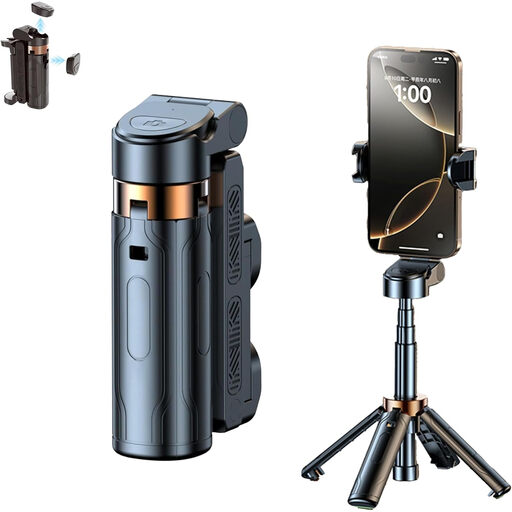
3-in-1 Bluetooth selfie stick with tripod and remote control

3-in-1 Bluetooth selfie stick with tripod and remote control

For smartphone photography when you want to set up your phone and take the shot using a Bluetooth remote control.

The product title lists an extendable selfie stick and a 360° rotating phone holder.

Joybuy

Magnetic smartphone grip with remote control and fill light

Magnetic smartphone grip with remote control and fill light

For smartphone photography when you want to use a grip with a detachable Bluetooth remote control.

The product description lists a 1/4-inch tripod thread and an integrated fill light.

Joybuy
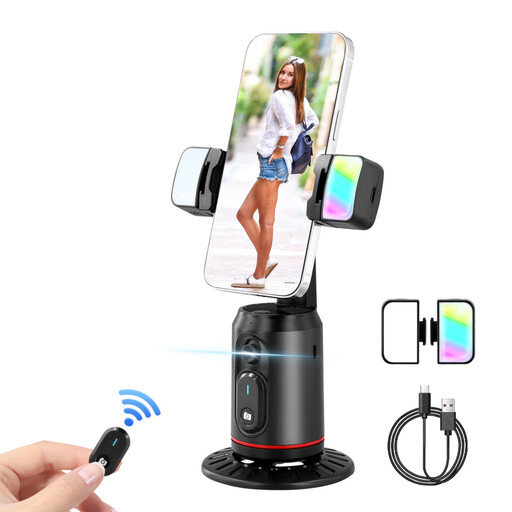
360° smartphone gimbal with tripod, two selfie lights and remote control

360° smartphone gimbal with tripod, two selfie lights and remote control

For smartphone photography when you want to use a remote control and a phone holder that you can position as needed.

The product title lists a 360° rotating holder, two selfie lights and a tripod with face tracking.

Joybuy

Ulanzi JJ02 phone tripod with Bluetooth remote shutter release

Ulanzi JJ02 phone tripod with Bluetooth remote shutter release

For taking smartphone photos at the table when you want to position your phone on a tripod and take the shot wirelessly.

The product title lists a 3-in-1 design and two cold shoe mounts.

Joybuy

Frequently asked questions

Do I need to buy a remote shutter release to take a few pasta photos?

Not necessarily. If your camera is in a fixed position, try the built-in self-timer first. If you want to take shots as soon as you’ve finished arranging the scene, a compatible wired or wireless remote release is an option. Either way, make sure the camera is stable.

Why won’t my Sony Bluetooth remote release the shutter even though Bluetooth is switched on?

The Sony RMT-P1BT only works with a camera that supports this Bluetooth remote control. Check the Bluetooth remote-control setting and the pairing; if you’ve used it with another camera, you may need to pair it again.

Will the Fujifilm RR-100 work straight away with every camera on its compatibility list?

No. Fujifilm says that some listed models also require a third-party 2.5 mm to 3.5 mm adapter. Check the note for your exact camera model.

Are there any extra parts or batteries I should look out for?

It depends on the model. The Hama BRS5 uses a CR1632 battery. Rollei says the Wireless Remote Release 28146 needs a camera cable selected to suit your camera; check the connection and what’s included before you buy.

How should I dispose of an old remote control and its battery in Germany?

According to the German Environment Agency, electrical waste and batteries must not go in household rubbish. Take the remote control to a suitable electrical waste collection point and put any removable battery in a separate battery collection box.