
Lieferung heute & morgen

Qualitätsgarantie

Willkommens-Angebote freischalten: KOSTENLOSE Lieferung | Bis zu 80 % RABATT | Kostenlose 30-Tage-JoyPlus-Testphase
App herunterladen
PC accessories and office equipment need to suit your workspace, existing hardware and actual usage profile. A mini PC for studying has different requirements from a gaming PC, a USB mouse for the library or an ergonomic office chair for daily home working.
As a Joybuy Product Recommendation Officer, I filter relevant product data and highlight details that are easy to overlook in product descriptions. This makes it possible to narrow down your choice objectively, without being guided solely by high resolutions, numerous connection options or design promises.
A high DPI figure on a mouse does not automatically mean more comfortable operation. For office work, web browsing and word processing, 1000 to 1600 DPI may be sufficient. Reliable tracking, a suitable shape and a connection that fits your workspace are more important.
The processor model, RAM, SSD, graphics solution and connections should also be considered together when choosing mini PCs and gaming PCs. A compact desktop PC with 4K support is not automatically suitable for every game. Conversely, a powerful computer may take up unnecessary space and use more energy for simple office tasks.
A Bluetooth adapter or Wi-Fi card for a PC requires a compatible operating system and, where applicable, available ports or slots. According to the product details, the TP-Link UB500 supports plug-and-play operation on Windows 11, Windows 10 and Windows 8.1; a driver is required for Windows 7.
The TP-Link Archer TBE550E has more limited requirements: the product description lists Windows 11 in the 64-bit version as a prerequisite. A free PCIe slot is also needed. Before buying, you should therefore check your operating system, case format and available slots.
A gaming chair with a footrest or an office chair with a mesh back can be a good choice if the seat height, backrest, armrests and footprint suit both the user and the desk. A footrest does not replace a correct sitting position. Likewise, an ‘ergonomic’ label alone says nothing about the specific adjustment options.
When choosing a chair, buyers should therefore check the dimensions, maximum user weight and adjustment options in the product details. Folding armrests or a compact base may be more practical in smaller rooms.
At least the following points are relevant when choosing a mini PC:
A wired USB mouse is easy to set up and does not require a battery. The RAPOO N1600 is specified as having an optical sensor, three buttons, a USB connection and a symmetrical body suitable for both right- and left-handed users. The product details also state a cable length of approximately 1.5 metres and a lifespan of up to 5 million clicks.
If you are looking for a quiet computer mouse, check which buttons are actually noise-reduced. The RAPOO N1600 is described as having quieter clicks on the left and right buttons; the mouse-wheel click is not included.
A Bluetooth adapter can be useful for wireless peripherals. According to the manufacturer, the TP-Link UB500 supports Bluetooth 5.3 and up to seven connected devices. However, the actual range depends on walls, sources of interference and the connected devices.
AA batteries should match the device’s power requirements. The VARTA Longlife Power AA batteries are described as providing 1.5 volts, with a stated shelf life of ten years and a pack size of ten. Old batteries should not be disposed of with household waste; take them to designated collection points instead.
Travel games with a compact packed size can be useful for families and holidays. According to the product description, Triominos The Original Tour Edition contains 56 triangular playing pieces, four racks and instructions. The game is designed for two to four players aged six and over. Due to small parts, it is not suitable for children under three years of age.
When choosing a transparent display case, collectors should pay attention to the material, dimensions, dust protection and stability. The COIZYZZL display box for collectors is described as a two-piece set made from transparent PS plastic or acrylic panels. The stated dimensions of 30 × 17 × 24.5 cm should be checked against the item being displayed.

Why this product suits the profile: For studying, home working and everyday office tasks, this model combines a compact design with 16 GB LPDDR4 RAM, a 512 GB SSD and AMD Ryzen 5 7430U.
The choice is not based solely on the case size: the processor, RAM, SSD, Wi-Fi 6 and support for up to three 4K displays are all clearly specified.
Six cores and twelve threads, a 512 GB SSD, plus Bluetooth 5.2 and Wi-Fi 6 according to the product details.
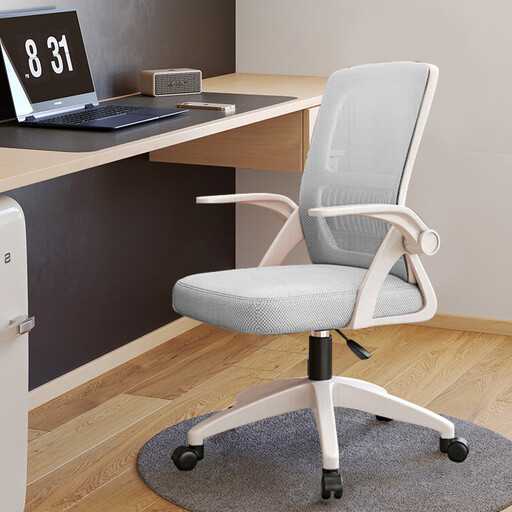
Why this product suits the profile: With a mesh back, fold-up armrests and specified lumbar support, this model is aimed at users who regularly work from home.
Rather than focusing solely on appearance, the mesh material, lumbar support and fold-up armrests are considered as specific features.
Breathable mesh back and fold-up armrests according to the product description; a pink version is also available.
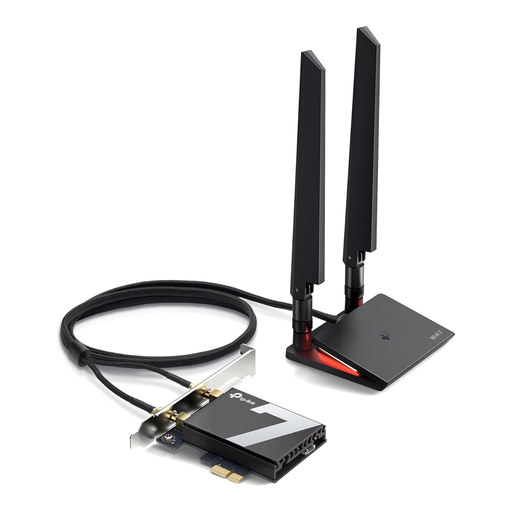
Why this product suits the profile: For PC upgraders with a compatible Windows 11 system, this PCIe card offers Wi-Fi 7, Bluetooth 5.4 and tri-band support.
The required Windows 11 64-bit compatibility and a free PCIe slot are checked before purchase. This helps avoid choosing an unsuitable adapter.
Wi-Fi 7, WPA3, Bluetooth 5.4 and 6 GHz support according to the product description; network performance also depends on the router.
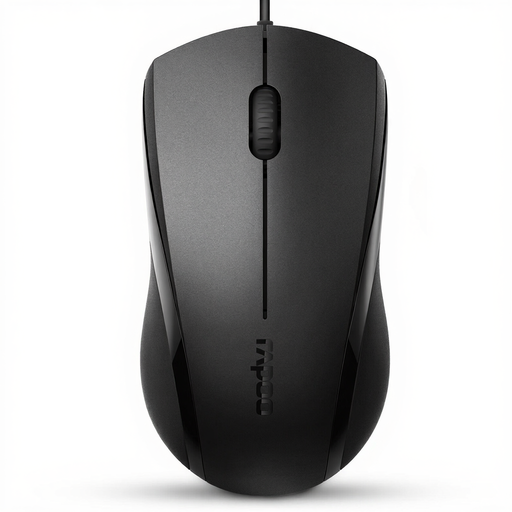
Why this product suits the profile: This wired mouse is suitable for offices, libraries and shared workspaces where easy installation and reduced clicking noise are important.
The noise claim is considered in context: the left and right buttons are quieter according to the description, but pressing the mouse wheel is not completely silent.
USB plug-and-play, symmetrical shape, optical sensor and case dimensions of 118 × 63 × 40 mm according to the product details.
We have put together a complete, regularly updated list of products that fully meet these strict selection criteria and the safety regulations applicable in the EU.
For typical office tasks, a compact desktop PC or mini PC with an SSD, sufficient RAM, a stable network connection and suitable monitor connections is often enough. A USB mouse and an office chair adjusted to the right height complete the workspace. Before buying, check that the operating system, connections and desk dimensions are compatible.
Actual battery life depends on the device, usage and surroundings. The VARTA Longlife Power AA batteries are stated to have a shelf life of ten years. This should not be confused with a fixed operating time in a particular device. Batteries should be stored in a dry place, and their polarity should be checked after insertion.
Not necessarily. A Wi-Fi 7 adapter is only worthwhile if the PC has a suitable PCIe slot, the operating system is supported and the router provides Wi-Fi 7. With older routers, a compatible Wi-Fi 6 adapter or the existing networking technology may be sufficient.