
Lieferung heute & morgen

Qualitätsgarantie

Willkommens-Angebote freischalten: KOSTENLOSE Lieferung | Bis zu 80 % RABATT | Kostenlose 30-Tage-JoyPlus-Testphase
App herunterladen
Choosing a gaming PC case is more than just an aesthetic decision. It's the foundation of your build, critically influencing cooling performance, component longevity, and the ease of assembly. However, the market is flooded with marketing promises that often prioritise looks over function. This guide will help you identify common pitfalls and make an informed choice based on technical facts.
As your Joybuy Product Recommendation Officer, I'll filter the relevant information for you, so you can find a case that perfectly matches your requirements.
Before we dive into the important parameters, let's look at the typical mistakes that often lead to disappointment and unnecessary expense.
To avoid these pitfalls, focus on the following three technical aspects. These define the true performance and user-friendliness of a case.
Cooling is paramount for a stable gaming PC. There are two fundamental approaches here:
Pay attention to the number and size of pre-installed fans, as well as the maximum number of fans that can be mounted. Dust filters on all air intakes (front, top, bottom) are a must for a clean system and easy maintenance.
The size of the case must match your components—not just for today, but for future upgrades as well.
An appealing exterior is important, but it shouldn't undermine functionality.
Here are some models tailored to specific user needs that meet the criteria mentioned above.
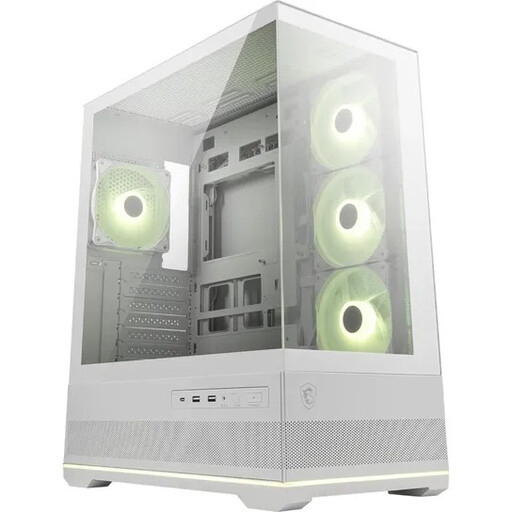
Why This Fits Their Persona: Ideal for users who want to showcase their hardware as if it were in a display case. The 270° panoramic glass provides a seamless view of the components, while the white colour scheme and pre-installed ARGB fans enable a brilliant light show.
It bypasses the "show-over-flow" trap with a smart dual-chamber layout and support for up to 10 fans. The side-mounted reverse-blade fans draw in cool air directly while showcasing their lighting without an obstructive frame.
270° panoramic glass for an uninterrupted view. Includes 4 ARGB fans (3 of which are reverse-blade) and an ARGB hub for instant, synchronised lighting.
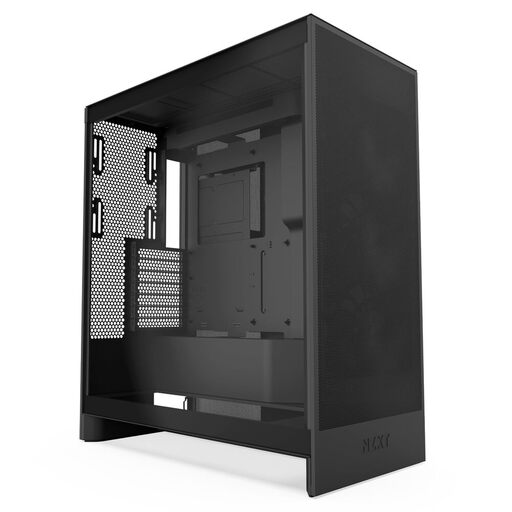
Why This Fits Their Persona: For users who prioritise maximum cooling performance above all else. This case is consistently designed for high airflow to keep even the most power-hungry high-end components running at low temperatures.
It solves the problem of hidden compatibility issues with a spacious layout, wide cable channels, and explicit support for large radiators (up to 420mm). This makes installing powerful components significantly easier.
Optimised mesh panels for maximum airflow. Offers dedicated mounting spots for three 120mm bottom fans for direct GPU cooling.
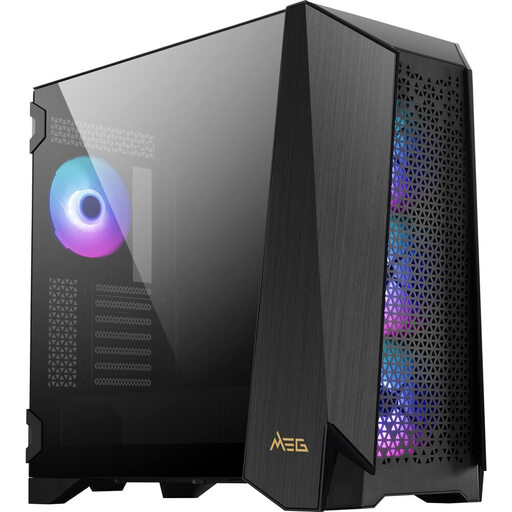
Why This Fits Their Persona: For demanding users who need maximum control, modularity, and space for complex builds with E-ATX motherboards and custom water cooling. This case is a platform for extreme system configurations.
It solves the "RGB lock-in" trap with an integrated touchscreen that allows for software-independent control of fans and ARGB lighting. At the same time, it maintains compatibility with motherboard standards, ensuring full flexibility.
Unique 4.3-inch IPS touchscreen for system monitoring and control. Modular side panel that can be swapped for a fan bracket or a custom water-cooling distribution plate.
We've compiled a full, up-to-date list of products that fully meet these strict selection criteria and UK safety regulations.
There's no one-size-fits-all answer, as it depends on the components installed. A solid baseline configuration for most systems consists of at least two intake fans at the front and one exhaust fan at the rear. For high-end systems, three front fans and additional fans in the top or bottom are recommended to ensure optimal airflow.
No. Although ATX is a motherboard standard, the internal dimensions of cases vary greatly. Always check the maximum GPU length specified by the case manufacturer and compare it with the length of your desired GPU. Keep in mind that a front-mounted radiator will reduce the available space by about 25-30mm.
Not necessarily. A glass side panel has no direct impact on airflow. It only becomes problematic if the front is also made entirely of glass and lacks sufficient side or bottom air intakes. Modern, well-engineered cases with glass fronts have solved this problem with thoughtful designs that route airflow around the glass. However, an airflow PC case with a mesh front will generally offer higher potential airflow.