
Lieferung heute & morgen

Qualitätsgarantie

Willkommens-Angebote freischalten: KOSTENLOSE Lieferung | Bis zu 80 % RABATT | Kostenlose 30-Tage-JoyPlus-Testphase
App herunterladen
A gaming PC case is far more than just a box for your valuable components. It's the foundation for cooling performance, expandability, and the overall aesthetic of your entire setup. However, the market is flooded with alluring designs that, in practice, often cause more problems than they solve. As your Joybuy Product Recommendation Officer, I'll help you identify the common pitfalls and make an informed decision based on technical facts rather than marketing hype.
Before we dive into the important specifications, let's look at the three most common mistakes made when choosing a case, which often lead to disappointment and additional costs.
The "Aquarium" Trap: Aesthetics Over Airflow A PC case with a glass panel on multiple sides can look impressive, but if it lacks sufficient air intakes, it quickly becomes a heat-trapping coffin for your expensive hardware. Components like the CPU and graphics card will throttle their performance at high temperatures, directly impacting your gaming experience. A good design balances looks and functionality.
The "'It'll Fit' Miscalculation: Ignoring Dimensions Many buyers only check for motherboard compatibility (e.g., an ATX case) but overlook critical dimensions for other components. The maximum graphics card length, CPU cooler height, and power supply installation depth are crucial. Nothing is more frustrating than discovering during assembly that your new high-end graphics card is a few millimetres too long.
The "All-Inclusive" Deception: Low-Quality Fans Many cases are advertised with pre-installed ARGB case fans. However, these are often cheap models that are loud, produce low static pressure, and have uneven lighting. The result: you end up paying twice because you'll soon need to replace the included fans with more powerful models.
To avoid these traps, focus on the following three core aspects. These define the true performance and longevity of your build.
Cooling performance is paramount. There are two fundamental approaches here:
Pay attention to the number and size of potential fan mounts (120mm vs. 140mm) and radiator compatibility if you plan to install or upgrade to water cooling. A case should offer at least enough space for a 240mm or 360mm radiator in the front or top.
Measuring is better than guessing. Before buying a PC case, check these four dimensions:
Good cases are distinguished by thoughtful details:
Here are some recommendations tailored to specific user needs that meet the criteria mentioned above.
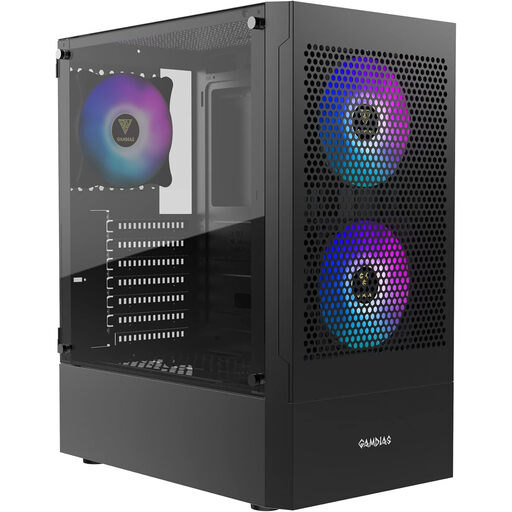
Why This Fits Their Persona: This case provides an excellent starting point for a first custom gaming PC. It combines a modern look with three pre-installed ARGB fans and a cooling-focused mesh front without breaking the bank.
It bypasses the "aquarium" trap with its perforated front for high airflow and provides a solid out-of-the-box setup with three ARGB fans, avoiding the "all-inclusive" deception.
Excellent value for money; out-of-the-box cooling with three pre-installed 120mm ARGB fans; mesh front for optimised airflow.
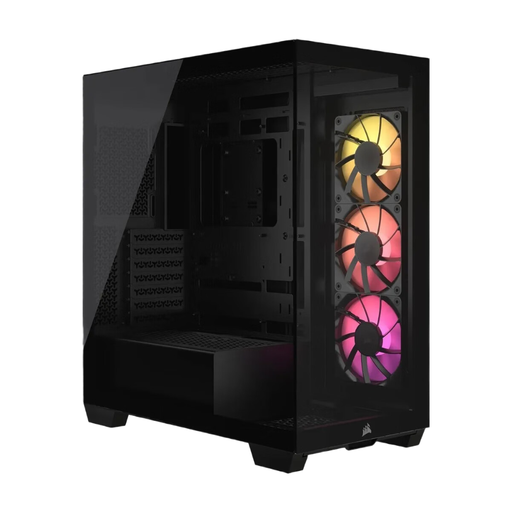
Why This Fits Their Persona: For users who prioritise aesthetics, this case offers a wraparound, pillarless panoramic glass front and side. It's the ideal stage to showcase elaborate RGB setups and custom components. A white or black PC case is available.
Despite the glass-heavy design, cooling is taken seriously with room for up to ten fans. Compatibility with reverse-connection motherboards (ASUS BTF, MSI Project Zero) elegantly solves the problem of unsightly cables in the main chamber.
Panoramic view of the components; support for back-connect motherboards for an ultra-clean aesthetic; high cooling capacity despite the glass design.
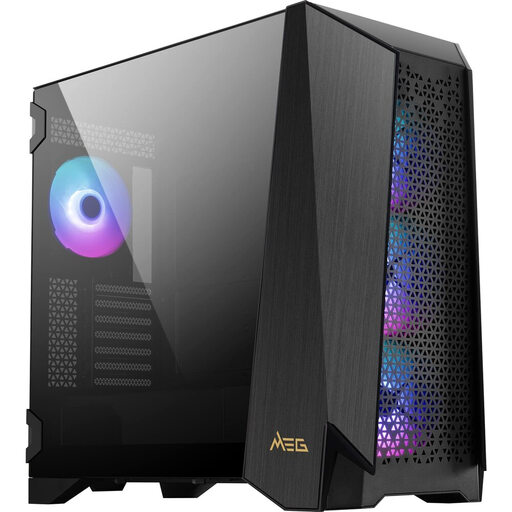
Why This Fits Their Persona: For users who refuse to compromise on performance and functionality. This Mid Tower case offers space for E-ATX boards, massive graphics cards, and is specifically prepared for elaborate custom water-cooling loops.
It solves the "'it'll fit' trap" with its extremely spacious interior and a modular side panel that can adapt for E-ATX boards or a custom water-cooling distribution plate. The touchscreen offers control without software dependency.
Highly modular for maximum flexibility; integrated IPS touchscreen panel for system control; tremendous cooling potential with four pre-installed 140mm fans.
We have compiled a complete, real-time list of products that fully satisfy these strict selection criteria and UK safety regulations.
1. How many case fans are necessary for a gaming PC? For a typical mid-range gaming PC, a configuration with two 120mm or 140mm fans in the front (intake) and one 120mm fan in the rear (exhaust) is a solid baseline. For high-end systems, additional fans in the top (exhaust) are recommended to effectively dissipate waste heat from the CPU and GPU.
2. What is the difference between a Mid Tower and a Full Tower case? A Mid Tower case is the most common form factor and offers sufficient space for standard ATX motherboards and most components. A Full Tower is significantly larger and taller. It is mainly needed for systems with E-ATX or even larger motherboards, multiple graphics cards, or elaborate custom water-cooling systems with several large radiators.
3. Will any graphics card fit in any ATX case? No. Although the case may support ATX motherboards, the graphics card length is a separate, independent specification. Flagship models from graphics card manufacturers, in particular, are often very long and will not fit into every compact Mid Tower case. Always compare the length of the graphics card with the maximum supported length of the case.