
Lieferung heute & morgen

Qualitätsgarantie

Willkommens-Angebote freischalten: KOSTENLOSE Lieferung | Bis zu 80 % RABATT | Kostenlose 30-Tage-JoyPlus-Testphase
App herunterladen
Choosing a PC case is no longer just a matter of functionality. A panorama PC case transforms a computer from a mere workhorse into an aesthetic centerpiece for any room. However, the path to a visually stunning yet high-performance system is paved with potential pitfalls. Many buyers invest in a so-called aquarium PC case, only to discover later that design choices negatively impact performance or the assembly process. This guide will help you distinguish marketing hype from genuine benefits and make the right choice.
Before you decide on a model, you should be aware of three common problems that often only become apparent after purchase.
To avoid the mistakes mentioned above, you should pay attention to a few core technical features during your selection. These determine whether a case just looks good or also provides a solid foundation for a high-performance gaming PC case.
A well-thought-out cooling concept is essential for panorama cases. Pay attention not only to the number of possible fans but also to their positioning.
Dimensions are critical. Make sure the case meets your requirements.
Here are some recommendations tailored to different needs and priorities that take the above criteria into account.
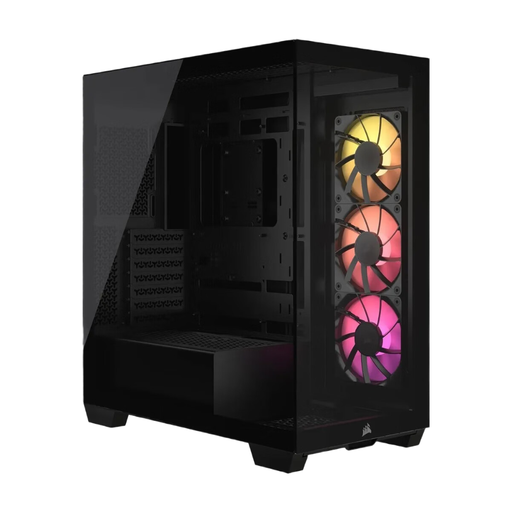
Why This Fits Their Persona: Ideal for users who strive for an immaculate interior. Compatibility with reverse-connection motherboards (ASUS BTF) allows nearly all cables to be hidden, which makes a crucial difference in a panorama case.
Solves the cable management dilemma by supporting reverse-connection motherboards. The cooling concept, with space for up to ten fans, effectively prevents the airflow trap.
Combines a modern panoramic look with future-proof functionality (reverse connection). The three pre-installed RS120 ARGB fans provide a solid foundation for cooling and lighting.
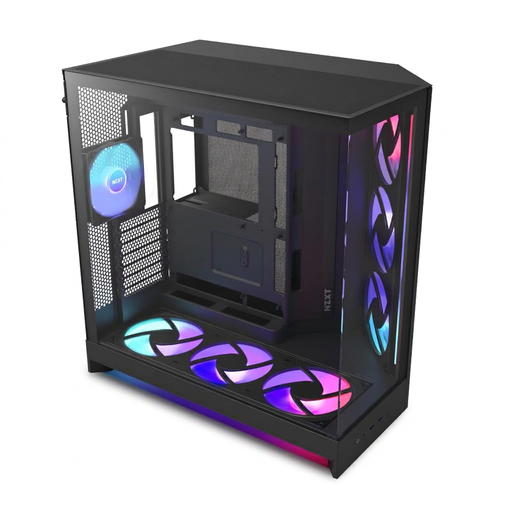
Why This Fits Their Persona: For users who want maximum cooling performance and an uncompromising presentation of their high-end components. The dual-chamber design separates the power supply and cables from the main chamber, ensuring an extremely tidy look.
The dual-chamber layout is the direct answer to the cable management dilemma. The perforated panels and the high number of fan mounts (including seven pre-installed RGB fans) guarantee excellent airflow.
Offers an unobstructed panoramic view through seamless glass and superior thermal management. The generous inclusion of fans makes it ready for demanding systems right out of the box.
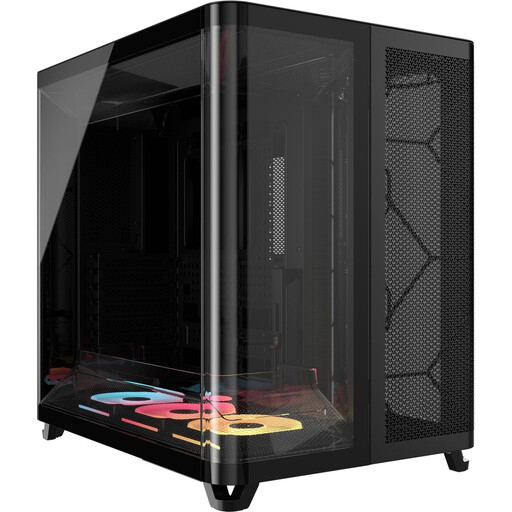
Why This Fits Their Persona: Perfect for users who want to build a powerful RGB system but dread the hassle of complex wiring. The iCUE LINK ecosystem radically simplifies the installation of fans and lighting.
Addresses the cable management dilemma at a fundamental level with the iCUE LINK system, which connects multiple fans via a single cable. The dual-chamber design also ensures excellent cooling performance.
Significantly simplifies the build process and drastically reduces the number of cables required. The pillarless glass front offers a completely unobstructed view of the components.
We have compiled a complete, real-time updated list of products that fully meet these strict selection criteria and relevant safety regulations.
Not necessarily. While early models often suffered from heat buildup, modern panorama cases feature sophisticated cooling concepts. Features like perforated bottom and side panels, strategically placed fan mounts (especially for bottom intake), and dual-chamber designs ensure effective airflow. It's crucial to look for these airflow-optimised features when buying, not just the glass panels.
A reverse-connection case is designed for special motherboards (e.g., ASUS BTF) where the power, SATA, and USB connectors are located on the back of the board. This allows all primary cables to be routed behind the motherboard tray, resulting in an exceptionally clean and tidy appearance in the main chamber. It is not essential for pure system performance, but for enthusiasts who place the highest value on aesthetics, it is a decisive advantage.
This depends on the specific case model. Always check the maximum GPU length specified by the manufacturer (e.g., 400mm or 435mm). Many modern black or white mid-tower cases are already designed to accommodate very long high-end graphics cards. Nevertheless, checking the dimensions before purchase is essential to avoid compatibility issues.