
Lieferung heute & morgen

Qualitätsgarantie

Willkommens-Angebote freischalten: KOSTENLOSE Lieferung | Bis zu 80 % RABATT | Kostenlose 30-Tage-JoyPlus-Testphase
App herunterladen
A PC case needs to offer more than attractive looks. It determines whether the graphics card, CPU cooler and power supply actually fit, how easily components can be installed and whether warm air can escape the system reliably. If you choose based solely on RGB lighting or a glass front, you will often overlook important details.
The term “ATX case” does not automatically mean that every ATX or E-ATX motherboard will fit without problems. With E-ATX, the width, cable-routing cut-outs and space for radiators can be crucial. Reverse-connector motherboards also require suitable cut-outs behind the motherboard tray.
You should therefore check the following before buying:
A PC case with pre-installed fans can make initial assembly easier. However, the combination of fan positions, openings and front panel is what really matters. A closed glass front can restrict air intake more than a perforated mesh front.
An airflow PC case should ideally have clearly defined air paths. Typically, air is drawn in through the front or bottom and expelled through the rear or top. Dust filters at intake points make maintenance easier, but they do not replace regular cleaning.
RGB lighting and tempered glass make your components visible, but they do not automatically improve everyday usability. You should also look for USB-C, the number of USB-A ports, audio jacks and the ability to control lighting without proprietary software.
A PC case with USB-C is only useful if the motherboard has the correct internal connector. Otherwise, the port may not work or may only be usable with an additional adapter.
The maximum graphics card length is often stated without additional front fans or a radiator. Therefore, do not measure only the GPU length; also allow for the space required by the cooling system. Large cards may need extra room for side-mounted power connectors.
Important comparison figures include:
For large builds with multiple drives or a wide motherboard, an E-ATX case may be a sensible choice. If you are planning a classic gaming system with an ATX motherboard, Midi-Tower cases often offer a well-balanced combination of internal space and footprint.
If you want to install liquid cooling, compare the radiator size and its possible installation positions. A PC case for liquid cooling may accommodate 240, 280, 360 or even 420 mm radiators. The specification “360 mm” does not refer solely to the radiator’s actual thickness together with the fans. You should therefore also check:
Steel constructions provide stability, while glass panels let you showcase your components. A tempered-glass side panel should be placed carefully on a padded surface, as its edges can be damaged by hard surfaces.
Tool-free side panels, removable dust filters and magnetic front covers reduce maintenance. Before buying, it is also worth checking the drive bays: multiple 3.5-inch and 2.5-inch bays are important if you need extensive data storage.
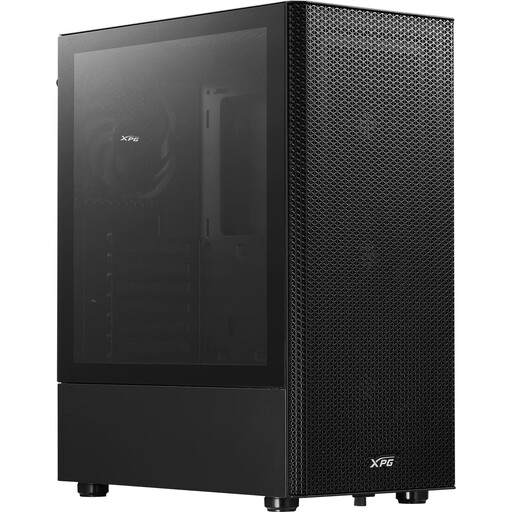
Why this product suits this profile: This ATX Midi-Tower case supports ATX, Micro-ATX and Mini-ITX, and comes with four pre-installed 120 mm fans. This means fewer additional components are needed for a classic gaming PC.
The perforated front and removable dust filters prioritise air intake over a fully enclosed front panel. The maximum GPU length is 310 mm.
Four 120 mm fans, support for a 360 mm front radiator and two 3.5-inch drive bays.
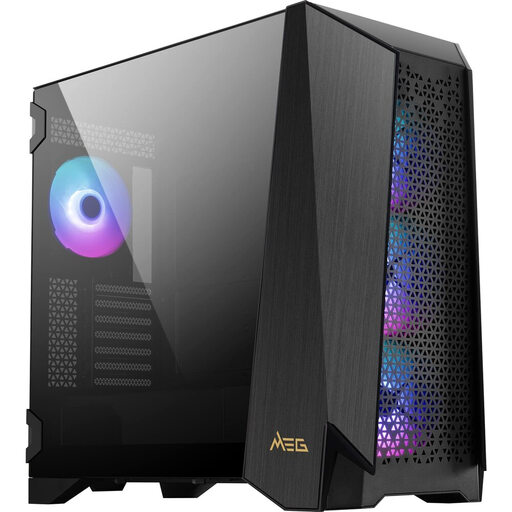
Why this product suits this profile: Demanding builds benefit from E-ATX support, four 140 mm ARGB fans, modular side panels and a 4.3-inch IPS touchscreen.
The compatibility data specifies clear limits: up to 400 mm GPU length, 185 mm CPU cooler height and 220 mm power supply length. This makes it easier to plan a high-end build with greater precision.
Up to ten fans, radiators up to 360 mm in several positions and a USB 3.2 Gen 2x2 Type-C port.
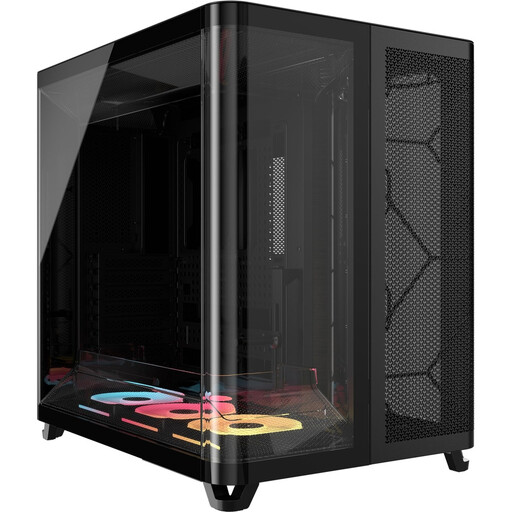
Why this product suits this profile: The dual-chamber layout separates the motherboard, graphics card and cooling from the power supply, cables and drives. This is ideal for users who want to accommodate many components in a neat, organised layout.
The separate compartments reduce cable clutter in the main airflow path. However, before installation, you need to allow for the 458 × 445 × 308 mm dimensions and the larger space requirement.
Three pre-installed 120 mm LX-RGB fans, graphics cards up to 400 mm and CPU coolers up to 180 mm.
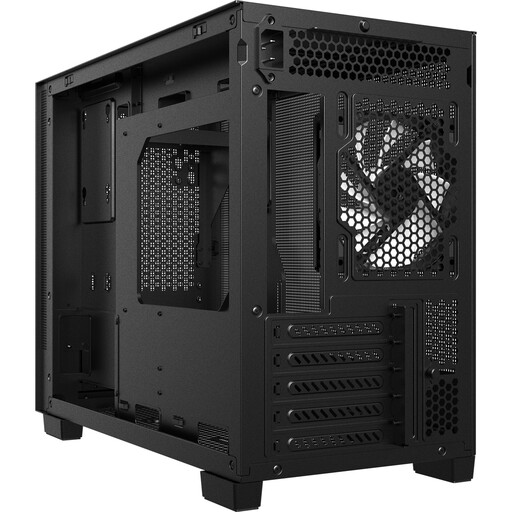
Why this product suits this profile: This compact case is designed for Micro-ATX and Mini-ITX motherboards, making it suitable for smaller workspaces or space-saving gaming systems.
The mesh panels and integrated dust filters support an open airflow path. At the same time, component selection needs to be carefully considered because of the Micro-ATX and Mini-ITX limitation.
USB-C 3.2 Gen 2, two USB-A ports, GPU support up to 370 mm and space for a radiator up to 360 mm at the top.
We have put together a complete, regularly updated list of products that fully meet these strict selection criteria and the safety regulations applicable in the EU.
Before placing your order and assembling your system, we recommend this quick check:
For many gaming systems, a Midi-Tower case with ATX support is sufficient. The key factors are the maximum GPU length, CPU cooler height, fan positions and radiator options. If you have an especially large graphics card or an E-ATX motherboard, choose a roomier model.
This depends on the processor, graphics card and case design. Pre-installed fans reduce the need for upgrades. A well-planned intake and exhaust layout with unobstructed airflow is more important than having a large number of fans. Dust filters should be cleaned regularly.
Its service life depends on the materials, mechanical stress, dust protection and the upgrades you have planned. A case with sufficient headroom for GPU length, cooler height, connections and radiator space can support several generations of hardware. So do not just check your current configuration; also consider potential future upgrades.