
Lieferung heute & morgen

Qualitätsgarantie

Willkommens-Angebote freischalten: KOSTENLOSE Lieferung | Bis zu 80 % RABATT | Kostenlose 30-Tage-JoyPlus-Testphase
App herunterladen
A PC case does more than determine the look of your build. It also decides whether your graphics card, CPU cooler, power supply and radiator will actually fit, and how easy it will be to upgrade later. As a Joybuy Product Recommendation Officer, I focus on filtering out technical details that matter and common buying misconceptions, rather than relying on design promises.
A PC case with pre-installed fans can save you time during assembly. But their position is what really matters. Multiple front fans need sufficiently large intake vents, while warm air should be expelled through the rear or top. A solid glass or plastic front can restrict airflow more than a finely perforated mesh panel.
So check:
The stated graphics card length may not apply when a front radiator or drive cage is installed at the same time. The length of the power supply can also affect the space available for cables and drives. When choosing a gaming PC case, compare the whole configuration, not just the GPU length.
Allow at least a few millimetres of clearance. This is especially important with a large cooler, side-mounted radiators or angled power connectors, where the stated maximum can leave little room to spare.
A PC case with RGB and a PC case with tempered glass are designed for users who want to show off their hardware. However, the lighting needs the right connections, usually a 5 V ARGB header or a separate controller. A 12 V RGB connection is not automatically compatible.
Tempered glass is also heavier and more susceptible to damage from hard knocks to the edges. When cleaning or upgrading, place the panel on a stable, padded surface.
A mid-tower case is a practical balance between size and expandability for many builds. An ATX case often supports ATX, Micro-ATX and Mini-ITX motherboards. For larger boards, you’ll need explicit E-ATX support; dimensions can vary by model.
Keep in mind:
A case may support several formats without offering the same amount of room for cable management or cooling with each one.
Compare the manufacturer’s specifications with the dimensions of your components:
For water cooling, you need to consider radiator thickness, fan depth and the clearance around the RAM and motherboard together. “Supports 360 mm” doesn’t always mean every radiator and fan combination will fit.
A well-ventilated PC case should provide a clear airflow path: cool air is typically drawn in from the front or bottom and expelled at the rear or top. Magnetic dust filters make regular cleaning easier. Front connections such as USB-C, USB-A and audio should suit the devices you use every day.
Also look for:
Information on RoHS and REACH should come from the manufacturer. For fans and RGB components, the type of electrical connection also matters. Disconnect the PC from the mains before installation, and handle sharp metal edges and glass panels with care.
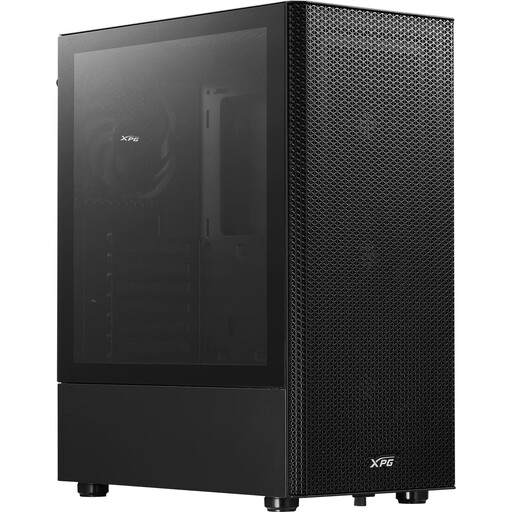
Why this product suits this profile: This ATX mid-tower case supports ATX, Micro-ATX and Mini-ITX motherboards and comes with four pre-installed 120 mm fans. That means you won’t need to buy several additional case fans straight away for a basic build.
The perforated front and magnetic dust filter provide a clear route for airflow, rather than relying on a completely solid design panel.
Supports GPUs up to 310 mm, CPU coolers up to 166 mm and front radiators up to 360 mm.
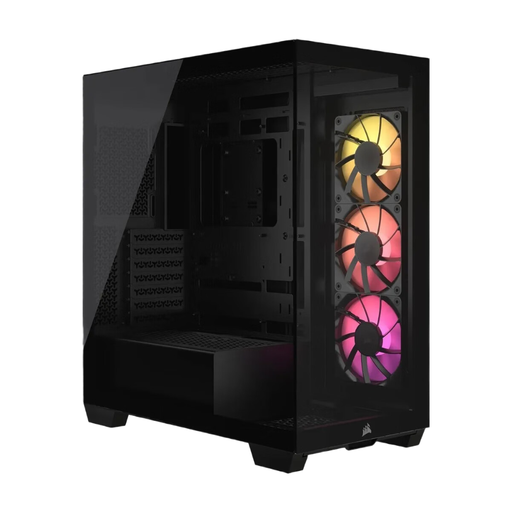
Why this product suits this profile: This case combines panoramic tempered glass with three pre-installed CORSAIR RS120 ARGB PWM fans and a tidy interior.
Support for motherboards from Mini-ITX to E-ATX, along with clearance for 400 mm GPUs and 220 mm power supplies, makes it easier to plan a high-performance build.
Supports up to ten 120 mm fans, offers USB-C and is compatible with selected reverse-connection motherboards.
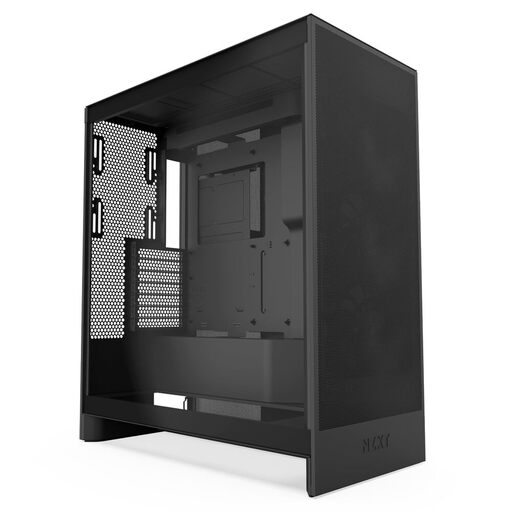
Why this product suits this profile: Designed for demanding gaming, streaming and creator systems, this model offers extra fan mounts at the bottom for the GPU and support for large radiators.
Mesh panels and clearly defined fan positions create a straightforward airflow path. However, check component clearances before installation.
Three pre-installed front fans, support for up to 420 mm front and 360 mm top radiators, plus three mounting points for 120 mm bottom fans.
We’ve put together a complete, regularly updated list of products that meet these strict selection criteria and fully comply with the safety regulations in force in the EU.
For a typical gaming PC, two or three well-positioned fans are often a good starting point. A common setup is intake at the front or bottom, with exhaust at the rear or top. More powerful hardware may benefit from additional fans or water cooling. What matters most is a clear airflow path, not simply the number of fans.
Lifespan depends on the materials, how heavily it’s used, dust, where it’s kept and how often it’s modified. With careful use, a steel case can last for many years. Fans and RGB components, on the other hand, are individual parts that can wear out or fail electronically, so they may need replacing sooner. Regular filter cleaning and a stable, well-ventilated position help reduce common sources of wear.
The price depends on factors such as motherboard compatibility, materials, pre-installed fans, glass panels, USB-C, radiator mounts and RGB controls. So compare more than just the purchase price: check whether the fans, controllers or dust filters you need are already included. This will help you get a better idea of the total cost of your build.