
Lieferung heute & morgen

Qualitätsgarantie

Willkommens-Angebote freischalten: KOSTENLOSE Lieferung | Bis zu 80 % RABATT | Kostenlose 30-Tage-JoyPlus-Testphase
App herunterladen
Choosing a PC case is a foundational decision that dictates the performance, longevity, and aesthetics of your entire system. But the market is filled with bold claims that often fail to deliver. Many buyers invest in a case only to discover later that it throttles cooling performance or isn't compatible with future components. This guide will show you what to look for to make an informed decision.
Before we dive into the details, it's important to understand the most common mistakes that lead to disappointment and unnecessary expense.
To avoid these mistakes, you should focus on objective, technical features rather than pure marketing.
A PC case with good airflow is defined not just by the number of fans, but by a well-thought-out design. Pay attention to the following points:
The internal specs are what count. Before buying, check these specifications down to the millimetre:
Here are two recommendations tailored to different user profiles that meet the criteria mentioned above.
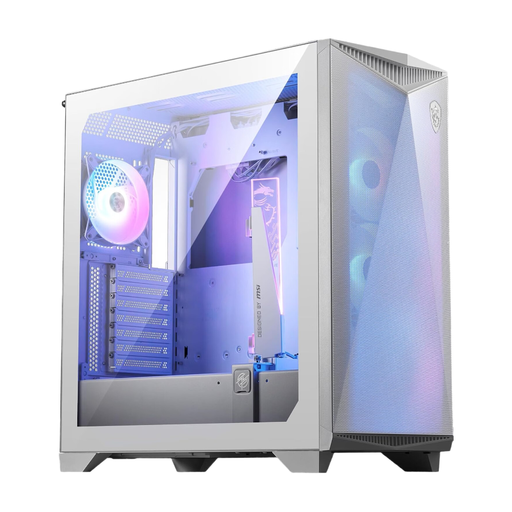
Why This Fits Their Persona: Ideal for users who want to build a high-end system with the largest components without compromising on cooling performance. This MSI case is designed for maximum performance.
It bypasses the “airflow facade” with a perforated front and space for up to 12 fans. Compatibility for E-ATX motherboards and 360mm GPUs prevents unpleasant surprises during installation.
An omnidirectional graphics card holder to stabilise heavy GPUs is integrated. Offers a modern USB 3.2 Gen 2x2 Type-C port on the front.
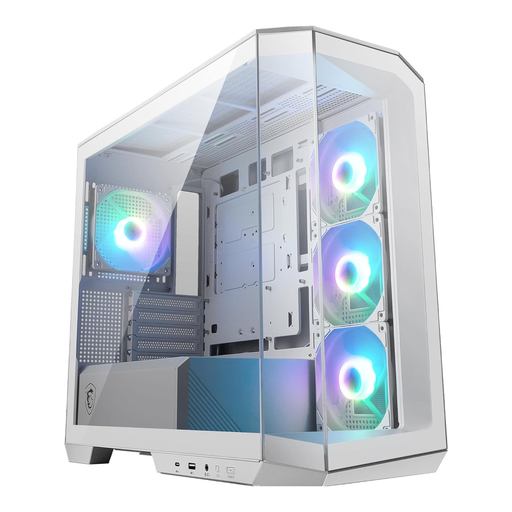
Why This Fits Their Persona: Perfect for users seeking an aesthetically outstanding white gaming case in a compact Micro-ATX format who want to showcase their hardware through panoramic glass.
It avoids hidden costs, as four ARGB case fans and a controller are pre-installed. With 33 mm of space for cable management, a clean build is made possible without extra tools.
Offers a 270-degree panoramic view of the components. The front USB-C port supports fast data transfers up to 20 Gbps.
We have compiled a complete, up-to-date list of products that fully meet these strict selection criteria and applicable safety regulations.
The exact number of pre-installed fans can vary depending on the retailer and batch. However, the product specifications state that the case has room for up to ten 120mm fans and two 60mm fans. This allows for a comprehensive and customisable cooling configuration to meet the highest demands.
The case includes swappable PCI-E slot covers that allow for vertical mounting of the graphics card. However, a separate PCI-E riser cable is typically required to connect the graphics card to the motherboard in this orientation, and it is usually not included with the case. The included graphics card stand, however, is designed to support the GPU in both orientations (horizontal and vertical).
Yes, according to the manufacturer's specifications, the MSI MPG GUNGNIR 300R Airflow White is designed to accommodate motherboards up to the E-ATX form factor. This makes it a versatile white mid-tower case for high-performance builds based on larger motherboards. It is still advisable to cross-reference the exact dimensions of the motherboard with the case's specifications.