
Lieferung heute & morgen

Qualitätsgarantie

Willkommens-Angebote freischalten: KOSTENLOSE Lieferung | Bis zu 80 % RABATT | Kostenlose 30-Tage-JoyPlus-Testphase
App herunterladen
A PC case with an integrated touchscreen promises a new level of system control and aesthetics. But before you invest in this advanced component, it's crucial to distinguish quality from the hype. Many models entice with a futuristic display that, in practice, turns out to be an impractical gimmick or neglects fundamental features like airflow. This guide will help you avoid common purchasing pitfalls and make an informed decision.
When selecting a high-end case, seemingly attractive features can quickly become expensive mistakes. Pay close attention to these three points:
To avoid the pitfalls mentioned above, you should carefully examine three technical aspects. These define the difference between a showcase and a true high-performance case.
An integrated display is only useful if it simplifies system management. Look for an IPS panel, known for its excellent viewing angles and colour accuracy. However, the crucial question is how it's controlled. Ideally, the screen operates independently of the OS, allowing for direct adjustments to fan curves, ARGB profiles, and temperature displays. This avoids additional software load and potential conflicts.
A modular PC case is the key to future-proofing and adaptability. Instead of a rigid layout, modular designs allow you to swap internal components like drive cages, fan brackets, or even parts of the motherboard tray. This is especially important for builds with E-ATX motherboards, as they often require dedicated space for cable management and large cooling solutions. A modular system allows you to adapt the interior precisely to your current and future components.
The sheer number of fan mounts is no guarantee of good cooling. The air path is what's crucial. An optimal layout draws cool air in from the front or bottom and exhausts warm air out the back and top. Look for the following features:
Based on the criteria above, we have identified a few models suitable for the different priorities of PC builders.
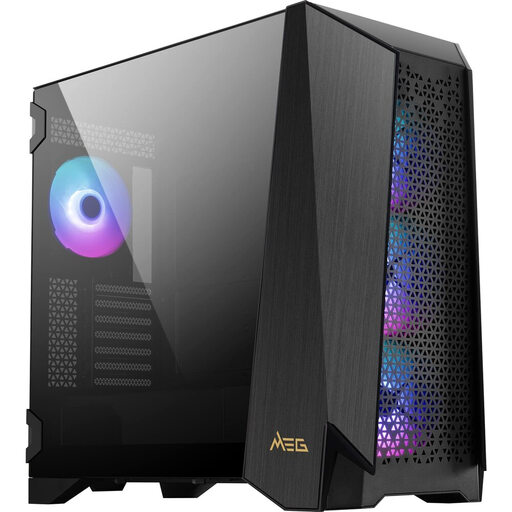
Why This Fits Their Persona: For users who demand the highest level of control, performance, and flexibility. This case is designed as the central control hub for a high-end system where no compromises are to be made.
The 4.3-inch IPS touchscreen is not a gimmick; it enables direct control of fans and lighting. The modular side panel solves compatibility issues by creating space for E-ATX motherboards or additional fans.
Functional Touchscreen: Direct hardware control.
High Compatibility: Supports E-ATX boards and GPUs up to 400 mm in length.
Strong Airflow: Four pre-installed 140mm ARGB fans.
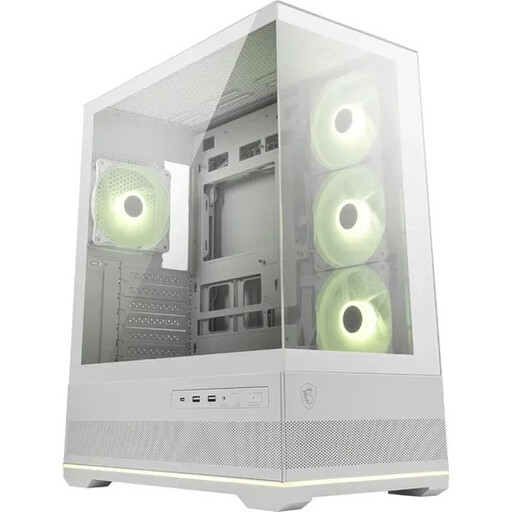
Why This Fits Their Persona: Ideal for users who want flawless aesthetics and an unobstructed view of their components. The focus here is on visual presentation without compromising on cooling performance.
This case deliberately omits a touchscreen, focusing instead on superior aesthetics. The 270° panoramic glass and reverse-blade fans avoid the pitfall of poor airflow by integrating cooling as a design element.
270° Panoramic View: Seamless front and side glass.
Optimised ARGB View: Three side-mounted reverse-blade fans for a view without obstructive frames.
Good Cooling Performance: Dual-chamber layout supports up to 10 fans.
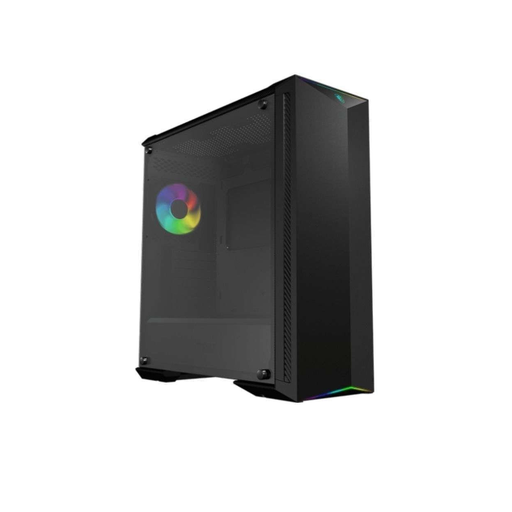
Why This Fits Their Persona: For builders whose top priority is raw cooling performance and maximum component compatibility. Aesthetics are important, but function takes precedence to support an overclocked, high-end system.
This case bypasses the compatibility trap with its spacious interior, explicitly designed for E-ATX motherboards and 400mm GPUs. The focus on optimised airflow, with room for up to seven fans, puts cooling above all else.
Broad Compatibility: Supports E-ATX, ATX, and graphics cards up to 400 mm.
Airflow-Optimised: Designed for up to seven case fans for maximum cooling performance.
Customisable: Offers the ability to attach 3D-printed parts.
A well-planned setup is more than just the case. Discover matching components to complete the aesthetics and functionality of your build.
A touchscreen is worth it if it offers genuine, hardware-level functions that simplify operation—like controlling fan speeds or lighting profiles without extra software. If it only serves to display images or requires unstable software, the added value is minimal. Models like the MSI MEG PROSPECT 700R show what a useful implementation can look like.
Very important. A modular PC case offers the flexibility to adapt the interior to new components. If you want to upgrade to a larger graphics card, an E-ATX motherboard, or a custom water-cooling loop in a few years, a modular case allows you to create the necessary space without buying a whole new case. It's an investment in the longevity of your build.
Not necessarily. In a well-designed case, the touchscreen is placed in an area that isn't critical for air intake. High-quality models integrate the display without completely blocking the front panel, ensuring airflow is not compromised by including generous side or bottom intakes. Always check if there are sufficient openings for air supply next to the display.