Who should consider these options?

Local multiplayer sessions

If you want several people to play on the same device, check that the specific game supports multiplayer, how many players it allows and whether it recognises all the controllers. Steam and Valve Steam Support explain that multiplayer and gamepad support depend on the game.

PC gamers with a sofa setup

For gaming from the PC on your sofa, check that a cable is long enough and can be routed safely, or that the device supports the right wireless connection. Logitech G, GameSir, 8BitDo and Microsoft document different connection options for their respective models.

Players with their own media files

If you want to use files as well as play arena games, check whether the specific title can handle them or whether you’ll need separate playback software. Valve Steam Support’s gamepad guidance covers controls in supported games; it doesn’t confirm any file or playback functionality.

What should you look for when buying?

Wired PC gamepad

A good fit if: Your Windows PC has a USB port and the cable can reach your seat safely.

Things to weigh up: Logitech G lists a 1.8 m cable and switchable XInput and DirectInput modes for the F310. The manufacturer says DirectInput mode requires a software installation. GameSir lists a detachable 3 m cable and Windows 10/11 support for the G7 SE.

Wireless PC gamepad

A good fit if: You don’t want a cable between your PC and your seat, and your device supports the wireless technology you need.

Things to weigh up: Connection options vary by model. Microsoft lists USB, Bluetooth and Xbox Wireless for the Xbox Wireless Controller. For the 8BitDo Ultimate 2C Wireless, the manufacturer specifies 2.4 GHz wireless via the included adapter or USB on Windows, while Bluetooth is for Android.

PlayStation controller on PC

A good fit if: You prefer the PlayStation button layout and your specific Windows game supports the controller.

Things to weigh up: Sony lists USB and Bluetooth for supported Windows PCs. Sony says haptic feedback requires a compatible game and a USB connection on PC.

What you’re looking for What to check Who is it important for?
Game and multiplayer compatibility Check the platform, gamepad support, local player limit and control mode for the specific game. If possible, test all your controllers together. If I want to play with several people on one device, the game needs to recognise all the controls we need. Around 33% of consumers say game and multiplayer compatibility is their top buying consideration.
Connection and setup Check the distance to your seat, safe cable routing, available USB ports and the wireless technology you need. For gaming from the sofa, the connection to your PC needs to work well from where you’ll be sitting. Around 27% of consumers prioritise suitable range and connectivity.
Using your own media files Check which file formats the specific game supports. If you’ll be playing files separately, also check how the playback software maps controller inputs. If I want to use my own files during or alongside an arena match, I need to know whether the game or a separate app can play them. Around 20% of consumers say using their own media files is their top buying consideration.
Button layout Check that the actions you need, button arrangement and preferred layout work with the specific game. In fast-paced matches, I want to be able to reach the actions that matter with my chosen layout. Around 20% of consumers prioritise a suitable button layout.

Common buying misconceptions

  • Assuming PC compatibility means support in a specific multiplayer game

    Connecting a controller doesn’t guarantee that the game will accept its control mode or assign multiple controllers correctly. Steam Support notes that gamepad control styles only work in games that support them.

    Before buying, check controller support and how many input devices can be used at the same time in the specific game.

  • Assuming “Bluetooth” means wireless play on Windows

    Some models don’t support Bluetooth on Windows. For the 8BitDo Ultimate 2C Wireless, the manufacturer lists Bluetooth for Android, but 2.4 GHz wireless or a cable for Windows.

    Before choosing a wireless setup, check the connection type for the exact model and the device you plan to use it with.

  • Confusing controller features with in-game media playback

    Extra buttons and other controller features can’t add file or playback functionality that the game doesn’t have.

    Check whether the game supports your own files by looking up the specific title. If you’ll be playing them separately, also check how the other app maps controller inputs.

Key brands at a glance

Logitech G

The F310 is a wired PC option if you need USB connectivity and switchable control modes.

  • Logitech G says the F310 has a 1.8 m cable and XInput/DirectInput modes.
  • Logitech G says DirectInput requires a software installation. Make sure the cable is long enough to reach your seat.

8BitDo

The Ultimate 2C Wireless is a Windows option for buyers comparing 2.4 GHz wireless, USB and mappable extra buttons.

  • According to the manufacturer, it comes with Hall Effect sticks, R4/L4 buttons and a USB-A wireless adapter.
  • The manufacturer lists Bluetooth for Android, not as a Windows connection option. An advertised polling rate doesn’t prove an advantage in any particular game.

Microsoft Xbox

Xbox Wireless Controllers are worth considering for Windows PCs if you want a choice of documented connection options.

  • Microsoft lists USB, Bluetooth and Xbox Wireless as connection options for a Windows device.
  • Xbox Wireless may require a separate adapter. Check the player limit for the specific game separately.

Sony PlayStation

DualSense controllers are an option if you prefer PlayStation buttons and can check whether your Windows game supports them.

  • Sony lists USB and Bluetooth for supported Windows PCs.
  • Sony says haptic feedback requires both support from the game and a USB connection to the PC.

GameSir

The G7 SE is a wired option for Windows 10/11 and the Xbox consoles listed by the manufacturer.

  • GameSir lists a detachable 3 m cable, Hall Effect sticks and two mappable rear buttons.
  • Make sure the cable can be routed safely around your gaming setup. The manufacturer’s claims about preventing stick drift are not an independent long-term test.

Joybuy products for PC gaming sessions

The following Joybuy products are listed as controllers with a wireless connection option for PC. For each model, check that its control layout and connection work with the specific game and device.

BIGBIG WON Fight Master leverless controller for Switch 2, Switch, PC, iOS and Android

BIGBIG WON Fight Master Leverless Controller

May suit you if your PC game supports a leverless Hitbox layout; the button arrangement needs to work with the specific game.

Platforms listed in the product name: Switch 2, Switch, PC, iOS and Android.

The product name lists an all-button Hitbox layout, plus Bluetooth, 2.4 GHz wireless and a wired connection.

View on Joybuy

The G-Lab K-PAD-HELIUM-WL wireless PC controller with two rear buttons

The G-Lab K-PAD-HELIUM-WL

May suit you if you’re looking for a wireless PC controller with rear buttons. Check that your PC supports its connection.

The product name lists a wireless 2.4 GHz connection, PC use and two rear buttons.

View on Joybuy
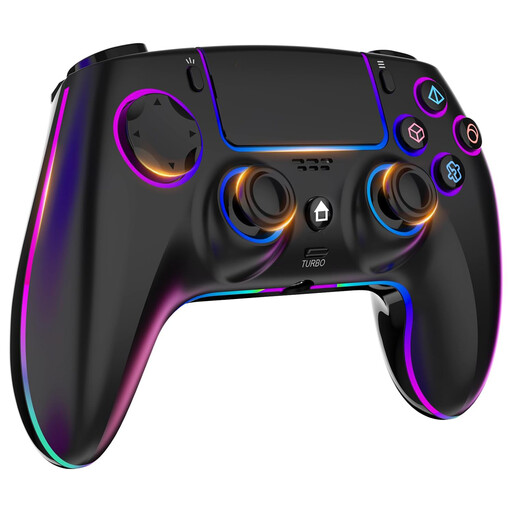
Wireless controller for PS4 and PC with touchpad and headphone jack

Wireless controller for PS4 and PC

May suit you if you’re looking for a wireless controller for PC or PS4. Check separately that your specific PC game supports it.

The product name lists dual vibration, turbo, a touchpad and a headphone jack.

The product name specifies a 1000-mAh battery.

View on Joybuy

EasySMX D10 wireless PC controller with TMR joystick and dual-mode triggers

EasySMX D10 PC Controller

May suit you if you’re looking for a wireless controller for PC games; support for controller input in the specific game remains key.

The product name lists Bluetooth, a TMR joystick, dual-mode triggers and mechanical buttons.

The product name also lists Switch, Android and iOS as compatible platforms.

View on Joybuy

Black wireless DualShock controller, described in the product name as compatible with PS4 and PC

Black wireless DualShock controller for PS4 and PC

May suit you if you’re looking for a wireless controller for PC or PS4; check that it’s supported by the game you want to play.

The product name describes the model as compatible with PS4 and PC.

View on Joybuy

Frequently asked questions

Can I play the same arena game with friends using any PC controller?

No, PC compatibility alone doesn’t tell you that. Check that the specific game supports local multiplayer and controllers. Steam notes that the game must support the control style you choose.

Can a controller play my local music or video files in a game?

No, buying a controller alone won’t do that. You’ll need to check whether the specific game supports files and the formats you want to use. If you’re using a separate playback app, its controller mapping matters too.

What can I do if several controllers get mixed up?

Connect and test each device individually, then check the player assignments in the game. Steam Support notes that games may prioritise devices differently when several controllers are connected, depending on how they handle XInput or DirectInput.

What are my rights if a controller is faulty after purchase in Germany?

Your statutory rights are generally against the seller and are separate from any voluntary manufacturer’s warranty. The Verbraucherzentrale explains that the seller is responsible for ensuring the goods were free from defects when handed over for two years.

How should I dispose of an old controller or its batteries in Germany?

The Umweltbundesamt advises that waste electrical equipment and used batteries should not go in household rubbish. Take them separately to a suitable collection or take-back point.