
Lieferung heute & morgen

Qualitätsgarantie

Willkommens-Angebote freischalten: KOSTENLOSE Lieferung | Bis zu 80 % RABATT | Kostenlose 30-Tage-JoyPlus-Testphase
App herunterladen
Effective PC cooling is the foundation of a stable, high-performance system. But the market is filled with marketing promises that often prioritise aesthetics over function. Many users invest in components that fail to meet their expectations or even lead to compatibility issues. As your Joybuy Product Recommendation Officer, I'll help you identify the crucial factors and avoid common pitfalls.
Before you make a decision, you should be aware of the three most common mistakes that lead to unnecessary expense and frustration.
To avoid these pitfalls, focus on three core technical aspects that determine the true performance and suitability of a cooling solution.
Every processor generates a specific amount of heat, specified as its TDP (Thermal Design Power) in watts. Your CPU cooler must be able to dissipate at least this value. You must also verify that the cooler is compatible with your specific CPU socket, whether it's a current Intel PC cooler (e.g., LGA1700/1851) or AMD PC cooler (e.g., AM5). This information is fundamental to ensuring a successful installation.
These two values describe how a fan moves air and are optimised for different use cases:
A PWM fan (Pulse Width Modulation) has a 4-pin connector that allows the motherboard to dynamically adjust its speed based on the CPU temperature. This ensures quiet operation under light loads and maximum cooling performance when it's needed. In contrast, a 3-pin fan often runs at a constant or only roughly adjustable speed, leading to a poorer performance-to-noise ratio.
Here are some recommendations tailored to specific user profiles that take the above criteria into account.
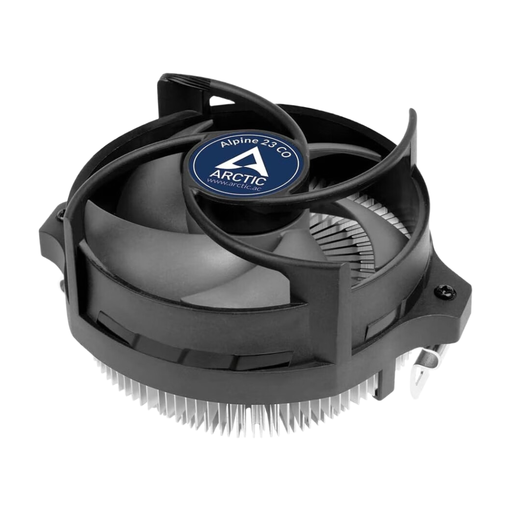
Why it's a good fit: Ideal for users looking for a reliable and straightforward upgrade for their AMD system. The focus is on functionality and simple installation without breaking the bank.
This model forgoes RGB lighting and focuses on efficient cooling for standard TDP CPUs. Its compact design prevents compatibility issues in smaller cases.
The pre-applied thermal paste and simple clip system allow for a quick, tool-free installation. The dual ball bearing is designed for continuous operation.
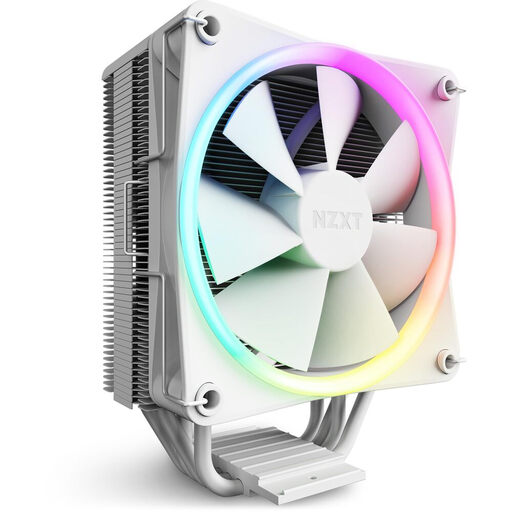
Why it's a good fit: For users who want a balance of strong cooling performance and a clean, modern design with customisable RGB lighting for their Intel or AMD build.
This model combines aesthetics with function. The four copper heat pipes with direct-contact technology ensure efficient heat dissipation, thus avoiding the trap of "show over substance" products.
The sleek aluminium cover hides the heat pipes for a clean look. The included 120mm fan is a high-static-pressure PWM model.
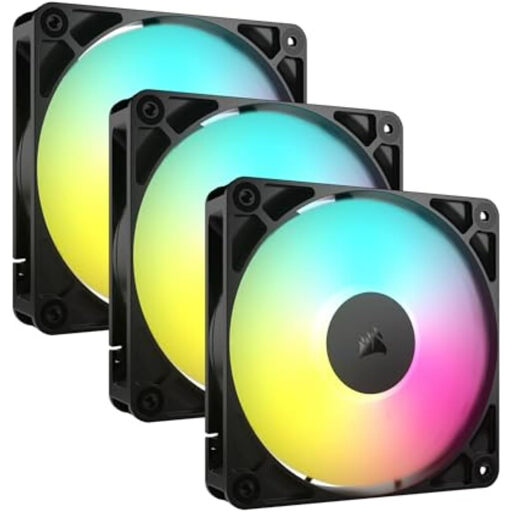
Why it's a good fit: Perfect for users who want to optimise their entire system's airflow, with a focus on quiet operation, clean cable management, and premium build quality.
This kit solves the noise problem with a magnetic dome bearing and PWM control. It doesn't force users to compromise between high performance and low noise.
The daisy-chain connectivity significantly simplifies wiring for multiple fans, ensuring a tidy system. The triple pack offers a complete solution for case ventilation.
We have compiled a complete, up-to-date list of products that fully meet these strict selection criteria and German safety regulations.
1. How often should you clean PC fans? Regular cleaning is crucial for consistently good cooling performance. It is recommended to clean the fans and heatsinks with compressed air every 3 to 6 months to remove dust. More frequent cleaning may be necessary in dustier environments.
2. What is the difference between RGB and ARGB fans? Standard RGB fans (4-pin, 12V) light up in a single colour at a time, which can be changed via the motherboard or a controller. ARGB fans (Addressable RGB, 3-pin, 5V) are more advanced: each individual LED on the fan can be controlled independently. This allows for complex, dynamic effects like rainbow waves. Be sure to check the connector compatibility with your motherboard.
3. Is a CPU air cooler enough, or do I need water cooling? For most processors, including for gaming, a high-quality CPU air cooler is perfectly sufficient and often offers a better price-to-performance ratio. A water cooling system (AIO) can offer advantages in peak temperatures for heavily overclocked high-end CPUs or in very compact cases where there isn't room for a large air cooler. However, it is generally more expensive and involves more potential points of failure (pump, tubing).