
Lieferung heute & morgen

Qualitätsgarantie

Willkommens-Angebote freischalten: KOSTENLOSE Lieferung | Bis zu 80 % RABATT | Kostenlose 30-Tage-JoyPlus-Testphase
App herunterladen
The right PC cooling setup is not simply about having as many fans as possible or running them at a high speed. Compatibility, installation position, control and the balance between airflow and noise are what really matter. PC builders, gamers and owners of compact Mini-ITX or Micro-ATX systems can avoid unnecessary expense by taking these factors into account.
A 120 mm fan or 140 mm fan will not fit every case. As well as the diameter, you need to check the available mounting holes, frame thickness and clearance around the RAM, graphics card and radiator. Even a low-profile CPU cooler may come into contact with the side panel of a compact case.
For example, a top-blow cooler such as the ARCTIC Alpine 17 CO is specified as being 77 mm high, with a footprint of approximately 96.2 × 96.2 mm. Before buying, these measurements should be checked against the case manufacturer's specifications.
A high-pressure fan, or radiator fan, is designed to overcome resistance from components such as fins, dust filters and radiators. By contrast, a case fan with high airflow may be more suitable for an unobstructed mounting position. The specifications airflow and static pressure describe different characteristics and should match the intended position.
For a radiator, specifications such as up to 3.52 mmH₂O on the NZXT F240 RGB Core are relevant. For case ventilation, however, airflow volume, noise level and the planned direction of airflow may be more important.
PWM and ARGB are not the same thing. A 4-pin PWM connector controls fan speed. The lighting on an ARGB PC fan is typically controlled via a 3-pin 5 V ARGB connector. A 5 V ARGB plug must not be connected to a 12 V RGB connector, as this could damage the LEDs.
Before placing your order, check the connectors on your motherboard, whether a fan hub may be required and whether the cable lengths are sufficient. Software compatibility, for example with the motherboard controls or NZXT CAM, also varies between systems.
For a CPU cooler, the processor socket and the maximum permitted cooler height are non-negotiable. According to the product specifications, the ARCTIC Alpine 17 CO is designed for LGA1700 and LGA1851 and features a 92 mm PWM fan. Its specified maximum speed is 2700 rpm, while the maximum noise level is 26 dB.
According to the manufacturer's specifications, the GAMDIAS Boreas M2-51D Digital supports, among others, AM4, AM5, LGA1150, LGA1200, LGA1700, LGA2011 and LGA2066. Its single-tower design uses a 120 mm fan with a 4-pin PWM connector. Even so, you must check the available space for the cooler, RAM and side panel in your specific build.
A larger fan can deliver a comparable airflow at a lower speed, but it requires suitable mounting points. When choosing a fan, you should therefore consider the speed range, noise rating, bearing type and dimensions together.
The ARCTIC P12 Pro is a 120 mm PWM fan without lighting. It is specified as reaching up to 3000 rpm, with an airflow of 130.84 m³/h, static pressure of 6.90 mmH₂O and a maximum noise level of 22.50 dB. By contrast, the ARCTIC P14 Pro A-RGB uses a 140 mm design and, according to the product data, reaches up to 2500 rpm and an airflow of up to 186 m³/h.
A PWM fan can adjust its speed according to the temperature. This allows it to run more slowly when idle and provide greater airflow under load, provided that the BIOS or control software is configured correctly.
For a radiator fan, static pressure is also important. The NZXT F240 RGB Core combines two pre-installed 120 mm fans in a 240 mm frame. Each fan is specified at up to 72.4 CFM and 3.52 mmH₂O. The unit requires a suitable 240 mm mounting position in the case or on the radiator.
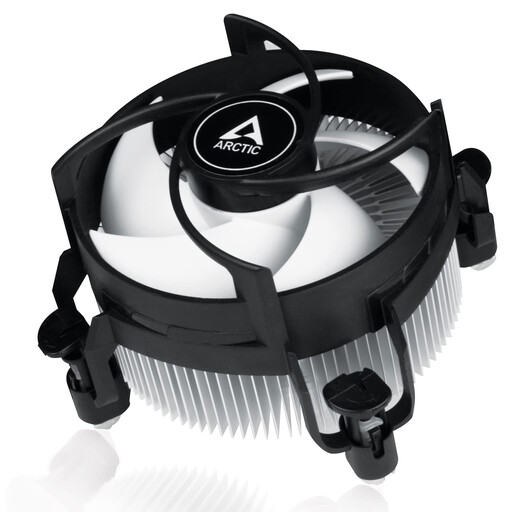
Why this product suits the profile: This compact top-blow cooler is designed for systems with an Intel LGA1700 or LGA1851 socket and offers a pre-installed solution with push pins.
Socket compatibility and the 77 mm height are clearly specified. This makes it easy to check whether the cooler will fit your existing case before buying.
92 mm PWM fan, pre-applied MX-4 thermal paste and tool-free push-pin installation.

Why this product suits the profile: This pre-installed unit with two 120 mm RGB fans is designed for 240 mm radiator or case positions, reducing installation time and effort.
Separate PWM and 5 V ARGB connectors are provided. Even so, you should check the connectors against your motherboard or controller before installation.
Up to 2400 rpm, up to 72.4 CFM per fan and 3.52 mmH₂O static pressure according to the product specifications.
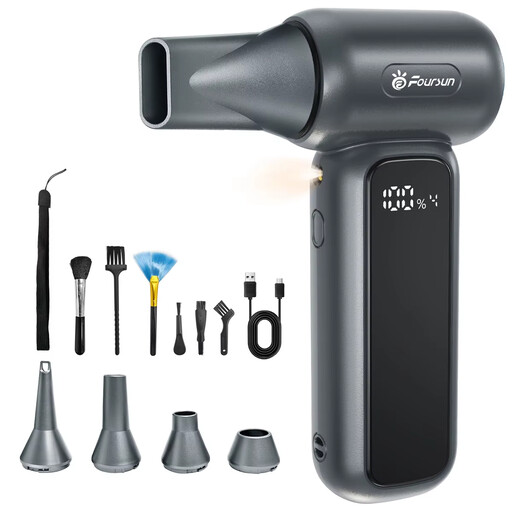
Why this product suits the profile: This electric air duster is ideal for users who clean their PC regularly and are looking for a rechargeable blower with multiple attachments.
Four speed settings allow you to adjust the airflow for delicate components or heavier dirt. Electronics must only be cleaned when the PC is switched off and disconnected from the mains.
10000 mAh battery, USB-C charging, up to four settings and several nozzle and brush attachments according to the product description.
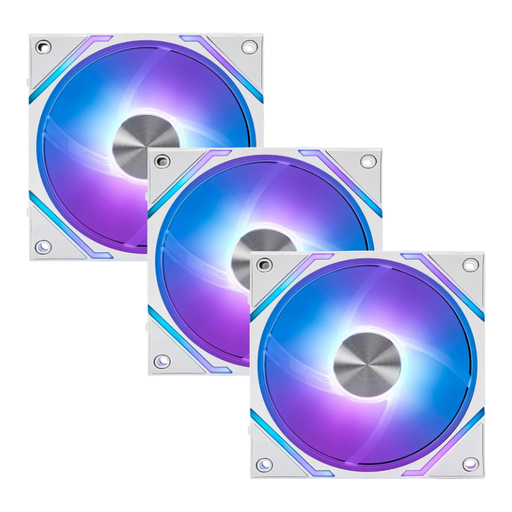
Why this product suits the profile: This 120 mm ARGB PWM fan is ideal for users who want to connect multiple fans and control the lighting centrally in a compatible system.
According to the specifications, the integrated hub supports up to 18 fans. However, you must check your motherboard, SATA power supply and ARGB control before buying.
0 to 1900 rpm, airflow of 73.82 CFM and static pressure of 2.56 mmH₂O according to the technical data.
Dust on fins, filters and fan blades can reduce airflow and increase noise. Before cleaning your PC, switch it off completely and disconnect it from the mains. You can carefully hold the fan blades in place while blowing them clean, preventing them from spinning uncontrollably at high speed.
An electric air duster can be reused and does not require disposable cartridges. Do not direct the airflow continuously at bearings or delicate connectors. Liquids must never be allowed inside the PC case.
We've put together a complete, regularly updated list of products that fully meet these strict selection criteria and the safety regulations applicable in the EU.
The required number depends on the case, components and available fan positions. Fresh air is often drawn in from the front or bottom, while warm air is expelled at the rear or top. A clear, effective airflow pattern is more important than simply having as many fans as possible.
PWM fans can adjust their speed according to the temperature. When the system is under a light load, the speed can drop, while it increases as the temperature rises. Actual noise levels also depend on the fan curve, bearing, installation and case vibration isolation.
This depends on its location, pets, dust levels in the room and how often it is used. A visual inspection every few months is sensible. Before cleaning, always switch off the PC and power supply and disconnect them from the mains.