First, check whether your specific fantasy adventure supports controllers on your platform. Then weigh up a wired connection without a wireless receiver against wireless play, which may require a USB port, receiver or charging dock. Extra buttons and DualSense haptics are only useful selection criteria if your game and the required connection support these features.
Who is this guide for?
PC gamers checking compatibility
If you play fantasy adventures on your PC, check before buying whether your game and connection support the controller. Valve lets you search Steam for supported controller types, while Microsoft and Sony each explain the connection requirements and features of their controllers.
Gamers with a crowded desk
If you have limited space, consider cable routing, USB ports and room for a wireless receiver or charging dock together. The guides from Microsoft and 8BitDo describe different connection methods for their respective models.
Gamers who want custom button layouts
If you want to map frequently used actions to extra buttons, check how many there are and how they can be assigned on the specific model, as well as whether your game supports them. GameSir and PowerA list extra or mappable buttons for certain controller models.
What should you look for when buying?
| What matters to you |
What to check before buying |
Who is it most relevant to? |
| Game and platform compatibility |
Check support for your specific platform and game; also check the connection type for the model you want. |
If your main priority is making sure you can control your adventure with the controller, support for that specific game is key. Around 33 % of consumers put game and platform compatibility first. |
| Space and connection |
Allow for cable routing, available USB ports and space for a receiver or charging dock. |
If your desk has limited space, you’ll need to plan for the cable, receiver and storage space. Around 27 % of consumers prioritise desk space and connection. |
| Comfort and power |
Try out the button layout and grip if possible, and check the power source and accessories included with the specific version. |
If you’re planning longer gaming sessions, the controls should suit your hands and your preferred power source should fit your routine. Around 20 % of consumers focus mainly on comfort and power. |
| Extra buttons and in-game effects |
Check which buttons can be remapped on the exact model and whether the game supports the effects you want. |
If you want to remap frequently used actions or make use of supported in-game effects, the specific features available in each game matter. Around 20 % of consumers prioritise extra controls and supported in-game effects. |
Common misconceptions when buying a controller
-
“DualSense-compatible” doesn’t mean every special PC feature will work
Sony says haptic feedback on PC requires a supporting game and a USB connection. Adaptive triggers also require support from the game in question.
Before buying, check which features work with your specific game and consider whether the required cable routing will work at your desk.
-
Controllers with similar names don’t necessarily have the same features
The 8BitDo Ultimate 2 Wireless guide describes a 2.4 GHz USB receiver for wireless play on Windows. The Nintendo Switch version from PowerA is not the same as the Enhanced Wired Controller for Xbox.
Compare the full model name, supported platform, connection type and what’s included with the specific version.
-
Wireless play still needs a plan for space and power
The Xbox product listing reviewed specifies AA batteries; the 8BitDo Ultimate 2 Wireless is designed to be used with a receiver and charging dock. Depending on the model, you’ll need space for accessories or need to factor in the power source.
Before buying, check which ports are free, where you can place a receiver or charging dock, and what power source the version you’ve chosen uses.
Brands to consider
Microsoft Xbox
Xbox Wireless Controller for Windows PCs and Xbox, if you’re looking for standard controls with a suitable connection.
- Microsoft lists USB, Bluetooth and Xbox Wireless as connection options for Windows devices.
- An adapter may be needed for Xbox Wireless. Check compatibility with your specific game separately.
Sony PlayStation
DualSense for supported PlayStation and PC games, if certain feedback features matter to you.
- Sony says adaptive triggers require game support, while haptic feedback on PC requires both game support and a USB connection.
- These requirements don’t guarantee that every fantasy adventure supports the features.
8BitDo
Ultimate 2 Wireless for supported Windows systems, if a USB receiver, charging dock and configurable extra buttons suit your set-up.
- 8BitDo lists a charging dock and configurable extra buttons for this model.
- The guide describes a 2.4 GHz USB receiver for wireless play on Windows. Other Ultimate versions may have different connection options.
GameSir
G7 HE is a wired option for Windows 10/11 and Xbox, if you want extra rear buttons.
- The guide lists USB-C, Hall Effect sticks and two lockable rear buttons for this model.
- You’ll need a suitable route for the cable across your desk. Claims about preventing stick drift don’t guarantee protection against every fault.
PowerA
Enhanced Wired Controller for Xbox Series X|S: a wired option with mappable buttons and Windows compatibility.
- For its Xbox model, PowerA lists two mappable buttons and a detachable 3-m cable.
- The Nintendo Switch version is a different product and shouldn’t be treated as an identical Windows model.
Controllers at Joybuy
This selection at Joybuy includes PC controllers for a range of desk set-ups, including wireless models and wired options. The features you can use depend on the specific game, platform and connection.
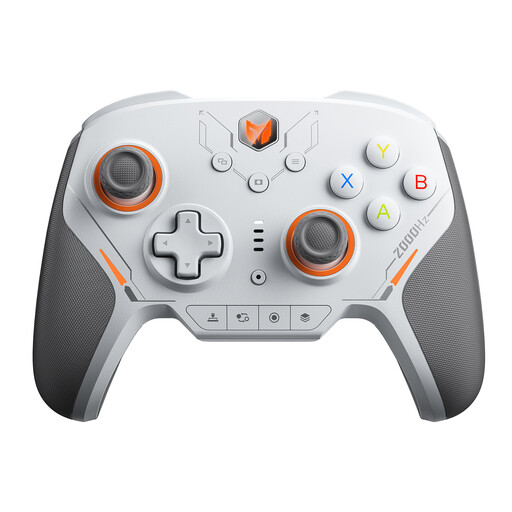 No image available
BIGBIG WON BLITZ2 Wireless Controller
An option if you’re looking for a wireless PC controller with extra input buttons; check support for your game separately.
The product title lists 16 mechanical buttons, TMR joysticks and a 2000 Hz report rate.
View at Joybuy
 No image available
PlayStation DualSense Wireless Controller, Midnight Black
Suited to supported games if you want to use DualSense features and are happy to connect to your PC via USB.
Sony says haptic feedback on PC requires a supporting game and USB; adaptive triggers also require game support.
View at Joybuy
 No image available
BEITONG KP70 Elite Wireless Gaming Controller
A wireless option for PC gaming if extra buttons and the input supported by your game meet your needs.
The product title lists six programmable buttons, Haptic Feedback Triggers and compatibility with PC, Nintendo Switch/Switch 2, Steam and Android.
View at Joybuy
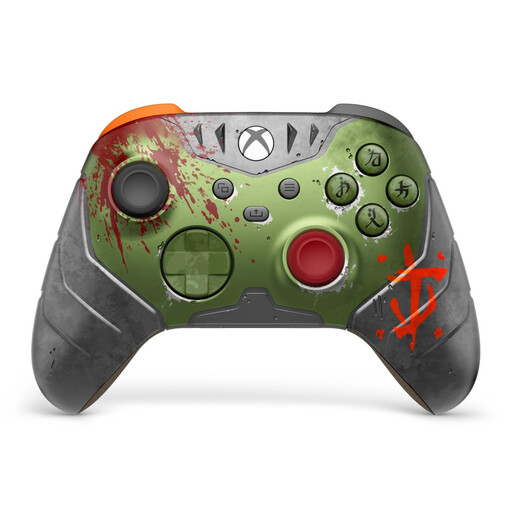 No image available
Microsoft Official Xbox Series X/S Wireless Controller, DOOM: The Dark Ages Limited Edition
A wireless option if your PC or Xbox game supports the controller and the available connection suits your set-up.
The product title lists Xbox One, Xbox Series X/S and PC. AA batteries are specified as the power source.
View at Joybuy
 No image available
GameSir G7 HE Wired Controller, Black
A good fit if you want to use a wired controller at a fixed gaming set-up and need extra rear buttons.
The guide lists USB-C, two lockable rear buttons and Windows 10/11 support for this model. Make sure the cable route works for your desk.
View at Joybuy
Frequently asked questions
Is “PC-compatible” enough to make every fantasy adventure work with the controller?
No. Check your specific game’s controller support; on Steam, you can search for supported controller types. You’ll need to check whether each individual game uses the features you want.
How do I connect an Xbox Wireless Controller to a Windows PC?
Microsoft lists a suitable USB cable, Bluetooth or Xbox Wireless as connection options. An adapter may be needed for Xbox Wireless. Before buying, check which options your PC supports.
Does the 8BitDo Ultimate 2 Wireless need Bluetooth for wireless play on Windows?
No. The guide describes using the 2.4 GHz receiver in a USB port on a Windows device running Windows 10 version 1903 or later. The Bluetooth instructions for this model are for Android.
Does DualSense haptic feedback work on PC over Bluetooth too?
Sony says haptic feedback on PC requires a supporting game and a USB connection. Adaptive triggers also require support from the game in question.
What are your rights in Germany if a controller bought online is faulty?
When you buy from a business seller, you’re generally entitled to a statutory guarantee of at least two years from the date you receive the item; this is different from a voluntary manufacturer’s warranty. Online purchases also generally come with a 14-day right to cancel. These consumer rights are not special approval or registration requirements for using a controller. The European Union explains the statutory guarantee, and the Verbraucherzentrale provides information about the right to cancel.


