
Lieferung heute & morgen

Qualitätsgarantie

Willkommens-Angebote freischalten: KOSTENLOSE Lieferung | Bis zu 80 % RABATT | Kostenlose 30-Tage-JoyPlus-Testphase
App herunterladen
Choosing a new PC keyboard can quickly become overwhelming. The market is flooded with marketing buzzwords that often promise more than they deliver. Many users invest in a model that fails to meet their expectations after just a few months, whether due to degrading key quality or impractical features. Before you make a decision, it's crucial to understand the most common pitfalls to avoid a bad investment.
This guide focuses on the objective criteria that define a great keyboard, helping you make the right choice for your specific needs—whether for the home office, demanding gaming, or mobile use.
The 3 Most Common Keyboard Buying Traps:
To navigate the pitfalls mentioned above, you should focus on three core technical aspects. These parameters are the primary determinants of the performance, longevity, and user comfort of your new PC keyboard.
The technology beneath the keys defines the entire typing experience.
The surface you touch every day is critical for feel and durability.
The connection type must suit your workspace and your devices.
Here are some recommendations tailored to specific user groups and their requirements.
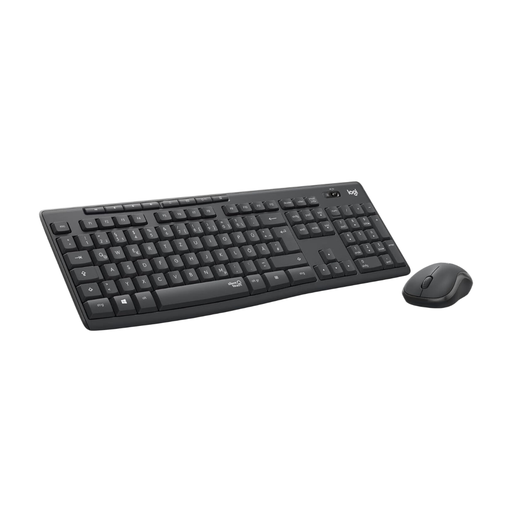
Why it's a great fit: This keyboard and mouse combo is designed for focused work. It offers a reliable wireless connection and an extremely long battery life, which minimises maintenance. The full-size layout and number pad make it a complete office keyboard.
It sidesteps the "silent keyboard" myth with its verifiable SilentTouch technology, which Logitech claims reduces clicking and typing noises by over 90%.
Stable 2.4 GHz wireless connection and a battery life of up to 36 months for the keyboard and 18 months for the mouse.
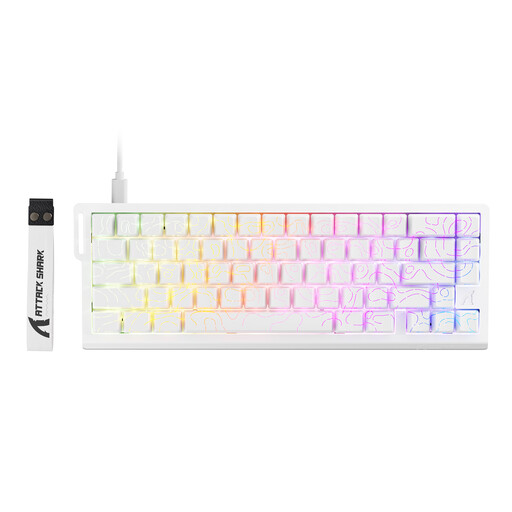
Why it's a great fit: This mechanical keyboard is engineered for maximum performance. With magnetic switches, an 8000 Hz polling rate, and a Rapid Trigger function, it delivers the response speed and precision required for competitive gaming.
It avoids the RGB trap by focusing on measurable performance features like its ultra-low latency (0.125 ms) and customisable actuation sensitivity, rather than just aesthetics.
Hall Effect magnetic switches with an adjustable actuation point (0.1–3.4 mm) and PBT double-shot keycaps for durability and a premium feel.
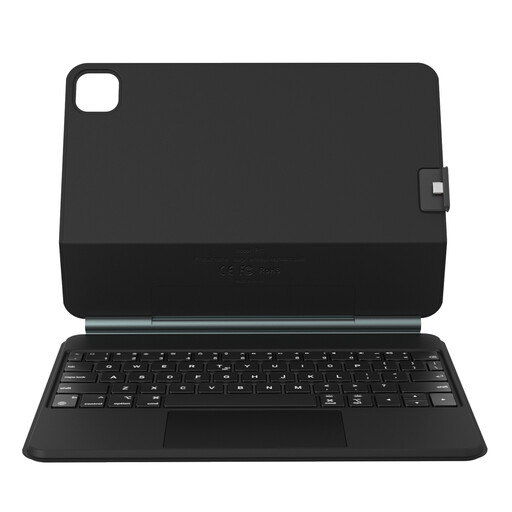
Why it's a great fit: This case transforms an iPad Pro or iPad Air into a mobile workstation. The combination of a protective case, a scissor-switch Bluetooth keyboard, and a precision trackpad is ideal for on-the-go productivity.
It elegantly solves the connectivity problem for tablet users by relying on Bluetooth technology optimised for mobile devices and offering seamless magnetic integration.
The magnetic "floating" design allows for ergonomic viewing angles. The case is detachable, which enables flexible use-case scenarios.
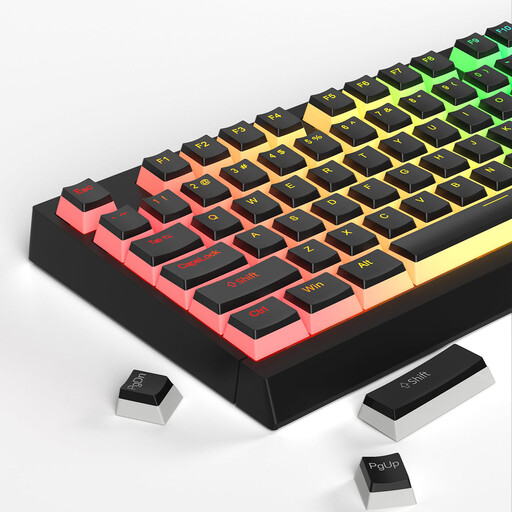
Why this accessory is a great fit: For mechanical keyboard owners who value premium feel and aesthetics. This set of PBT keycaps is a direct upgrade for enhanced durability and a better feel while typing and gaming.
This is the direct solution for worn-out ABS keycaps. The PBT material prevents the "shining effect," and the double-shot legends won't wear off, extending the life of the keyboard's appearance.
The translucent "pudding" design significantly enhances the luminosity of any RGB keyboard, creating impressive, diffused lighting.
If you want to further customise your mechanical keyboard or are looking for special cleaning accessories, you'll find suitable products in our curated selection.
1. How long does a mechanical keyboard last compared to a membrane keyboard? A mechanical keyboard is designed for a much longer lifespan. The switches are often rated for 50 to 100 million keystrokes. A standard membrane keyboard typically only lasts for 5 to 10 million keystrokes before the typing feel noticeably degrades or individual keys fail.
2. Is a wireless keyboard suitable for gaming? Modern wireless gaming keyboards that use 2.4 GHz RF technology offer latency that is indistinguishable from a wired connection for most gamers. They are very well-suited for almost all gaming scenarios. Only in the professional esports scene, where every potential source of interference must be eliminated, do many players still prefer a wired connection for absolute reliability.
3. Do I need special software for an RGB keyboard? Not always. Many RGB keyboards allow you to control basic lighting effects and colours directly via key combinations (e.g., Fn + function key). However, proprietary manufacturer software usually offers more advanced options, such as syncing the lighting with games, creating custom lighting profiles, or programming per-key effects.