
Lieferung heute & morgen

Qualitätsgarantie

Willkommens-Angebote freischalten: KOSTENLOSE Lieferung | Bis zu 80 % RABATT | Kostenlose 30-Tage-JoyPlus-Testphase
App herunterladen
Choosing a new PC mouse can quickly become overwhelming. Manufacturers advertise high DPI counts, countless buttons, and futuristic designs. However, not every advertised feature is relevant to every user or worth the extra cost. Often, these exaggerated marketing promises lead to buyer's remorse. Before you make a decision, it's important to know the most common pitfalls.
To make the right choice, you should focus on a few crucial technical parameters. These determine the performance and comfort in daily use.
The choice between a wired and a wireless mouse depends on your priorities.
The sensor is the heart of every mouse. Modern optical sensors work precisely on almost any surface. The DPI value indicates how sensitive the mouse is to movement.
The shape of the mouse should fit your hand. An ergonomic mouse is shaped to support a natural hand posture and reduce strain during long periods of use.
Based on the criteria mentioned, we have selected a few models for specific user profiles.
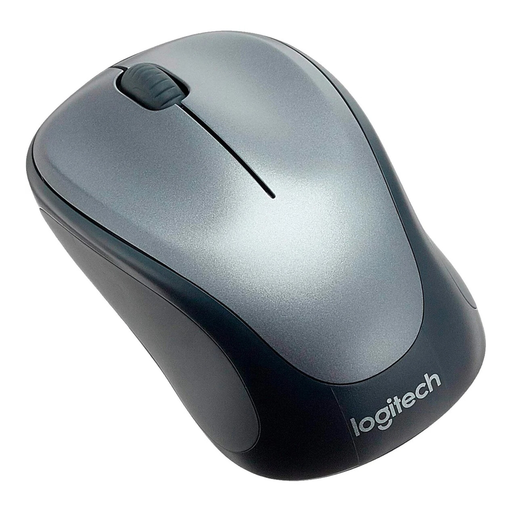
Why this model is a great fit: Ideal for users who want a straightforward and reliable wireless mouse for everyday tasks like browsing, emails, and office applications. The symmetrical design with rubberised grips is comfortable for both left- and right-handed users.
This model skips the exaggerated DPI values and focuses on a practical 1000 DPI sensor. The 2.4 GHz wireless technology ensures a stable connection without the dropouts common in cheaper models.
Simple plug-and-play setup via the USB receiver and a long battery life make it a low-maintenance companion.
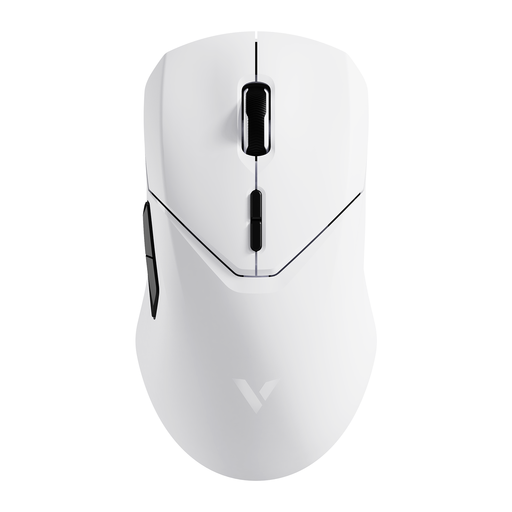
Why this model is a great fit: Designed for demanding gaming where response speed and precision are critical. The lightweight design and high polling rate minimise latency and enable rapid movements.
The high DPI value of up to 26,000 is functional here and precisely adjustable via software, not just a marketing gimmick. The 4K wireless technology specifically addresses the problem of unstable connections in wireless gaming mice.
Equipped with a high-precision PAW3398 sensor and an extremely high 4,000 Hz polling rate for near-zero latency input. 10 programmable buttons offer extensive customisation options.
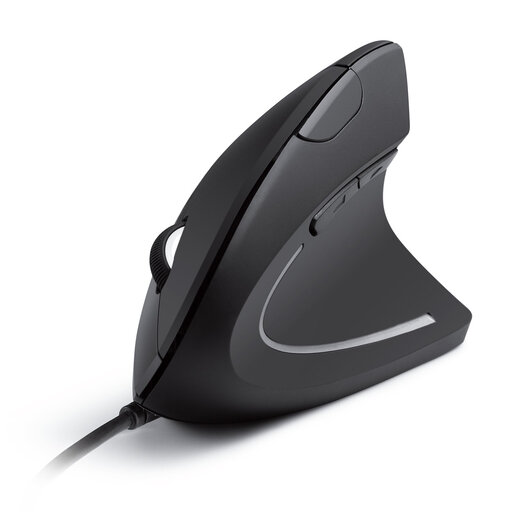
Why this model is a great fit: Specifically designed for users who spend many hours at the PC and want to prevent wrist or arm discomfort. The vertical design promotes a neutral posture.
This model solves the "false ergonomics" problem by enabling a fundamentally different hand position designed for relief. It focuses on this core function rather than on distracting extra features.
The vertical "handshake" position reduces muscle strain. Additional forward and back buttons make navigation easier. The wired connection ensures reliable function without battery changes.
If you need a different combination of features, such as a complete **keyboard and mouse combo** or a particularly portable solution, you can find more models in our full category.
A 2.4 GHz wireless mouse comes with a dedicated USB receiver (dongle). This connection is typically very stable and responsive, making it suitable for most use cases, including gaming. A Bluetooth mouse connects directly to the Bluetooth module built into your computer or laptop. This saves a USB port but can be more susceptible to interference in environments with many wireless signals.
For general office work and web browsing, 800 to 1,600 DPI is perfectly adequate. It allows for precise and smooth cursor control. Gamers often prefer mice with adjustable values, typically in the range of 1,600 to 6,400 DPI, to adapt the sensitivity to different game situations. Very high values above 10,000 DPI are only relevant for a few specialised applications on high-resolution multi-monitor setups.
Regular maintenance can significantly extend your mouse's lifespan. Clean the housing and the scroll wheel with a slightly damp cloth. The optical sensor on the underside should be kept free of dust with a dry microfibre cloth. Using a mousepad not only protects the mouse's feet but also improves the sensor's precision. For a wired mouse, you should be careful not to kink or put heavy strain on the cable.