
Lieferung heute & morgen

Qualitätsgarantie

Willkommens-Angebote freischalten: KOSTENLOSE Lieferung | Bis zu 80 % RABATT | Kostenlose 30-Tage-JoyPlus-Testphase
App herunterladen
Choosing a new PC mouse can quickly become overwhelming given the countless models and technical specifications. Marketing buzzwords and exaggerated performance claims often lead to decisions that don't match your actual needs. As your Joybuy Product Recommendation Officer, I'll help you understand the essential criteria and avoid common pitfalls, so you can make an informed choice.
A frequent mistake is assuming that a high price or a long feature list automatically guarantees quality. Let's look at three common misconceptions that often lead to buyer's remorse:
To find the right mouse, you should focus on a few crucial technical parameters. These will help you objectively evaluate a model's performance.
The sensor is the heart of every mouse. Modern optical sensors work reliably on almost any surface. The DPI value indicates the sensor's sensitivity.
The choice between a wired mouse and a wireless one depends heavily on your workspace and priorities.
An ergonomic mouse is shaped to support a natural hand posture and reduce strain. Vertical mice are a good example of this. For office or home office environments, a silent mouse with minimized click noise can also be advantageous. While three to five buttons are sufficient for most users, gamers or power users often need additional, programmable buttons for macros and shortcuts. A keyboard and mouse combo can be a great option for creating an ergonomically and visually coordinated workspace.
Here are some recommendations tailored to different needs, specifically avoiding the pitfalls mentioned earlier.
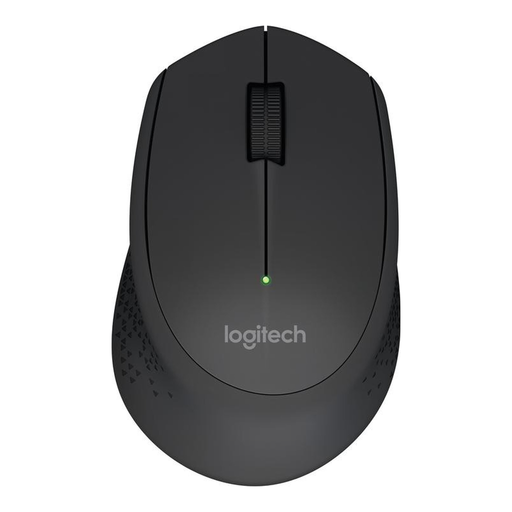
Why it's a great fit: Ideal for users seeking a reliable and straightforward wireless mouse for daily use in the office or at home. Its ergonomic shape provides comfort for long workdays.
With 1000 DPI, it offers practical sensitivity without the extra cost of unnecessarily high values. The long battery life alleviates the biggest concern with wireless mice.
Long battery life of up to 18 months (according to Logitech) and a stable 2.4 GHz connection via a nano USB receiver.
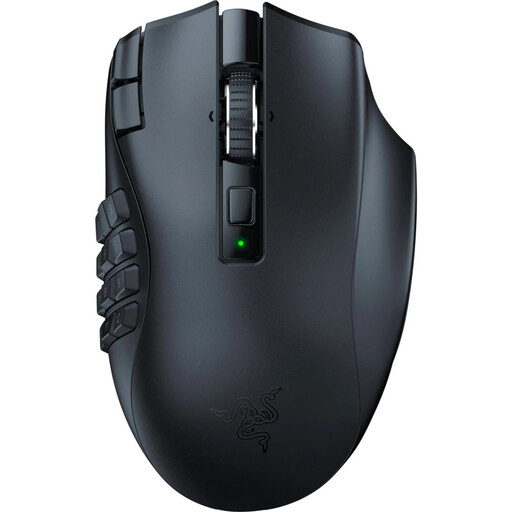
Why it's a great fit: Designed for MMO and MOBA players who need a high number of programmable buttons for complex command sequences and quick access to abilities.
The high DPI is functionally justified here. The dual-mode (HyperSpeed Wireless and Bluetooth) intelligently resolves the conflict between latency and battery life.
19 programmable buttons for maximum control and the Razer HyperScroll wheel with two modes (free-spinning or tactile) for precise actions.
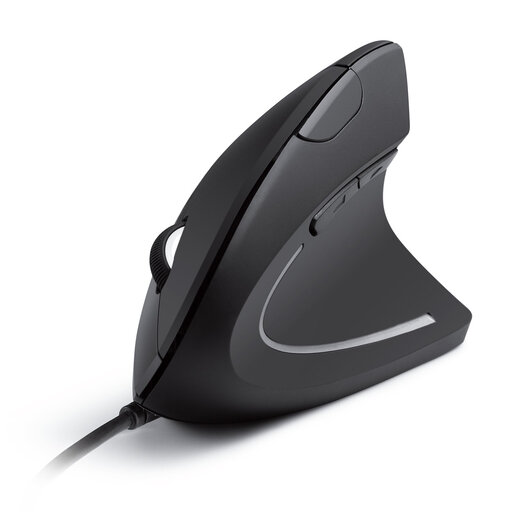
Why it's a great fit: For anyone who spends many hours at the PC and wants to proactively prevent wrist and arm strain. The vertical design promotes a natural posture.
This model prioritizes function over form, directly addressing the pitfall of neglected ergonomics. It's a deliberate choice for comfort over a flashy design.
The vertical 'handshake' design reduces muscle strain. The DPI levels (1000/1600) are well-suited for office and everyday tasks.
A good PC mouse is just one part of an optimized workspace. For interference-free, high-speed data transfer, especially in high-end setups, high-quality cables are also crucial.
An optimized workspace also needs the right cabling. Discover our range of high-quality connectivity solutions.
For standard office applications and web browsing on a Full HD monitor, 800 to 1,600 DPI is ideal. Gamers playing on 4K monitors can benefit from values up to 6,400 DPI to move the cursor quickly across the large screen. Higher values are usually only relevant for a very small niche of professional esports athletes.
A gaming mouse often features a high-precision sensor with adjustable DPI levels, a higher polling rate for faster response times, additional programmable buttons, and a build designed for durability. An office mouse, on the other hand, focuses on ergonomics for long work sessions, often quieter operation, and reliable, straightforward functionality.
Battery life varies greatly depending on the model, usage, and connection type. Simple wireless office mice can often last 12 to 24 months on a single AA battery, according to manufacturer specifications. Rechargeable gaming mice typically have a shorter runtime of 40 to 100 hours per charge, as they have more powerful sensors and often include RGB lighting. Manufacturer claims, such as those from Logitech or Razer, provide a good guideline.