
Lieferung heute & morgen

Qualitätsgarantie

Willkommens-Angebote freischalten: KOSTENLOSE Lieferung | Bis zu 80 % RABATT | Kostenlose 30-Tage-JoyPlus-Testphase
App herunterladen
A PC mouse needs to feel comfortable in your hand, but that’s not all. Depending on how you’ll use it, connection type, sensor, buttons, weight, battery life and compatibility can all matter to different degrees. If you focus only on a high DPI figure or eye-catching RGB lighting, you could overlook important features and end up with a mouse that doesn’t suit your day-to-day needs.
As Joybuy’s Product Recommendation Officer, I’ve grouped the key product details by use case. This makes it easier to avoid common pitfalls and compare models more effectively.
DPI describes the sensitivity of the sensor; it doesn’t automatically tell you how accurate it is. Moderate settings are often enough for office applications. Higher values can be useful for gaming if they suit your preferred control style and screen resolution. A high-DPI mouse should also offer several adjustable settings, so you can tailor the sensitivity to different tasks.
A wireless mouse can connect via Bluetooth, a 2.4 GHz USB receiver or multiple connection types. Bluetooth saves a USB port, but your device needs to be compatible. A USB receiver can provide a stable connection, but it will take up a port. With a wireless mouse, you should also check whether it needs batteries or has a built-in rechargeable battery.
An ergonomic mouse needs to suit your hand size and preferred grip. Right-handed users don’t necessarily need the same shape as left-handed users. Weight also affects how a mouse feels: lightweight gaming mice are quick to move, while some users find a heavier mouse easier to control. Compact models can encourage an awkward hand position if you have large hands.
An optical sensor is common in many current mice. What matters is smooth tracking, a suitable DPI range and the ability to change settings easily. A model such as the Logitech B100 has 800 DPI and three buttons. That’s enough for browsing, word processing and basic office tasks.
For more demanding games, models such as the G-Lab KULT-COBALT-B offer an adjustable range of 800 to 12,800 DPI. However, the DPI figure alone doesn’t tell you whether a mouse is right for you. Check the polling rate too: this tells you how often the mouse reports its position to the computer. 1,000 Hz means frequent updates, which can matter in fast-paced games.
A mouse with programmable buttons can be set up with shortcuts, macros or frequently used functions. This is useful for gaming, image editing and complex workflows. Check whether the buttons can be configured using the manufacturer’s software and whether you can save profiles.
More buttons also mean a larger body and more settings to manage. For everyday office work, three to six buttons are often enough. An RGB gaming mouse offers extra lighting, but this is mainly for appearance and doesn’t directly indicate sensor performance or durability.
A USB mouse usually works as soon as you plug it in. With a Bluetooth mouse, check that your PC, Mac, tablet or laptop supports Bluetooth. Multi-device mice can switch between several devices, making them useful if, for example, you use a work computer and a personal laptop.
For a rechargeable mouse, consider battery capacity, the charging port and whether you can use it while it charges. Battery-powered models can offer long running times, but you’ll need replacement batteries. Claims such as ‘up to’ depend on lighting, connection type and how intensively you use the mouse.
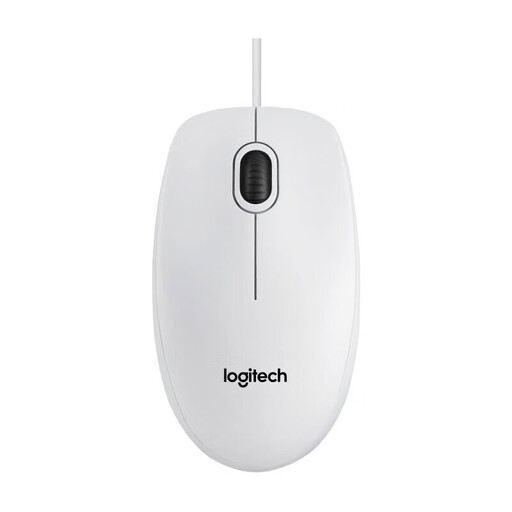
Why this product suits this profile: This USB mouse is designed for everyday PC and Mac tasks, and doesn’t require any extra software for basic use.
Its specifications focus on straightforward use rather than promising unnecessary gaming features.
800-DPI sensor, three buttons, ambidextrous shape and plug-and-play USB connection.
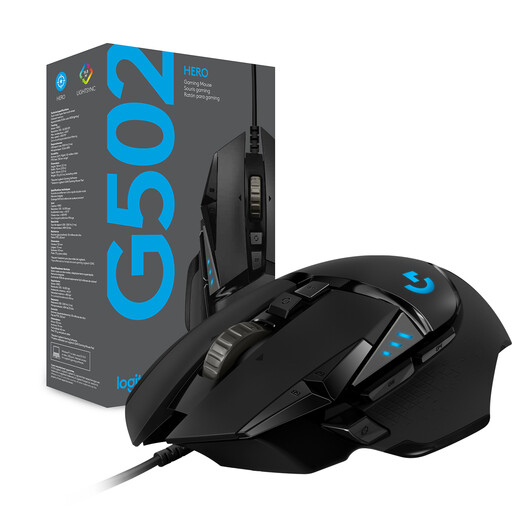
Why this product suits this profile: This wired model is designed for users who prefer plenty of controls and extensive customisation for gaming.
The choice isn’t based on RGB lighting alone; sensor range, number of buttons and adjustable weight are also considered.
HERO sensor with 200 to 25,600 DPI, eleven programmable buttons and five optional weights.
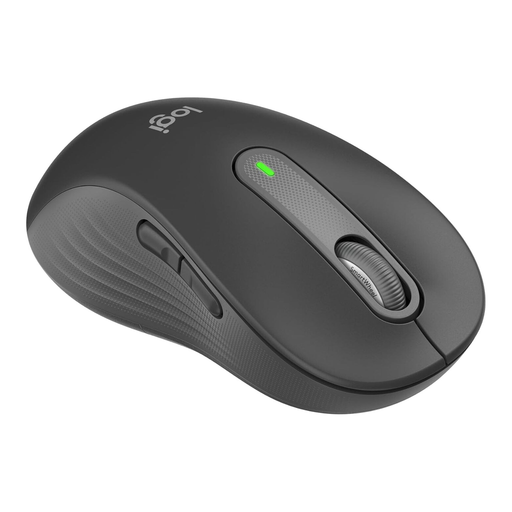
Why this product suits this profile: This left-handed mouse is designed for larger left hands and offers both Bluetooth and a Logi Bolt receiver.
It specifically takes hand preference and hand size into account, rather than simply making a general claim about ergonomics.
Quiet clicks, programmable side buttons, multi-device use and a stated battery life of up to 24 months.
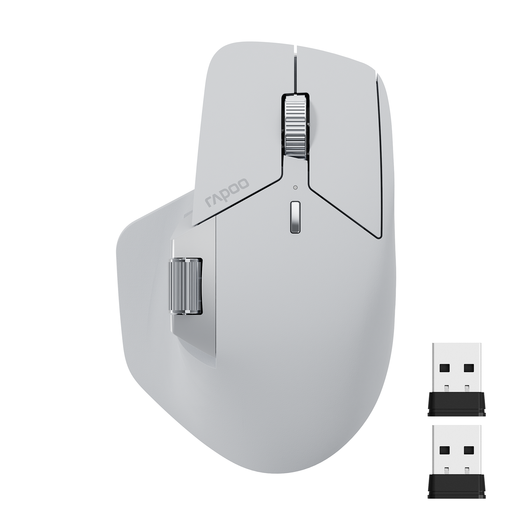
Why this product suits this profile: For multitaskers using a PC, Mac, tablet or smartphone, this multi-device mouse offers several connection options and plenty of programmable buttons.
Bluetooth, 2.4 GHz and USB are clearly listed as different connection options, so you can check device compatibility before buying.
Connects to up to four devices, 11 programmable buttons, USB-C charging and a DPI range of 50 to 4,000.
We’ve put together a comprehensive, regularly updated list of products that meet these strict selection criteria and comply fully with the safety regulations in force in the EU.
Look for the stated size and the mouse’s dimensions. The Logitech Signature M650 L and the left-handed M650 L Left are listed as suitable for large hands. The shape should also suit your preferred grip.
It depends on your device and how you’ll use the mouse. Bluetooth is a good choice if you want to keep USB ports free and your device supports Bluetooth. A USB mouse is often easy to set up and usually doesn’t need to be paired. For gaming, a mouse with a 2.4 GHz receiver or a cable may be a better choice.
Battery life depends on battery capacity, lighting, connection type and usage. Product claims such as ‘up to 95 hours’ or ‘up to 24 months’ are estimates based on specific conditions. Check whether a USB-C cable is included, whether you can use the mouse while it’s charging and how easy it is to replace the batteries.