Which form factor is right for you?

For housemates who are sensitive to noise

If you play while someone else is sleeping or concentrating in the same room, the keyboard, mouse and audio matter just as much as the computer. MSI describes one version of the Cubi N ADL S as fanless; that says nothing about the noise made by the complete setup.

For adventure gamers with a specific games list

For each game you want to play, compare its operating system, memory and graphics requirements with the full PC specification. The requirements for Return to Monkey Island show why a genre label alone isn’t enough to confirm that a PC is suitable. The requirements are listed on Steam.

For gamers without a permanent desk

If you share your desk and want to put your computer away after playing, a laptop and a mini desktop are very different options: a desktop still needs a separate monitor, while a laptop comes with its own screen. Lenovo describes these form factors for the LOQ 15 Gen 10 and the IdeaCentre Mini.

What should you look for?

What to consider What to check before buying Who this matters most to
Keeping the room quiet Consider the cooling system on the specific model alongside noise from the keyboard, mouse and audio. Fanless doesn’t mean the whole setup is silent. If I play while someone else is sleeping or concentrating in the same room, the noise from the entire setup matters to me. Around 36% of consumers put this first.
Game compatibility Check each game’s operating system, RAM and graphics requirements against the specific model. Steam lists at least 8 GB RAM and a DirectX 12-compatible GPU or Vulkan 1.2 for Return to Monkey Island. I want to know that the adventures I’ve chosen will run on the PC, rather than relying on the genre label. Around 29% of consumers prioritise compatibility with the specific games they play.
Space and storage With a mini PC, make room for a suitable monitor and check its connections. With a laptop, consider whether its screen and where you’ll use it work for your shared room. If I want to leave as little as possible on a shared desk after playing, it’s important to me that the screen can be put away too. Around 21% of consumers prioritise being able to pack their setup away.
What’s included in the setup Check what’s included and the exact model variant. ASUS offers NUC 14 Pro kits without a pre-installed operating system, RAM or storage, as well as fully equipped versions. I want to choose only the components my setup actually needs, without mistaking a kit for a ready-to-use PC. Around 14% of consumers pay particular attention to getting the right complete setup.

Fanless mini PC

A good fit if: you already have a monitor and the integrated graphics can handle the games you want to play. MSI describes the Cubi N ADL S as fanless.

The trade-off: you’ll need to add a monitor and peripherals; the form factor doesn’t confirm how well games will run.

Compact desktop with a fan

A good fit if: the computer can stay in one place and you need connections for a monitor you choose separately. Lenovo says the IdeaCentre Mini has ports for multiple monitors.

The trade-off: Lenovo describes its cooling as noise-reducing. That doesn’t mean it’s fanless or inaudible while gaming.

Laptop

A good fit if: you want to move between gaming spots or put the screen away completely after playing.

The trade-off: the cooling system and keyboard may disturb your housemates. Check how noisy the specific laptop is when running the game you want to play.

Larger desktop or gaming tower

A good fit if: you want to play more demanding games as well as adventures, and have a permanent spot with a monitor.

The trade-off: the case and extra peripherals take up space; a larger form factor doesn’t guarantee quieter operation.

Common planning mistakes

  • Assuming ‘fanless’ means every adventure will run

    The cooling design of the MSI Cubi N ADL S doesn’t prove that its integrated graphics meet the requirements of a particular game.

    Check the requirements for your key games individually against the complete PC specification.

  • Treating a mini PC kit as a complete computer

    ASUS NUC 14 Pro kits may be supplied without a pre-installed operating system, RAM or storage. Specifications vary by model.

    Compare the exact model number and check which components are included.

  • Planning for the computer case alone

    A mini desktop needs an external monitor and peripherals for typical use. A laptop and a desktop take up shared space in different ways.

    Before choosing, work out which devices you already have and what can stay set up permanently.

Brands worth considering

MSI

The Cubi N ADL S range is a compact mini PC option for a permanent gaming spot.

  • MSI describes the S form factor as fanless; the Cubi N ADL S-217DE is listed with an N200 processor and Windows 11 Pro.
  • The manufacturer’s claim confirms neither the gaming performance of the integrated graphics nor the noise level of the complete setup.

Lenovo

The IdeaCentre Mini and LOQ cover different needs: a compact desktop or a laptop with a screen.

  • Lenovo lists ports for multiple monitors on the IdeaCentre Mini Gen 8 and describes its cooling as noise-reducing.
  • Noise-reducing cooling doesn’t prove that a PC will run quietly in a bedroom. LOQ specifications vary by model.

ASUS

The NUC 14 Pro is a compact option where the exact specification matters.

  • The range includes different mini PC and kit configurations.
  • Kits may not include an operating system, RAM or storage. Check the graphics and specification of the exact version too.

HP

The Pro Mini 400 G9 is an example of a small desktop PC with a documented Windows configuration.

  • The 937U0EA#ABD configuration is listed with Windows 11 Pro, 16 GB RAM, a 512 GB SSD and Intel UHD Graphics 770.
  • These specifications don’t prove how well it will run the games you want to play or how noisy it will be in a bedroom.

Joybuy products for compact gaming setups

This selection features mini PCs for compact setups. If you choose a mini PC, allow for a suitable monitor and peripherals, and check the requirements of the games you want to play against the relevant specification.

FIREBAT AM02L Mini PC

FIREBAT AM02L Mini PC, Ryzen 5 6600H, 16 GB LPDDR5, 512 GB SSD

The mini PC form factor suits a compact setup if you already have a separate monitor and peripherals.

Listed specifications include a Ryzen 5 6600H, 16 GB LPDDR5, 512 GB M.2 NVMe SSD, Windows 11 Home and Radeon 660M. Check that they meet the requirements of your games.

View at Joybuy

SOYO S5Air Mini PC

SOYO S5Air Mini PC, Ryzen 5 7535HS, 16 GB LPDDR5, 512 GB NVMe SSD

This compact form factor is an option if there’s little room for a computer on your shared desk.

Listed specifications include a Ryzen 5 7535HS, 16 GB LPDDR5, 512 GB NVMe SSD, Windows 11 Pro and Radeon 660M. You’ll also need a monitor and peripherals.

View at Joybuy

FIREBAT F1 Mini PC

FIREBAT F1 Mini PC, Ryzen 5 7640HS, 24 GB LPDDR5, 512 GB PCIe 4.0 SSD

The product description calls the design fanless. That may appeal if you’re setting up a permanent gaming spot and want to avoid noise from the computer’s fans.

Listed specifications include a Ryzen 5 7640HS, 24 GB LPDDR5, 512 GB PCIe 4.0 SSD and Radeon 760M. Check compatibility against the requirements of the games you want to play.

View at Joybuy

FIREBAT A8 Mini PC

FIREBAT A8 Mini PC, Ryzen AI 9 365, 24 GB DDR5, 1 TB PCIe 4.0 SSD

The product description calls the design fanless. Before choosing it, check that the specification suits the games you want to play and the setup you have in mind.

Listed specifications include a Ryzen AI 9 365, 24 GB DDR5, 1 TB PCIe 4.0 SSD and Radeon 880M. A mini PC also needs a separate monitor and peripherals.

View at Joybuy
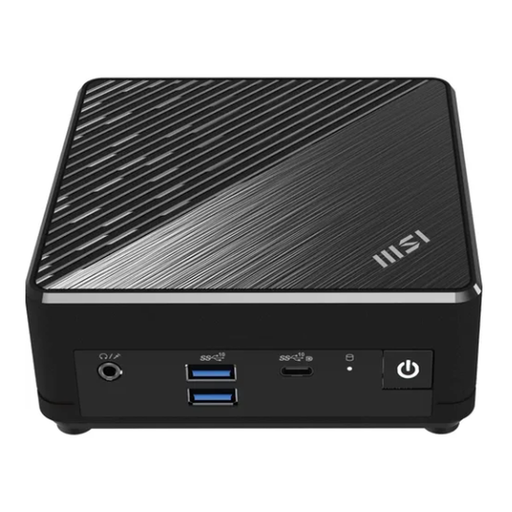
MSI Cubi N ADL S-217DE Mini PC

MSI Cubi N ADL S-217DE, N200, 8 GB RAM, 256 GB SSD, Windows 11 Pro

Passive cooling is an option if you want to avoid noise from the computer’s fans, but it doesn’t mean the PC is suitable for every adventure.

This version is listed with an Intel N200, 8 GB RAM, 256 GB SSD, Windows 11 Pro and integrated Intel UHD Graphics. HDMI and DisplayPort are included; you’ll need to add a monitor and peripherals.

View at Joybuy

Frequently asked questions

Do I need a dedicated graphics card for point-and-click adventures?

Not necessarily. Compare the requirements for each game you want to play with the specific GPU and supported graphics API. The minimum requirements for Return to Monkey Island don’t automatically mean that any integrated graphics will be suitable.

What else should I consider when setting up a mini PC?

Check the monitor connection, peripherals and what’s included. ASUS NUC 14 Pro mini PCs with a full specification differ from kits; ASUS says kits may not include an operating system, RAM or storage.

How can I make my gaming setup considerate in a shared room?

Think of the computer, audio and peripherals as one complete setup: a fanless device only eliminates noise from the computer’s fans. Choose suitable audio and peripherals that are as unobtrusive as possible. The noise from a complete gaming setup depends on the individual devices and how you use them.

What rights do I have when buying a PC online from a business seller?

According to the European Union’s consumer information, goods are generally covered by a statutory guarantee of at least two years against the seller. For ordinary online purchases, you generally have 14 days from delivery to cancel. Exceptions and any return costs should be taken into account. An additional manufacturer’s warranty doesn’t replace these rights.

How should I dispose of an old PC in Germany?

According to the German Environment Agency, electrical and electronic waste must not go in household rubbish. You can take it to a recycling centre; additional conditions apply to returning it to a retailer, particularly when buying a new product.