
Lieferung heute & morgen

Qualitätsgarantie

Willkommens-Angebote freischalten: KOSTENLOSE Lieferung | Bis zu 80 % RABATT | Kostenlose 30-Tage-JoyPlus-Testphase
App herunterladen
Long gaming sessions, livestreams and video recordings put considerably more strain on a smartphone than everyday applications. The result can be a warm casing, reduced frame rates or delayed inputs. The right phone cooler for gaming can draw heat away directly from the device. However, it cannot replace proper device configuration and does not automatically protect against every form of overheating.
Claims such as “up to 45 °C less” or temperatures below freezing usually refer to specific laboratory conditions that cannot simply be applied to every smartphone. Important factors include room temperature, contact pressure, casing material, charge level and the amount of heat generated by the game.
When choosing phone cooling to prevent overheating, such figures should therefore be treated as manufacturer specifications. They do not guarantee that an iPhone or Android device will reach a particular temperature during every use.
A magnetic phone cooler is particularly easy to use with MagSafe devices or a suitable magnetic ring plate. Many Android smartphones, on the other hand, require an additional plate or clip. Thick protective cases can also weaken the contact.
Before buying, you should therefore check:
An RGB phone cooler can complement a gaming setup visually. However, the lighting says nothing about heat dissipation, noise levels or compatibility. The contact area, power supply, attachment method and fan control are more important.
Even contact is more important than an eye-catching casing. The cooler should sit flat on the intended rear surface and must not tilt because of camera bumps. A magnetic connection is practical for iPhone models with MagSafe. For Android devices, iPads or tablets, a clip-on phone cooler or magnetic ring plate may offer greater flexibility.
For devices with a sensitive surface, attachment with soft contact pads is recommended. Also make sure that the cooler is not positioned on an unsuitable area and does not obstruct the smartphone’s heat dissipation.
Many smartphone coolers are powered via USB-C. With a wired model, make sure the cable does not interfere with your hand or the holder while gaming. Battery-powered models are more portable, but need to be charged regularly.
For the Black Shark Magnetic Cell Phone Cooler 5 Pro, the supplier states a power consumption of up to 35 W and recommends a 40-W power adapter or more powerful charger, which, according to the product description, is not included. This is relevant when choosing a model: a charger that is too weak may limit the available cooling performance.
Automatic temperature control can make operation easier. According to the manufacturer, the Black Shark Magnetic Cell Phone Cooler 5 Pro uses two NTC sensors for monitoring. The product description also states that it switches off automatically at temperatures above 60 °C or below −20 °C. Such specifications are product-specific and should not be applied to other models.
Condensation is an important safety consideration with semiconductor coolers. If a contact surface becomes very cold, moisture can form in humid room conditions. The cooler should therefore not be operated unattended. If visible moisture appears, stop using it and allow the device to dry completely.
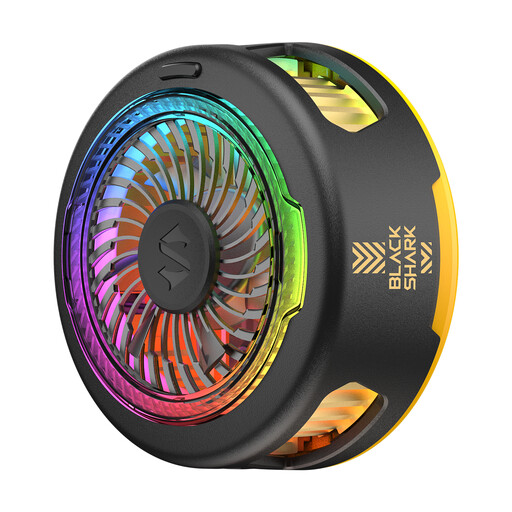
Why this product suits this profile: This portable smartphone cooler combines magnetic attachment with RGB lighting. According to the product name, it is designed for the iPhone Magnetic series, Android devices, tablets and iPads.
The attachment method is clearly stated. Even so, check before buying whether your device has a suitable magnetic surface or requires an additional holder.
Portable design, magnetic use and RGB lighting according to the product information.
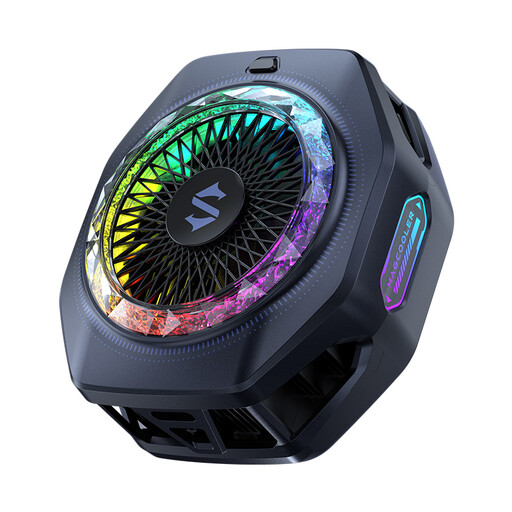
Why this product suits this profile: This model is aimed at users looking for temperature monitoring, app control and flexible attachment for longer gaming or streaming sessions.
The description specifies sensors, automatic temperature limits, and magnetic and clip attachment. This reduces uncertainty when switching between devices, but does not replace a compatibility check.
According to the manufacturer, up to 35 W of power, 18 addressable RGB LEDs, app control and detachable grips.
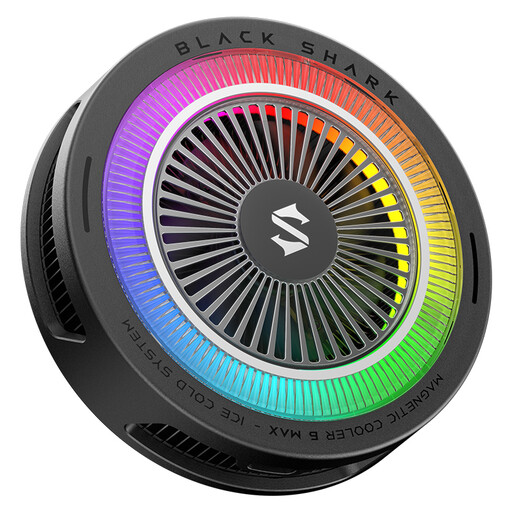
Why this product suits this profile: For iPad users, mobile streamers and content creators, the larger device class is crucial. According to the product name, this model is designed for iPads and uses such as gaming, streaming and photography.
Choosing a cooler designed for tablets prevents an undersized smartphone cooler from covering only part of the heat zone. Check the dimensions and magnetic ring position before buying.
Smart display, magnetic ring plate, addressable RGB LEDs and app-controlled cooling according to the product name.
Position the smartphone cooler on the contact area specified by the manufacturer. Remove a thick case if necessary and make sure that air vents remain clear. Charging and gaming generate additional heat. A cooler can reduce this strain, but does not automatically prevent thermal throttling.
For livestreams, a stable holder is recommended so that the cable does not pull on the device. With an iPhone cooler, MagSafe compatibility is particularly important. For Android devices, check the actual attachment solution as well as the model name. RGB functions and app control may increase power consumption.
We have put together a complete, regularly updated list of products that fully meet these strict selection criteria and the safety regulations applicable in the EU.
First, check whether the device has a magnetic rear surface. If not, you may need a magnetic ring plate or clip, depending on the model. The contact area must be clean, dry and as flat as possible. A protective case can affect both grip and heat transfer.
A smartphone cooling fan can draw heat away from the casing area and may help reduce temperature-related performance limitations. However, whether frame drops are actually prevented also depends on the processor, game, network connection, battery condition and device settings. The product information cannot be used to guarantee a particular frame rate.
Wired models require energy via USB-C while operating. Running costs depend on power consumption, usage time and your electricity tariff. More powerful devices may require a separate power adapter. Therefore, check whether a charger and cable are included and what minimum output the supplier recommends.