
Lieferung heute & morgen

Qualitätsgarantie
App herunterladen
Kategorien
The quality of smartphone video is increasingly defined by the stability of the footage. While the internal electronic image stabilization (EIS) in smartphones reduces micro-jitters, it reaches its limits during dynamic movements, fast pans, or when walking. A smartphone gimbal, also known as a phone stabilizer, mechanically compensates for these movements using motorized axes, enabling smooth, professional-looking video footage. Modern devices also integrate AI-powered features, expanding their use cases far beyond simple stabilization.
Selecting the right model is based on an analysis of technical specifications and the intended use case. The following parameters are crucial for making an informed decision.
A gimbal's core function is mechanical stabilization. The number of axes determines the degree of motion compensation:
The form factor determines its versatility. Many models combine the function of a gimbal with an extendable selfie stick tripod, allowing for flexible shooting angles and hands-free use.
A key feature of modern devices is AI-powered tracking. A tripod with AI tracking uses an integrated camera to autonomously keep people or objects centered in the frame.
Based on the technical criteria above, here is a selection of devices that meet the diverse needs of content creators.
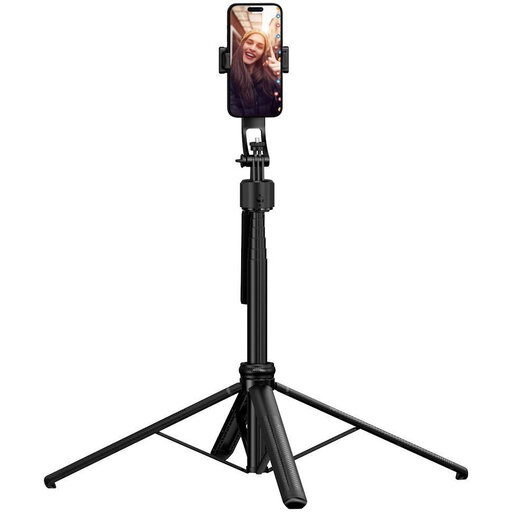
Why We Recommend This Product The Rollei Easy Creator Quadpod focuses on one core function: intelligent, hands-free tracking for static shots. It is not a traditional 3-axis stabilizer but rather a motorized tripod. Its four-legged design (quadpod) offers superior stability compared to conventional tripods, especially on uneven surfaces or at its full extension height of 163 cm. The integrated AI face tracking works without a dedicated app and reliably follows the user within a 360° radius.
Pros
Who It's For This model is ideal for content creators who primarily record stationary videos. This includes educators for online courses, fitness instructors, chefs for cooking tutorials, or vloggers who want to operate hands-free in a studio or at home. It is less suited for dynamic shots while walking.
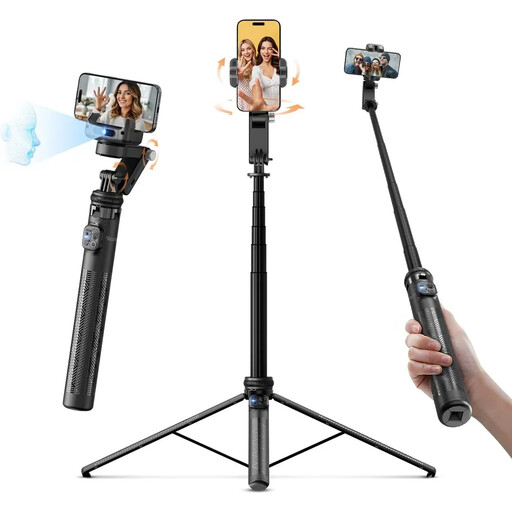
Why We Recommend This Product This device combines the motion stabilization of a gimbal with the features of an AI-tracking tripod. It's an all-in-one solution for a vlogging gimbal. It offers both mechanical stabilization for shots in motion and an intelligent face-tracking tripod for hands-free, stationary scenes. The integrated LED light, adjustable across three color temperatures (3000K - 6500K), is a significant advantage in low-light conditions.
Pros
Who It's For This model is aimed at versatile content creators like travel vloggers, TikTokers, and influencers who need a single, portable solution for a wide range of recording situations—from action-packed sequences to static talking-head videos.
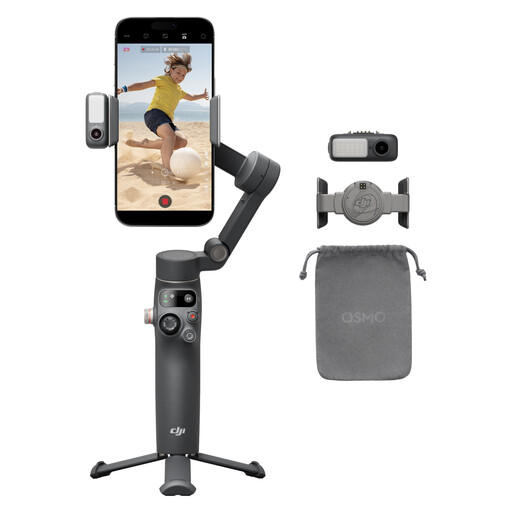
Why We Recommend This Product The DJI Osmo Mobile 7P is a highly advanced 3-axis stabilizer designed for maximum image stability and deep software integration. According to the manufacturer, DJI, its robust stabilization ensures lossless image smoothness. Its strength lies in its synergy with the DJI Mimo app, which offers features like ShotGuides (shooting templates) and one-tap editing. The multifunctional module integrates tracking, a light, and a receiver for DJI microphones, enabling professional-grade audio and video production.
Pros
Who It's For The Osmo Mobile 7P is designed for ambitious content creators and amateur filmmakers who prioritize top-tier image quality, cinematic movements, and an integrated ecosystem. It is especially suitable for users who already own DJI products like microphones or want to leverage the advanced software features for their creative work.
If your requirements are primarily focused on static shots, group photos, or simple selfies, and a full-fledged gimbal system exceeds your needs, it might be worth exploring our broader selection of mounts. In the Photo Stick category, you will find a variety of tripods and selfie sticks with different features and form factors.
1. What is the difference between a smartphone gimbal and a simple selfie stick tripod? A selfie stick tripod is a passive mount that simply holds the smartphone in position or extends your reach for selfies. A smartphone gimbal is an active system with motors and sensors that mechanically compensates for unwanted movements (like shaking or jolting while walking) in real-time to produce smooth video footage.
2. How does a tripod with AI tracking work? A tripod with AI tracking has its own small camera and processor. These components analyze the video feed live and recognize predefined objects, usually human faces or bodies. Once a target is acquired, the processor sends control signals to the motors in the tripod head, which pan and tilt the smartphone to automatically keep the target centered in the frame. This typically works without needing a special app on the smartphone.
3. Do I need a special app for a smartphone gimbal? Many of a gimbal's basic stabilization functions work directly with your smartphone's native camera app. However, to access advanced features like object tracking, time-lapse modes, dolly zoom effects, or to configure the gimbal motors, the manufacturer's proprietary app (e.g., DJI Mimo) is usually required. AI-tracking tripods, like the Rollei models featured, often work without an app.