
Lieferung heute & morgen

Qualitätsgarantie

Willkommens-Angebote freischalten: KOSTENLOSE Lieferung | Bis zu 80 % RABATT | Kostenlose 30-Tage-JoyPlus-Testphase
App herunterladen
Shaky and blurry smartphone videos can ruin even the best moments. A smartphone gimbal stabilizer promises smooth, professional-looking footage, but the market is flooded with devices full of exaggerated marketing claims and hidden flaws. As your Joybuy Product Recommendation Officer, I'm here to help you see through the hype and make an informed decision, so you don't pay for features that disappoint in practice.
Many buyers invest in a gimbal only to find it lying unused in a drawer after a short time. This is often due to three common pitfalls:
To avoid a bad purchase, you should focus on objective, technical parameters instead of marketing buzzwords. These three criteria are crucial for good performance.
A gimbal's most important characteristic is its ability to compensate for movement. There is a clear technical distinction here:
Every gimbal has a maximum payload, specified in grams. This value must be higher than the weight of your smartphone, including its case and any add-on lenses. A smartphone stabilizer operating at its load limit cannot execute clean movements, and its motors will wear out faster. Before buying, always check the manufacturer's compatibility list to ensure your gimbal for iPhone and Android models is suitable and supports your specific device.
Many features sound good on paper, but only a few offer real-world value.
Instead of presenting an overwhelming list, we are highlighting one model that combines the criteria above into a well-thought-out package suitable for a broad range of users.
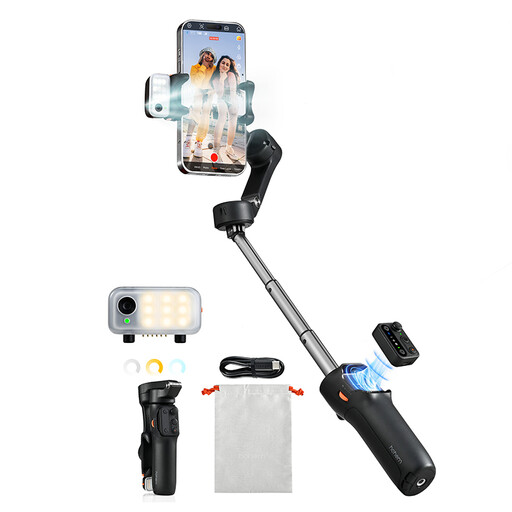
Why This Fits Their Persona: This model is ideal for vloggers, travelers, and social media users looking for a flexible all-in-one solution. It combines high-quality stabilization with practical features that work without cumbersome app-switching, enabling creative shots without extra equipment.
The magnetic AI tracking module is hardware-based and not tied to an app. The foldable design and low weight ensure high portability, while the robust iSteady 8.0 system guarantees reliable 3-axis stabilization.
The combination of a detachable remote, integrated tripod, extendable rod, and a 3-level fill light makes it an extremely versatile tool for nearly any shooting scenario.
We have compiled a comprehensive, up-to-date list of products that meet these strict selection criteria.
Battery life varies depending on the model and usage intensity. Most current devices offer an operating time of 8 to 13 hours, which is enough for a full day of shooting. Charging time via a USB-C port is typically 2 to 3 hours. Look for models with long battery life if you plan to use the gimbal for travel or extended projects.
Yes, proper balancing is crucial. Before turning the gimbal on, you should position your smartphone in the clamp so that it remains as level as possible even when the gimbal is off. This process only takes a few seconds but protects the motors, reduces power consumption, and ensures optimal stabilization performance.
The basic 3-axis stabilization works with any app that accesses your phone's camera, including the native camera app, Instagram, or TikTok. However, advanced functions like starting/stopping recording via a button on the gimbal, zoom control, or using specific shooting modes (e.g., Dolly Zoom) usually require the manufacturer's app. Models with hardware-based AI tracking offer the advantage that the intelligent tracking also works in third-party apps.