Who might need a mobile hotspot on a car journey?

Travellers with important online documents

If you need to access bookings or other documents while travelling, consider signal along your route and secure offline access. Ofcom notes that the user experience can vary depending on location, contract, device and network demand. The Federal Office for Information Security (BSI) recommends encrypting important stored documents or protecting them with a password.

Groups travelling with several devices

If several phones, tablets or laptops need to use the same connection, consider how many devices you actually need to connect, how you’ll power them and whether you have enough data. A dedicated router is an extra piece of hardware alongside your smartphone.

Travellers who may cross borders

If your route takes you beyond Germany, compare the terms of your existing plan with any data packages available for the countries you’ll visit. The European Union highlights fair use rules for roaming within its coverage area. Outside that area, check the terms and conditions for each country.

What should you look for when buying?

Smartphone hotspot

A good fit if: You only need occasional online access to documents on a few devices, and your plan and signal along the route are up to the job.

The trade-off: Using your phone as a hotspot uses up its battery and your data allowance.

LTE router with its own SIM

A good fit if: Several devices need to share the same connection regularly, or you’d rather not use your smartphone’s battery for this.

The trade-off: You’ll need another device and possibly a separate data plan. Check LTE coverage and the SIM format.

5G router

A good fit if: You regularly need to connect lots of devices or use data-heavy applications, in addition to accessing documents, and your device, plan and the relevant parts of your route support 5G.

The trade-off: 5G or advertised peak speeds don’t guarantee better reception in a moving car.

Travel hotspot with data packages

A good fit if: Your route takes you through several countries and you’d like to use suitable data packages, instead of or alongside your own SIM.

The trade-off: The countries covered, data allowance and validity period need to suit your route and length of stay.

Buying priority What to check before buying Who is this important to?
Signal along the route Check network coverage and plan terms for the relevant parts of your route. A high advertised speed doesn’t guarantee reception in a particular location. If I need to access bookings while travelling, actual signal along my route matters more to me than a high data rate. Around 29% of consumers put connectivity on the route first.
Secure offline access Before setting off, check which documents are available offline and whether originals are required in your particular case. Protect stored copies with a password or encryption. If the connection drops, I still want to be able to access important documents securely. Around 23% of consumers prioritise access to documents without a network connection.
Plan and data allowance Compare your existing data allowance with any SIM or data package you may need, including its coverage area. Fair use rules may apply to EU roaming. If I want to avoid planning around an unsuitable plan or an unnecessary package, I compare the data terms in advance. Around 18% of consumers focus on plans and data allowances.
Power and shared use Count how many devices need to be connected at the same time and plan a suitable way to charge them. Manufacturers’ battery life claims don’t guarantee how long a device will last on your journey. If several people need to connect their devices, I make sure that the usage and power supply are suitable for the journey. Around 18% of consumers prioritise shared use and battery life.
Crossing borders Check the terms for your SIM or data package in each country you visit, including coverage and validity. EU roaming rules don’t apply to every country. If my route takes me through several countries, I want to know where my plan or package will actually work. Around 12% of consumers prioritise the terms that apply when crossing borders.

Which assumptions should you avoid?

  • A faster router guarantees a connection

    Ofcom lists location, contract, device and network demand as factors that affect the mobile experience. Switching devices won’t automatically solve a dead zone along your route.

    Check the relevant parts of your route and keep important documents securely available offline.

  • A suitable data plan is automatically included with the router

    The device and data connection are separate parts of the purchase. Depending on the solution you choose, you may need a suitable SIM or a data package that you can buy separately.

    Check the SIM format, data allowance, validity period and countries covered separately from the router model.

  • The stated battery life will last for the whole journey

    For the M7200, TP-Link notes that actual usage time depends on how the device is used and how many devices are connected. The manufacturer’s figures therefore don’t guarantee how long it will last on your journey.

    Test the router with the devices you plan to use before travelling, and make sure you have a suitable charging option.

  • Public Wi-Fi and your own hotspot are equally secure

    The BSI advises against accessing confidential data over other people’s Wi-Fi networks. You should also set up your own router securely and protect it with a strong password.

    Use an appropriately secured connection for sensitive documents and protect stored files as well.

Popular brands for mobile travel hotspots

TP-Link

The German product pages list mobile LTE routers with a range of specifications.

  • TP-Link Germany says the M7200 can connect up to 10 devices and run for up to 8 hours; the M7650 is listed as supporting up to 32 devices and running for up to 15 hours.
  • These are manufacturer specifications for specific models, not measurements taken on a particular car journey. Both models mentioned use LTE.

NETGEAR

According to NETGEAR, the Nighthawk range includes mobile 5G routers with batteries, designed for more demanding connection or device needs.

  • NETGEAR advertises 5G, support for up to 64 devices at once and up to 13 hours of battery life for the Nighthawk M7 Pro MR7450.
  • These manufacturer claims don’t prove that reception will be better on a particular route. Extra features aren’t necessarily needed for occasional access to documents.

GlocalMe

According to the manufacturer, the G4 Pro combines a portable 4G hotspot with a Cloud SIM service and a Nano-SIM slot.

  • GlocalMe says the device can connect up to 10 devices.
  • The G4 Pro isn’t a 5G device. Check package coverage, validity and reception along your planned route; advertised country coverage doesn’t guarantee a signal in a particular location.

HUAWEI

HUAWEI lists the E5785L as a mobile LTE router with dual-band Wi-Fi.

  • The German specification page lists theoretical LTE data rates of up to 300 Mbit/s for downloads and 50 Mbit/s for uploads.
  • These figures aren’t measurements for a particular road. If you’re considering a deal, check the exact E5785 variant too.

Joybuy products for mobile connectivity on the go

The devices below include mobile LTE routers and a mobile 5G router. Before you travel, check that the device, SIM and power supply suit your needs and where you’ll be using them.

AVM FRITZ!Box 6825 4G LTE wireless router

AVM FRITZ!Box 6825 4G LTE

For mobile LTE access with a Nano-SIM, when a USB-C power source is available.

Cat 6; Wi-Fi 6 AX 600 Mbps; 1× Gigabit LAN; USB-C power supply; Nano-SIM; FRITZ!OS.

View at Joybuy

MERCUSYS MT110 4G LTE mobile Wi-Fi

MERCUSYS MT110 4G LTE

Described as a portable LTE hotspot with a battery, providing a mobile connection via Nano-SIM.

Up to 150 Mbps; Nano-SIM slot; 2200mAh battery. The stated battery life doesn’t guarantee how long it will last on your journey.

View at Joybuy
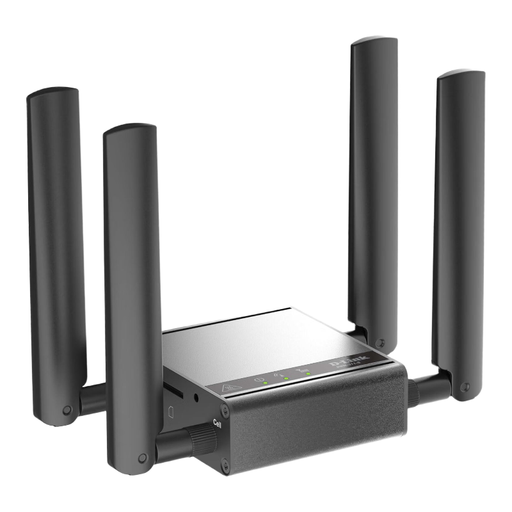
D-Link DWM-311-G mobile router, gateway and modem

D-Link DWM-311-G

The product description recommends this 5G device for indoor and industrial use. Bear this in mind when choosing a router for a car journey.

5G mobile network; 2.5GbE; external SMA mobile antennas.

View at Joybuy

TP-Link M7000 mobile Wi-Fi router 4G LTE

TP-Link M7000 4G LTE

Described as a portable LTE hotspot with a Nano-SIM and built-in battery for travel.

Up to 150 Mbps download and 50 Mbps upload; 2000mAh battery; Nano-SIM.

View at Joybuy

Frequently asked questions about travel documents and hotspots

Can I keep my travel documents online only?

Don’t rely solely on a hotspot, as it can’t guarantee access when there’s no mobile signal. The BSI recommends encrypting important digital documents or protecting them with a password. Also check whether copies are acceptable in your particular case; digital access doesn’t automatically replace any originals you may need.

What should I set up on my router before setting off?

Test the SIM and connection before your journey, change any default password used to manage the router, and check for available firmware updates. The BSI distinguishes the router administration password from the Wi-Fi password.

What data connection do I need to use with the router?

Depending on your device and chosen solution, you’ll need a suitable mobile plan, an additional SIM or a data package that you can buy separately. Compare data allowances, package validity and roaming terms; a device specification doesn’t mean that internet access is free.

Can I use the hotspot while driving?

Under § 23 Abs. 1a StVO, a person driving a vehicle may use an electronic device for communication, information or organisation only under the conditions set out in that provision. In particular, the device must not be picked up or held. Use is permitted via the intended voice control or read-aloud function, or with a brief glance appropriate to the circumstances. The provision makes an exception for a stationary vehicle with the engine completely switched off. Set up the connection before your journey, or stop before operating the router.

Will my German data plan work in the same way when I travel abroad?

Within the EU roaming area, domestic rates generally apply, subject to fair use rules. Don’t assume this applies outside that area; check the terms of your plan for each country you’ll visit before you travel.