
Lieferung heute & morgen

Qualitätsgarantie

Willkommens-Angebote freischalten: KOSTENLOSE Lieferung | Bis zu 80 % RABATT | Kostenlose 30-Tage-JoyPlus-Testphase
App herunterladen
A phone tripod can make taking photos and videos, making video calls and livestreaming much easier. However, many models look similar at first glance, while their design, load capacity and ease of use can vary considerably. If you focus only on the maximum height or a low price, you may end up with a tripod that wobbles in everyday use, isn’t suitable for your smartphone or quickly becomes impractical.
This guide explains which features to look for when buying a smartphone tripod and which models suit different uses.
A model that extends a long way isn’t automatically stable. The further you extend the centre column or telescopic arm, the more it is affected by wind, movement and the weight of your smartphone. A selfie stick with tripod can be suitable for group photos, but when fully extended it needs a sufficiently wide, sturdy base.
So check the:
A Bluetooth selfie stick usually doesn’t need a special camera app. However, pairing, the shutter button and battery type can vary between models. Check whether your smartphone uses iOS or Android, how the remote is powered and whether its range is sufficient for the distance you have in mind.
For example, the models mentioned in this guide have a stated range of up to 10 metres. This is a technical guideline and can depend on factors such as obstacles and the Bluetooth connection.
A MagSafe phone tripod or other magnetic smartphone tripod will only work reliably if your smartphone, case and magnet position are compatible. Devices that aren’t compatible may need an additional magnetic ring or a suitable case.
Make sure the phone is securely attached before using a magnetic mount. Magnetic products should also be kept away from pacemakers, bank cards and magnetic storage media if advised by the manufacturer.
A traditional phone tripod mount usually uses an adjustable clamp. This works with many smartphones, as long as the stated clamp range is wide enough. Also check whether you can leave a thick case on your phone.
Magnetic systems make it quick to swap devices, but they require compatible magnetic surfaces. If you regularly switch between smartphones, a mechanical clamp is often simpler.
A mini phone tripod is enough for a desk, kitchen or video calls. Models around 20 to 50 centimetres tall are easy to place on a table and carry around.
For travel photography or full-length shots, an extendable model is more suitable. Consider its folded size and weight in relation to how you plan to carry it. A longer travel tripod for smartphones takes up more space, but can give you a higher shooting position.
Aluminium offers a good balance of weight and rigidity in many tripods. Plastic parts can help reduce weight, but joints and locks should still be sturdy. The maximum load applies not just to your smartphone, but potentially to accessories such as a microphone or LED light too.
With a camera and smartphone tripod, you should also check that the head, thread and quick-release plate are compatible with your camera. A stated load capacity of 2 kg or more doesn’t automatically mean every setup will be equally stable when fully extended.
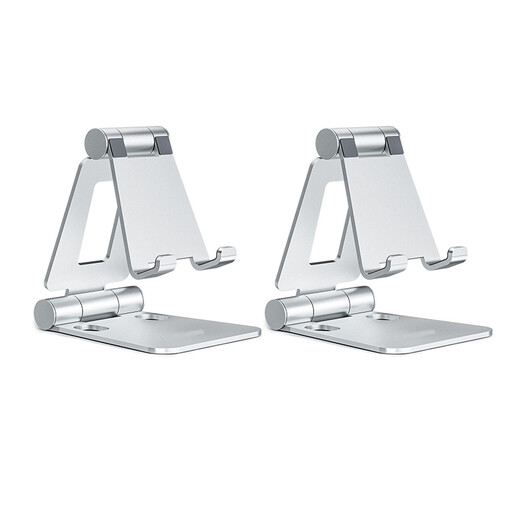
Why this product suits this user: This two-pack is ideal if you’re looking for a simple, portable phone stand for a table, desk or video calls.
It’s designed to be simple to use, without unnecessary Bluetooth or telescopic features. That means fewer components to set up or charge.
Aluminium construction, compact for transport and two stands in the set.
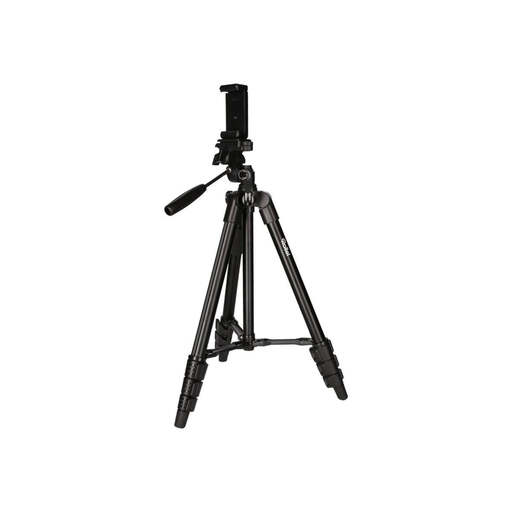
Why this product suits this user: This model is designed for travellers and vloggers who need an extendable design with a smartphone mount and remote shutter.
The specifications state a weight of 595 g, a folded length of 39 cm and a maximum load of 2 kg. This makes it easier to assess how portable it is and what its limits are before you buy.
Height of up to 120 cm, integrated spirit level, Bluetooth remote shutter with a range of up to 10 m and 75% recycled components, according to the product specifications.
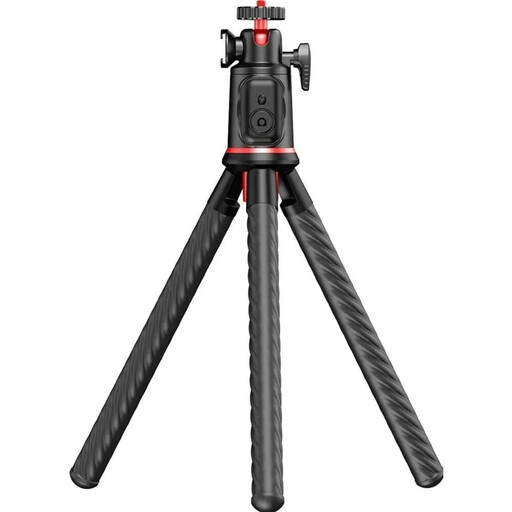
Why this product suits this user: For vlogs, outdoor shots and changing locations, this flexible mini tripod offers several ways to set it up.
The flexible legs can be set up on flat surfaces or secured to suitable structures. Check that it’s firmly attached before letting go, especially when shooting outdoors.
Bluetooth 5.4 remote shutter, 360-degree ball head, extendable selfie stick and cold shoe mount for a microphone or LED light.
We’ve put together a complete, regularly updated list of products that meet these strict selection criteria and fully comply with the safety regulations in force in the EU.
Place the tripod on a flat, non-slip surface. With extendable models, extend the thicker sections first and make sure all the locks are firmly closed. Position your smartphone in the centre of the mount. Before each shot, check that the clamp, ball head and legs are securely locked.
If you’re using a Bluetooth remote, it’s a good idea to test it briefly before you start shooting. When using a tripod outdoors, adding weight to the designated hook can improve stability. However, wind and uneven ground remain risk factors.
A table or mini tripod with an adjustable mount is usually enough for video calls. Look for a suitable clamp range, a stable base and a position that doesn’t block the camera or microphone. A Bluetooth shutter isn’t essential for this purpose.
Its lifespan depends on the materials, joints, transport and load. Don’t overtighten the locks. With magnetic mounts, check that the connection is secure before each use. Moisture, sand and hard knocks can damage the mechanism or electronics.
The remote usually uses very little power. Depending on the model, it may take a button cell or have a built-in rechargeable battery. Before buying, check the battery type, whether it can be replaced and the disposal guidance. If storing the device for a long time, switch it off or look after the battery as instructed by the manufacturer.