What to look for when buying
Screen size and colour gamut alone aren’t enough for previewing a photo book. Saal Digital recommends using the relevant product profile and software that supports soft proofing; according to the supplier, matching the on-screen image exactly to the print isn’t always possible.
Larger general-purpose monitor
Best if: you mainly review spreads, text and bleed with others, and only occasionally assess print colours.
The trade-off: More screen space makes it easier to see the overall layout, but it doesn’t replace calibration or the right ICC profile.
Graphics or photo monitor
Best if: you regularly assess colours and tonal values for print, and can set aside time for colour management.
The trade-off: Check that there’s enough screen space for the spread and tool panels. Specialist features don’t replace the supplier profile or suitable viewing conditions.
Monitor with docking features
Best if: laptops are frequently swapped at the shared desk and convenient connections are important.
The trade-off: Docking convenience doesn’t guarantee an accurate print colour preview. Make sure the resolution and desk space also suit your layout needs.
| Priority |
What to check when buying |
Who it matters most to |
| Colour and print preview |
Check the calibration options, soft-proofing software and the photo book supplier’s relevant ICC profile. |
If I’m matching colours and tonal values for a specific photo book, I need more than a wide colour gamut. Roughly 40% of consumers put print colour matching first. |
| Viewing the whole spread |
Compare screen size and native resolution together; also consider the stand and how much desk space it takes up. |
If I want to assess the spread, bleed and details at the same time, enough usable screen space is essential. Roughly 30% of consumers prioritise seeing the overall layout. |
| Viewing together |
Check the screen surface, adjustment options and seating positions under the lighting at the actual desk. |
If we’re looking at the screen from different seats, I want to minimise reflections and position the display appropriately. For roughly 20% of consumers, viewing together is the main priority. |
| Connections at a shared desk |
Check the video signal, charging power and peripheral connections needed for each laptop. |
If I switch between laptops, I want to connect and charge them without unnecessary cable swapping. Roughly 10% of consumers put switching between devices first. |
Monitors at Joybuy
This selection focuses mainly on larger monitors for viewing spreads at a shared desk, with one model also offering docking features. None of the features listed on its own guarantees a particular level of print colour accuracy.
 No image available
MSI PRO MP273UPDE E6 27-inch 4K UHD IPS
The listed 27-inch screen and 4K resolution make this an option for viewing spreads together.
27 inches; 3840 × 2160 pixels; IPS; 60 Hz.
View at Joybuy
 No image available
INNOCN 40C1U 40-inch 5120 × 2160 ultrawide
The listed wide 40-inch display may suit a spacious layout view. Check how your photo book software displays spreads in the 21:9 format.
40 inches; 5120 × 2160 pixels; 21:9; USB-C with 65 W Power Delivery.
View at Joybuy
 No image available
KTC M27P6 27-inch 4K MiniLED monitor
For viewing spreads at a shared desk, the listed 27-inch screen size and adjustable position are worth considering.
27 inches; 4K 160 Hz or FHD 320 Hz; MiniLED; height-adjustable, tiltable and swivel stand.
View at Joybuy
 No image available
MSI PRO MP275QPDGDE 27-inch WQHD docking monitor
An option if you need USB-C docking and KVM as well as a layout view at your shared workstation.
27 inches; WQHD with 2560 × 1440 pixels; USB-C with 98 W Power Delivery; KVM. WQHD has fewer pixels than 4K UHD, so consider this if you work with fine layout details.
View at Joybuy
 No image available
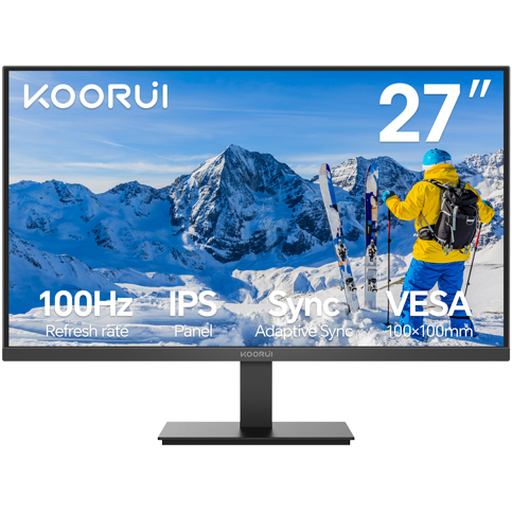
KOORUI E2711F 27-inch IPS Full HD
The 27-inch screen gives you space for layouts. For fine details, consider the Full HD resolution alongside your viewing distance and workflow.
27 inches; IPS; Full HD with 1920 × 1080 pixels; 100 Hz; VGA and HDMI.
View at Joybuy
Frequently asked questions
Is a high Adobe RGB rating enough for a reliable photo book preview?
No. A colour gamut figure alone isn’t enough. For a specific photo product, Saal Digital recommends a calibrated monitor, software that supports soft proofing and the relevant ICC profile. The supplier says that matching the colours on screen and in print exactly can’t always be guaranteed.
How should I set up my monitor to assess printed pages?
Keep the ambient lighting as consistent as possible, avoid glare and calibrate the monitor. For Saal Digital products, the supplier describes using soft proofing with the profile for the specific product. Check your photo book supplier’s guidance before applying these settings.
What regulations apply to a screen at a shared workstation?
The requirements in ASR A6 are relevant to screen-based workstations in workplaces and teleworking setups within its scope. In ASR A6, as at July 2024, the Federal Institute for Occupational Safety and Health describes the scope of application; the rule doesn’t apply generally to private screen use.
Can I return a monitor bought online if it doesn’t suit my desk?
In Germany, consumers generally have a right to cancel a distance contract; the consumer advice centre says the period is usually 14 days from receipt of the goods. Check your specific contract and any statutory exceptions. The right to cancel because you’ve changed your mind is separate from claims for faulty goods. According to the consumer advice centre, the seller—not the manufacturer—is responsible for putting faults right.
How can I compare the energy consumption of different monitors?
Compare the energy labels for the specific models. The European Commission describes an EU energy efficiency scale from A to G for electronic displays.


