Web tutorial writers
If you mainly create content for online viewing, you’ll want to see your text, editing interface and reference images all at once. Adobe recommends sRGB and appropriate profile conversion for web images.


For tutorials published mainly online, a clear workspace, a suitable sRGB mode and the right colour profile are essential. A wide Adobe RGB colour gamut alone won’t guarantee reliable web display. If you assess reference images for print, calibration, ambient lighting and your entire colour-management workflow become more important. Adobe recommends sRGB and appropriate profile conversion for web images.
If you mainly create content for online viewing, you’ll want to see your text, editing interface and reference images all at once. Adobe recommends sRGB and appropriate profile conversion for web images.
If you also assess reference photos for print, consistent colour decisions and calibration matter more than simply having the largest possible screen. Adobe also highlights the effect of ambient lighting and paper on the print workflow.
If you switch between working on the move and at your desk, check the display connection and charging power against the specifications for the exact monitor model. ASUS, BenQ and EIZO quote different USB-C Power Delivery figures for their respective models.
First decide whether you’ll mainly assess reference images for online viewing or print. Then compare the usable workspace and, if you’re connecting a laptop, check that the connection is suitable.
| Buying consideration | What to check | Who should consider this? |
|---|---|---|
| Colour for web images | Check the sRGB mode and colour profile alongside your export settings. | If my reference images will mainly appear online, I look for sRGB and suitable profile conversion rather than focusing solely on a wide gamut. Around 36% of consumers prioritise a web colour workflow. |
| Workspace and legibility | Consider screen size, resolution and aspect ratio together, and check scaling on your own computer. | If I want to see tutorial text, tools and images at the same time, the amount of space I can actually read and use matters more than the pixel count alone. Around 29% of consumers prioritise space and legibility. |
| Colour for print | Check that calibration is supported and that the colour gamuts meet the needs of your print workflow. | For print, I need consistent colour decisions and must also take lighting and colour management into account. Around 21% of consumers focus on colour accuracy for print. |
| Laptop connection | Check USB-C video output, the charging power you need and cable compatibility. | If I connect my laptop at my desk, the display signal and power supply need to work with my computer. Around 14% of consumers prioritise laptop connectivity. |
A high Adobe RGB or DCI-P3 figure doesn’t replace the right colour settings for images published online. Adobe recommends an sRGB workflow with profile conversion.
Check the colour mode, colour profile and export settings together, rather than comparing gamut percentages alone.
According to ASUS Germany, the ASUS ProArt PA279CRV combines a 27-inch 4K display with sRGB and Adobe RGB modes. The specifications also list 96 W USB-C Power Delivery.
According to BenQ Germany, the PhotoVue SW272U is a 27-inch 4K model with an Adobe RGB mode for photographic colour workflows.
According to EIZO Germany, the ColorEdge CS2400S is a more compact 24.1-inch option with a 16:10 aspect ratio, designed for photography and image editing.
According to Dell Germany, the Dell Pro Plus P3225QE is a 31.5-inch 4K monitor with a USB-C hub and a larger workspace.
According to LG Germany, the LG 27UP850K-W combines a 27-inch 4K IPS display with USB-C and an adjustable stand.
This Joybuy selection is aimed at people who write and check reference images at the same time. Compare the resolution and sRGB specifications, and, if you use a laptop, check each model’s connections and charging power.
 No image available
An option if you want to view tutorial text and reference images on a 27-inch screen.
27 inches, 3840 × 2160 pixels, IPS panel and an sRGB picture preset; the product name also lists 60 Hz and HDR Ready.
According to the product specifications, the height-adjustable stand swivels and pivots.
 No image available
The 27-inch version is designed for viewing tutorials and reference images side by side.
27 inches, 3840 × 2160 pixels and 99% sRGB; HDR10, HDMI and DisplayPort are also listed.
The product specifications list VESA compatibility and a tilt-adjustable stand.
 No image available
The wide workspace could be useful if you want to arrange text, your editing interface and reference images on one screen.
40 inches, 5120 × 2160 pixels, IPS and 99% sRGB; the product name also lists 100 Hz.
The specifications list USB-C with 65 W Power Delivery and PIP/PBP. Check that the charging power is suitable for your laptop.
 No image available
A 27-inch option for checking reference images alongside your tutorial interface.
3840 × 2160 pixels, 100% sRGB and an IPS panel; the product name also lists 120 Hz.
The specifications list USB-C with 90 W Power Delivery and PIP/PBP. Check compatibility with your laptop.
 No image available
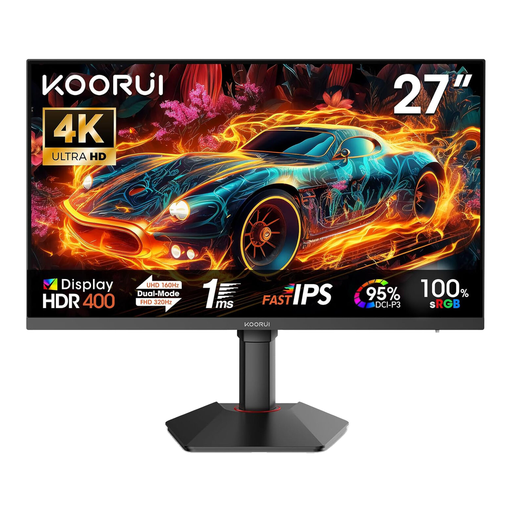
The listed 4K and sRGB specifications could be useful for checking reference images intended for online viewing.
3840 × 2160 pixels and 100% sRGB; the product name lists an IPS panel and a dual mode offering 4K at 160 Hz or FHD at 320 Hz.
The specifications list HDR400 and a height-adjustable stand with pivot and tilt functions.
No, not just because you’re publishing online. Adobe recommends sRGB and suitable profile conversion for web images. For accurate print work, you’ll also need calibration and appropriate viewing conditions.
Set up your colour-management workflow to suit your output and calibrate the monitor if you need to make reliable colour decisions. Adobe notes that changing the brightness or colour settings after calibration may mean you need to calibrate again.
Compare the EU energy label and product information for the specific models. The European Commission uses an A-to-G efficiency scale for electronic displays and lists information about HDR content display separately. Your actual electricity costs also depend on how long you use the monitor and your electricity tariff.
For consumer purchases, EU consumer information states that you’re generally entitled to a legal guarantee of at least two years from the date you receive the goods, which is provided by the seller; this is separate from a manufacturer’s guarantee. According to Verbraucherzentrale, online orders generally come with a 14-day withdrawal period from receipt, subject to the relevant exceptions.
ASR A6 doesn’t set a blanket purchasing requirement for all private users. It specifies requirements for screen-based workstations within its scope, and excludes private use outside workplaces and teleworking environments.