For postcard-sized portraits
You want to print festive portraits in a handy postcard size, then put the printer away after using it in your hobby room.


Start with the print size you want: a printer for postcard-sized portraits will differ from one for A4 or A3+ prints, while mini printers produce much smaller images. Then weigh up how many prints you plan to make and how much space you have, and check the paper, film or ink you’ll need, along with connectivity and smartphone compatibility.
You want to print festive portraits in a handy postcard size, then put the printer away after using it in your hobby room.
You need A4 or larger prints for individual portraits or photo projects, and want to choose the paper and print size to suit.
You plan to print photos regularly and want to weigh up consumables, maintenance and space requirements together.
Start by deciding on the image size you want. Then compare the print media available and check how much room the printer will take up.
| Buying consideration | What to check | Who is it most relevant to? |
|---|---|---|
| Postcard size and space | The print size you want and the compatible print media; space for the paper feed and printer. | If I want to print handy portraits and put the printer away afterwards, print size and space matter. Around 42 % of consumers prioritise postcard-sized prints when space is limited. |
| Larger portraits | The print size you need and the photo media suitable for it. | For a larger individual portrait, I need enough image area and suitable photo media. Around 25 % of consumers prioritise larger prints like these. |
| Consumables for regular printing | Compare the paper, ink or ribbon needed for the same image size, as well as maintenance requirements. | If I print portraits regularly, I want to plan for the materials and maintenance needed for the size I actually print. Around 17 % of consumers pay particular attention to print volume and consumables. |
| Small smartphone photos | The visible image size, film or paper, and smartphone and app compatibility. | For small pictures in craft projects, I want to print straight from my smartphone and don’t need a large portrait size. Around 16 % of consumers prioritise this kind of mini creative print. |
The printing options mentioned range from a small 62 × 46 mm image to A4. Your print could therefore be much smaller than the portrait you have in mind.
Decide on the print size you want first, then check which sizes and media the specific printer supports.
Canon Deutschland gives the PIXMA G650’s yield based on 10 × 15-cm photos. You can’t apply this figure directly to other sizes or images.
Compare the paper, ink or ribbon needed for the same image size and the number of prints you actually plan to make.
In its review, updated on 7 July 2026, F.A.Z. Kaufkompass recommended the Canon imagePROGRAF PRO-300. Canon Deutschland now lists the model as discontinued.
Use older reviews to understand a printer category, but check the model’s status and the specific offer separately.
Canon Deutschland lists different print sizes across its SELPHY and PIXMA ranges, from postcard prints to A4 photo prints.
Epson Deutschland describes the EcoTank ET-8500 as an A4 photo printer with refillable tanks, and the Expression Photo HD XP-15000 as a printer for sizes up to A3+.
The instax mini Link 3 is a smartphone printer for small instant photos.
The HP Sprocket Select uses an app and Bluetooth to print small ZINK photos.
The Mini 2 Retro is a compact smartphone photo printer that uses a combined paper and ribbon cartridge.
The printers listed here are mainly designed for mobile printing. For festive portraits, pay particular attention to the image size and print medium. With thermal printers, it’s also important to consider whether black-and-white prints will be enough.
 No image available
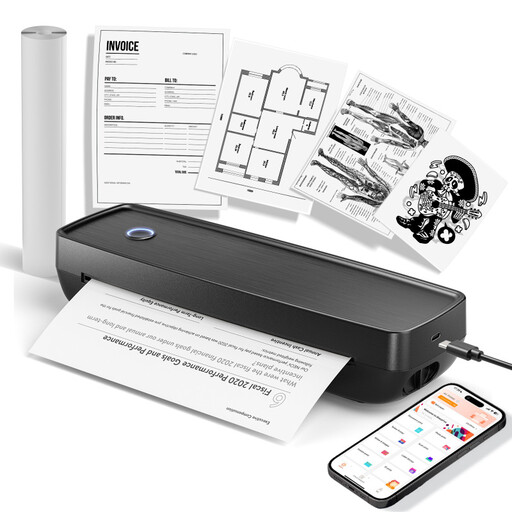
For small prints on the go: the product description says you can print photos in black and white from your smartphone via Bluetooth.
The product description says it comes with ten rolls of thermal paper.
Colour photo printing is not specified.
 No image available
For printing on the go: the product description lists photos as a print use and Bluetooth connections to smartphones, tablets and laptops.
 No image available
The product description mentions photo printing, Bluetooth and USB-C, and lists US Letter and Legal as the supported sizes.
Check that these sizes suit the portrait you plan to print.
 No image available
For small prints on the go: the description mentions an app and Bluetooth, while the title lists iOS and Android devices.
Compatible thermal paper is required.
 No image available
For small smartphone photos: the listed print size is 50 × 76 mm. According to the product description, it prints via Bluetooth and the Xiaomi Home App.
Self-adhesive ZINK photo paper is required.
Only if you’re happy with a small image: Fujifilm gives the instax mini Link 3 image size as 62 × 46 mm. Decide on the visible portrait size you want before choosing a printer.
For the Canon SELPHY CP1500, you’ll need a compatible paper and ribbon set. Canon lists Wi-Fi, USB and memory cards as ways to print, while the optional battery is not included. For the Fujifilm instax mini Link 3, you’ll need film and an app that’s compatible with your smartphone; film is sold separately.
For affected EcoTank or Expression printers, Epson recommends checking the nozzles first, then cleaning the print head using the maintenance function. The exact steps depend on the relevant model’s manual.
No. Verbraucherzentrale distinguishes between your statutory rights against the seller if goods are faulty and a voluntary warranty with its own terms and conditions. For a specific purchase, check the seller’s details and warranty terms separately.
According to Verbraucherzentrale, consumers generally have the right to cancel an online purchase, usually within 14 days of receiving the goods. You must notify the other party to the contract that you wish to cancel. Check whether any exceptions apply to your specific contract.