What to consider when buying
First decide how much image area your portrait work requires, then check the space needed and the consumables required for how often you print.
Postcard-size dye-sublimation printing
A good fit if: you want to assess individual portraits at 100 × 148 mm and put the printer away afterwards.
Bear in mind: The Canon SELPHY CP1500 doesn’t print on A4; you’ll need the right paper and ink cassette set.
A4 photo printing with individual cartridges
A good fit if: you need larger portraits and occasionally want to print documents, scan or copy.
Bear in mind: The Epson Expression Photo XP-8700 uses six individual photo ink cartridges, so factor in replacements and photo paper.
A4 photo printing with refillable tanks
A good fit if: you regularly print larger portraits or batches and have space to keep a printer set up permanently.
Bear in mind: Remember to plan for ink and maintenance; Canon notes that print head cleaning, if needed on the PIXMA G650, uses ink.
Small instant prints from your smartphone
A good fit if: very small images are enough for your collection; the Fujifilm instax mini Link 3 has an image area of 62 × 46 mm.
Bear in mind: Film is sold separately and you’ll need a compatible smartphone app; this format isn’t a substitute for a larger portrait reference.
| What matters when buying |
What to check |
Who should pay particular attention |
| Limited space for the printer and printing |
Printer dimensions, power supply, and space for paper input and output. |
If I share a desk, I want to be able to put the printer away after use. Around 40% of consumers prioritise compact storage. |
| Image area for portrait details |
The printable image area and supported photo paper sizes. |
If I want to compare facial features, I need a reference that’s large enough. Around 30% of consumers prioritise portrait detail. |
| Materials and maintenance for frequent printing |
Suitable media, replacement supplies and model-specific maintenance for your planned print volume. |
If I print lots of revised versions, I want to plan for consumables and maintenance. Around 20% of consumers place particular importance on these ongoing costs. |
| Small prints directly from a smartphone |
Image area, compatible smartphone or operating system, and the film required. |
If a small collection of images is enough for me, I want to print easily from my smartphone. Around 10% of consumers prioritise small smartphone prints. |
Joybuy products for small smartphone prints
These portable printers designed for use with smartphones are made for small prints. If your portrait reference needs an A4-sized area, look for a model specifically designed to print on A4.
 No image available
Portable mini thermal printer for smartphone photos
For small photo prints from your smartphone when portability matters; check that the image area is large enough for your portrait reference before buying.
Bluetooth connectivity, photo printing and a portable mini design are listed.
Joybuy
 No image available
Mini thermal printer for smartphone photos, labels and stickers
For small smartphone prints and other creative projects; the listed black-and-white output isn’t suitable for colour portrait studies.
Bluetooth, a portable design and a 1200 mAh battery are listed.
Joybuy
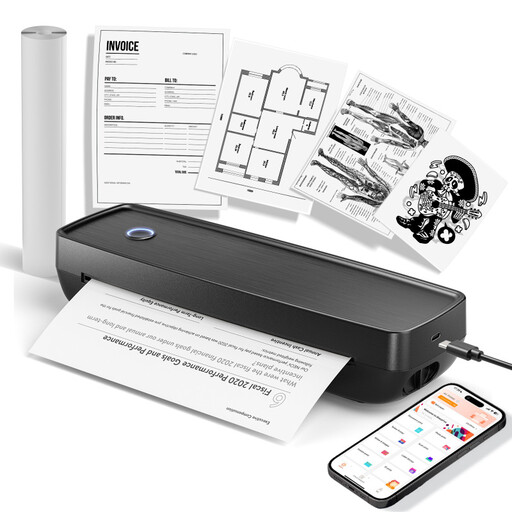 No image available
Portable wireless mobile printer
For black-and-white references when you need a printer for use on the go; it isn’t designed to print colour portrait studies.
Supported document sizes: US Letter and Legal. Compatibility with iOS, Android and laptops is listed.
Joybuy
 No image available
Xiaomi Portable Photo Printer Pro
For compact photo prints when you’re looking for a portable photo printer; check the image size and compatibility with your smartphone before buying.
Joybuy
 No image available
Xiaomi Portable Photo Printer 1S
For small smartphone photo prints if 2 × 3-inch (50 × 76 mm) prints are large enough for you; this image area is limited for larger views.
ZINK printing, Bluetooth, a weight of 180 g and connection via the Xiaomi Home app are listed.
Joybuy
Frequently asked questions
Is a mini instant photo large enough for portrait studies?
It depends on how clearly you need to see the details in your reference: the Fujifilm instax mini Link 3 has an image area of 62 × 46 mm. For larger views, consider the Canon SELPHY CP1500’s postcard format or an A4 photo printer.
Can I print from my smartphone without a Wi-Fi router?
It depends on the model and the devices you’re using. Fujifilm lists Bluetooth and a required smartphone app for the instax mini Link 3; Canon Germany lists Wi-Fi and the SELPHY Photo Layout app for the SELPHY CP1500. Check the connection type and app compatibility for your specific devices.
What should I do if an inkjet printer is printing streaks?
For the Canon PIXMA G650, first check the nozzle check pattern and clean the print head only if necessary. Canon recommends this approach for the G600 series, as cleaning uses ink. For other models, follow the relevant maintenance instructions.
Are a manufacturer’s guarantee and your statutory rights the same thing?
No. In Germany, statutory rights for faulty goods apply against the seller; a guarantee is an additional voluntary service, with terms set by the provider. The Verbraucherzentrale explains the difference between the two.
Can an old photo printer go in household rubbish?
No. The German Environment Agency explains that waste electrical equipment must be collected separately in Germany, for example at recycling centres or through suitable take-back schemes at retailers. Where possible, removable batteries should be disposed of separately.


