What to look for when buying
First decide on the finished photo size for your project page, then consider how many prints you need, whether you have other project pages to produce and how you want to print.
| What you need |
What to check when buying |
Who will find this especially important |
| The right photo size |
Match the finished size you want to the supported format and compatible media. Canon Germany lists 100 × 148 mm for the SELPHY CP1500; the PIXMA G650 and EcoTank ET-8500 print photos up to A4. |
If I want to show a sample photo in a specific space, the print size needs to fit. Around 40% of consumers put the right photo size first. |
| Costs for several print runs |
Compare the number of same-sized prints you’re planning and factor in the right ink, ribbon-and-paper sets and photo paper. Manufacturers’ stated yields depend on their test conditions. |
If I’m planning several photo batches, I care about the cost over the whole period of use, not just the initial price of the printer. Around 30% of consumers prioritise repeat print volumes. |
| Photos and text pages |
Check whether you also want to print, scan or copy documents, and whether the paper feed and connection will work with your school or home device. |
If I need captions and other project pages as well as photos, I want to know whether one printer can do both. Around 20% of consumers say photo and text pages are their main concern. |
| Small smartphone pictures |
Check the app, connection, image size and specialist paper that works with the model. A small portable photo printer isn’t an A4 solution. |
For a collage, I want to be able to print small pictures straight from my smartphone and stick them in. Around 10% of consumers focus on portable sticky-back prints like these. |
Joybuy products for this topic
This selection includes all-in-one printers for project pages and portable models for small smartphone prints. With thermal printers, pay particular attention to black-and-white output and using the right print media.
 No image available
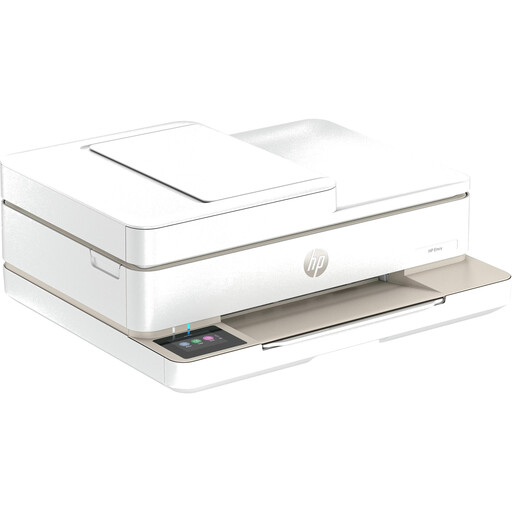
HP Envy 6520 All-in-One Wireless Inkjet Printer
Could be a good fit if you have other project pages to produce as well as photos and need print, scan and copy functions.
Colour printing; automatic document feeder; Wi-Fi and Bluetooth.
View at Joybuy
 No image available
Mini Bluetooth thermal printer
This model could be an option for small prints from your smartphone, but it won’t replace a colour photo printer for larger project photos.
The description lists black-and-white printing on thermal paper and Bluetooth connectivity. It also says that the thermal paper’s surface may turn black when rubbed.
View at Joybuy
 No image available
Portable Bluetooth thermal printer with 1200 mAh battery
This model could work for small prints on the go if black-and-white output is enough for what you have in mind.
The description lists thermal printing, black-and-white prints, Bluetooth and a 1200 mAh battery.
View at Joybuy
 No image available
Xiaomi Portable Photo Printer 1S
Better suited to small smartphone pictures to stick in than to large photos for a project page.
Self-adhesive ZINK photo paper in 2 × 3-inch (50 × 76 mm) format; Bluetooth printing via the Xiaomi Home app for iOS and Android. Stated weight: 180 g.
View at Joybuy
 No image available
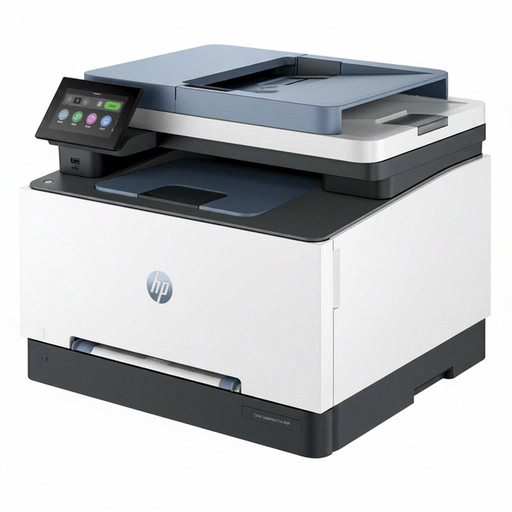
HP Color LaserJet Pro MFP 3302sdwg
Could be useful for project materials that include additional colour and text pages. Before buying, check that the paper size and media are suitable for the photo prints you’re planning.
Colour laser printer with automatic duplex printing; print, copy and scan functions. Connections: Wi-Fi, Ethernet and USB.
View at Joybuy
Frequently asked questions
Can I display sample photos of classmates in public if they can be recognised?
Not simply because you printed the photos yourself. Under § 22 KunstUrhG, consent is generally required to distribute or publicly display portraits; exceptions and other data protection considerations depend on the circumstances. The Rhineland-Palatinate data protection authority explains additional requirements for school websites. Check the intended use with the school; an internal project isn’t the same as publishing the photos.
How can I deal with streaks or missing colours when printing with ink?
For affected EcoTank or Expression models, Epson recommends starting with a nozzle check and, if needed, running a print-head clean using the maintenance function. Follow the instructions for your specific model rather than using a cleaning procedure that may not apply.
What can I do if the printer is faulty after I buy it?
For a consumer purchase in Germany, your statutory rights against the seller generally apply, and are separate from any voluntary guarantee. The Verbraucherzentrale explains that if a product is faulty, you can initially request that the seller remedy the problem by repairing or replacing it.
Can I use any ink and paper with a compact photo printer?
No, the right consumables depend on the model and print size. Canon lists compatible cassettes and ribbon-and-paper sets for the SELPHY CP1500; check the exact set name for the size you want before buying.


