If you have a spare power socket at your workstation, a desktop USB-C monitor with a large enough screen and suitable charging power for your laptop is an obvious choice. If there’s no spare mains socket, a portable screen powered by your laptop could be an alternative, but it offers less space for a full spread. To assess how colours will look in print, you’ll also need a suitable soft-proofing workflow, including compatible software and the ICC profile for your photobook product, as Saal Digital explains.
Who are these monitor options for?
Designers with few spare power sockets
If you want to power your monitor and laptop from as few sockets as possible, check that the monitor’s ports can handle both the video signal and your laptop’s charging requirements. Manufacturers’ specifications for USB-C and power delivery vary by model, including those from ASUS and Lenovo.
Designers working on large spreads
If you want to assess a full spread with your toolbars visible, consider the usable screen area, resolution, scaling and desk space. The specifications for the ASUS PA279CRV and Lenovo ThinkVision M14d show the differences in screen size and resolution.
Photobook designers who care about print quality
To check the colours of a specific photobook, your monitor, calibration, software and output profile all need to work together. Saal Digital explains how to use a suitable ICC profile in an application that supports soft proofing.
What should you consider when choosing?
Large desktop USB-C monitor
A good fit if: You have a power socket available for the monitor and want room for both the spread and your tool panels.
The trade-off: The monitor still needs mains power. USB-C can replace your laptop’s separate power adapter only if the charging output is sufficient and your laptop is compatible.
Desktop monitor geared towards colour work
A good fit if: You want to include previews of a specific photobook product in a calibrated colour-management workflow.
The trade-off: Hardware calibration or a wide colour gamut alone doesn’t prove that what you see on screen will match the printed result.
Portable monitor powered by your laptop
A good fit if: There’s no spare power socket for another monitor at your workstation, or you often move your preview setup.
The trade-off: A smaller screen limits your view of a full spread. Power passthrough requires a connected power source.
| Priority |
What to check before buying |
Who is it important to? |
| Power |
Check that your laptop port and cable support video output, then compare your laptop’s charging requirements with the monitor’s Power Delivery output. |
If I need to make do with few power sockets, I check whether the monitor can charge my laptop appropriately. Around 36% of consumers put power first. |
| Space for spreads |
Arrange the spread and tools in your chosen software at a comfortable scaling level; check the dimensions of the screen and stand. |
If I want to assess both pages and the tools at the same time, I look at the usable screen area and the space available on my desk. Around 29% of consumers prioritise viewing the full spread. |
| Colour checking |
Check the calibration options, the right ICC profile for your photobook and whether your software supports soft proofing. |
If I want to assess colours for a specific photobook product, my entire soft-proofing workflow needs to be suitable. Around 21% of consumers prioritise checking print colours. |
| Portable setup |
Check for DisplayPort Alt Mode on the laptop port you plan to use, and make sure you have a power source; Power Passthrough is not a power source in itself. |
If I often move my workstation, a compact setup matters more than a full-size view. Around 14% of consumers prioritise portability. |
Avoiding common misconceptions
-
USB-C doesn’t mean the monitor won’t need a power socket
Desktop monitors draw power from the mains. The stated wattage describes how much power they can supply to a laptop, not how the monitor itself is powered.
Before buying, check the whole power setup: the monitor’s mains connection, the laptop port and the charging power required.
Depending on the combination, you may still need a separate laptop power adapter or another power source.
-
A wide colour gamut doesn’t guarantee an accurate print preview
For a meaningful soft proof, your monitor settings, software and the ICC profile for the specific photobook product all need to work together.
Before placing an order where colour accuracy matters, check that a profile is available for your photobook product and chosen finish, and that your software supports soft proofing.
A colour-management workflow can take extra time to set up and calibrate, and may require calibration equipment.
-
Power Passthrough isn’t a built-in power supply
Power passthrough requires a power source to be connected. Without one, you’ll need to power the setup another way.
Check your laptop port, video signal and power source as one complete setup before relying on a portable monitor.
Monitor brands to consider
ASUS
For the ProArt PA279CRV, ASUS Germany lists a 27-inch, 4K display with USB-C and 96 W Power Delivery.
- The manufacturer’s specifications include a 3840 × 2160-pixel resolution and USB-C charging.
- These specifications don’t confirm that it’s suitable for soft-proofing a specific photobook; the monitor still needs a mains connection and desk space.
BenQ
BenQ lists hardware calibration and 90 W USB-C Power Delivery for the PhotoVue SW272U. According to BenQ, the PD2732U is also a 27-inch 4K model with Thunderbolt 4 and 90 W.
- These features may be relevant if you’re setting up a workstation for colour work.
- The specifications apply to these models. A wide colour gamut or colour mode alone doesn’t prove that the preview will match your chosen photobook.
EIZO
For the ColorEdge CS2740, EIZO lists a 27-inch, 4K display with hardware calibration and USB-C charging of up to 60 W.
- The manufacturer’s specifications describe features for a colour-managed workstation.
- If your laptop needs more charging power, you may still need a separate power adapter. You’ll also need to check that the right product profile is available for soft proofing.
Lenovo
According to Lenovo, the ThinkVision M14d is a portable 14-inch display with 2240 × 1400 pixels and USB-C ports.
- Its compact design is an option for a small or frequently changing workspace.
- The smaller screen limits your view of a large spread. Your laptop port needs to support both video output and power.
Dell
Dell describes the UltraSharp U2725QE as a desktop 27-inch 4K Thunderbolt hub monitor.
- The product specifications list a USB hub and power delivery of up to 140 W.
- Check that the connection is compatible with your laptop and meets its charging requirements. The product specifications don’t confirm that it’s suitable as a standalone photobook soft-proofing monitor.
Joybuy products for previewing at your desk
This selection features desktop monitors for previewing photobooks at your desk, including models with USB-C or a stated laptop-charging function.
 No image available
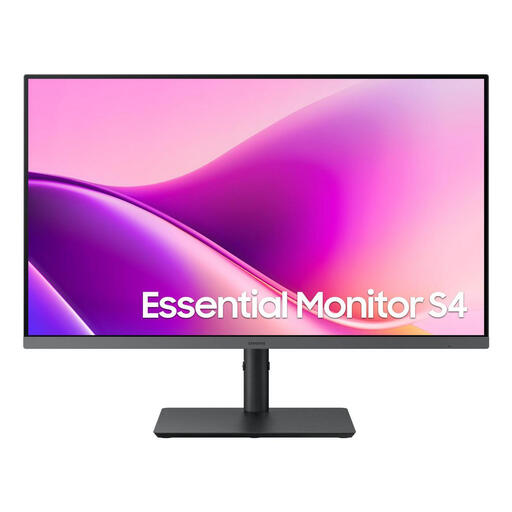
Samsung Essential Monitor S4 S43UF, 27-inch, Full HD, IPS, 100 Hz, USB-C
The 27-inch screen gives you a desktop preview area; check that it’s large enough for your spreads and tools.
The product name lists Full HD, IPS, 100 Hz and USB-C. Check whether the USB-C port in your specific setup supports video output and the laptop charging power you need.
View at Joybuy
 No image available
INNOCN 40C1U, 40-inch, 5120 × 2160 pixels, IPS, 100 Hz
The 40-inch screen could be a good choice for previewing a spread across a large area at your desk; check that you have enough space for it first.
The product specifications list 5120 × 2160 pixels, IPS, 100 Hz and USB-C with 65 W Power Delivery. Check that the charging power and video output are compatible with your laptop.
View at Joybuy
 No image available
INNOCN CB27U1, 27-inch, 4K UHD, IPS, USB-C with 90 W Power Delivery
This 27-inch desktop monitor is an option if you want more screen space for viewing spreads at your desk than a portable display can offer.
The product specifications list 3840 × 2160 pixels, IPS and USB-C with 90 W Power Delivery. Check that your laptop supports the connection and charging power.
View at Joybuy
 No image available
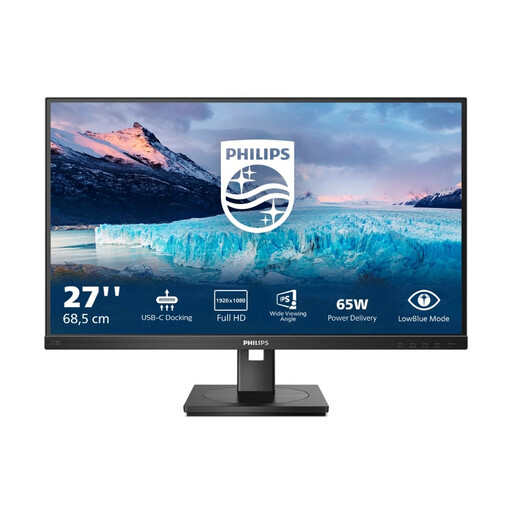
Philips 273S1, 27-inch, Full HD, IPS, USB-C with up to 65 W Power Delivery
This 27-inch monitor is designed for desktop previews; check that Full HD provides enough detail for the way you want to work.
The product specifications list USB-C with up to 65 W Power Delivery and a USB hub. Check that the charging power meets your laptop’s requirements.
View at Joybuy
 No image available
MSI PRO MP275QPDGDE, 27-inch, WQHD, IPS, USB-C with 98 W Power Delivery
This 27-inch desktop monitor is an option for previewing spreads at your desk; check that the WQHD resolution suits the way you work.
The product specifications list USB-C with 98 W Power Delivery and a height-adjustable stand. Check that the monitor is compatible with your laptop and meets its charging requirements.
View at Joybuy
Frequently asked questions
Is one USB-C cable enough to power a monitor and laptop without another socket?
Not with desktop monitors: they need mains power themselves. However, if your laptop and connection are compatible, the monitor’s charging function may mean you don’t need a separate laptop power adapter. A portable monitor powered by your laptop is another option; Power Passthrough doesn’t mean the screen generates its own power.
How do I set up my monitor to check photobook colours?
Use the appropriate ICC profile for your chosen photobook product in an application that supports soft proofing, and configure your monitor accordingly. Saal Digital provides profiles for the products and finishes it lists. Screen brightness and vibrancy won’t automatically match the finished product.
What should I know about energy use and consumer rights?
To compare the energy consumption of mains-powered monitors, you can refer to the EU energy label. To work out the actual cost, you’ll also need to know how long you use the monitor and your electricity tariff. In Germany, the seller is generally responsible for the statutory guarantee if a newly purchased product is faulty. The Verbraucherzentrale generally gives a two-year period and distinguishes statutory consumer rights from a voluntary guarantee.
Are monitors required to carry an energy label?
Electronic displays covered by energy labelling rules are rated on a scale from A to G. The European Commission lists computer monitors as covered electronic displays. Check the applicable product category and label for the specific model; this does not mean buyers need an additional power socket.


