For a simple overall view, a capable smartphone or digital camera you already own may be enough. For repeatable archive or print images, a mirrorless camera with a suitable lens is worth considering. What matters most is your intended use, a parallel set-up, even lighting and checking the corners of the image: more resolution alone won’t eliminate reflections or distorted edges. Guidance from the Federal Association of Artists’ Estates and advice from Museums in Brandenburg highlight what to consider when photographing artwork for reproduction.
Which documentation approach is right for you?
Collage artists creating archive or print images
If you need a repeatable file for archiving or printing as well as an overall view, assess the edges, colours and fine details in a test image. Guidance from the Federal Association of Artists’ Estates, provided by BBK Munich and Upper Bavaria, distinguishes between straightforward documentation and more demanding output needs.
Documenting small material details
If you also want to show layers or joins close up, check the close-focusing capabilities of the specific lens as well as the camera. Museums in Brandenburg highlight the importance of low lens distortion when reproducing artwork.
Occasional users
For a simple image of the whole panel, try using a camera you already own or a capable smartphone first. This will show whether you really need to buy something new for your intended purpose. Guidance from the Federal Association of Artists’ Estates lists these devices as suitable for straightforward documentary images.
What should you look for in a camera and set-up?
Start with your intended use and take a test shot. Your existing equipment may be enough for straightforward documentation; for repeatable results, a parallel set-up, suitable lens performance and controlled lighting matter. The Federal Association of Artists’ Estates and Museums in Brandenburg cover the requirements for reproduction photography and the importance of low lens distortion.
| Priority |
What to check before buying |
Who is this important to? |
| Straight edges and sharpness |
Check the panel size and shooting distance; assess a parallel test shot in all four corners. |
If I’m photographing the whole panel for an archive or print, I want straight edges and recognisable detail right into the corners. Around 29% of consumers put geometry and consistent sharpness first. |
| Lighting and colours |
Test the lighting and reflections on the actual panel; consider white balance and, if needed, RAW. |
With a white background and materials in different colours, I want to check that the lighting and colours look consistent and that reflections aren’t distracting. Around 29% of consumers prioritise even lighting and true-to-life colours. |
| Small details |
Decide how large you want the details to appear and check the close-focusing capabilities of the specific lens. |
If I want to show small layers of paper or joins in close-up, I’ll need a separate detail shot and should check the specific lens. Around 21% of consumers put close-up detail first. |
| Easy starting point |
Start by taking photos with the device you already own; then compare cameras, lenses and any accessories you might need. |
If a simple overall view is all I need to begin with, I want to see whether my existing device is up to the job first. Around 21% of consumers prefer a straightforward start without buying new equipment unnecessarily. |
Common misconceptions about documenting collages
-
More megapixels automatically mean a successful reproduction
Higher resolution won’t automatically compensate for a camera that isn’t parallel to the artwork, lens distortion or uneven lighting.
Before upgrading your camera body, check that the camera is parallel, the lighting is even and all four corners of a test shot look right.
Unsuitable images can mean extra editing or having to take the photo again.
-
A standard zoom kit is automatically suitable for the tiniest details
An overall view won’t necessarily show small material features large enough; close-up capability also depends on the specific lens and shooting distance.
Decide separately on the overall view and the size you want your details to appear, then check the supplied lens or the one you’re considering.
You may need an additional compatible lens to take larger detail shots.
-
All camera kits come with the same accessories
The lens and charging accessories can vary between specific kit versions.
Before buying, compare the full variant name with the list of items included in the offer.
Nikon notes that the stated Z50II kit does not include a charger, so you may need to buy a suitable charging accessory separately.
Key camera brands at a glance
Canon
The EOS R50 with RF-S 18–45 mm F4.5–6.3 IS STM is a specific mirrorless camera kit option for overall views.
- Canon Germany lists an APS-C sensor with 24.2 MP and a vari-angle screen for the EOS R50.
- These camera-body specifications don’t demonstrate reproduction quality; check how the specific kit lens performs at the edges of your panel.
Nikon
The Z50II kit with NIKKOR Z DX 16–50 mm f/3.5–6.3 VR pairs a mirrorless camera with a standard zoom lens.
- Nikon says the kit lens has built-in image stabilisation.
- Nikon states that the specified Z50II kit does not include a charger. The lens and accessories may differ in other variants.
Sony
According to Sony, the α6400 ILCE6400AKB.CEC variant pairs a camera body with a 16–50 mm II power zoom lens.
- Sony Germany confirms this specific kit combination.
- The kit name alone doesn’t guarantee a suitable overall view or sufficient close-up capability; check whether the specific lens suits the framing you need.
Fujifilm
The X-S20 is an X-Mount mirrorless camera, so you can choose a body and lens to suit your needs.
- Fujifilm lists 26.1 million effective pixels and RAW as a photo format for the X-S20.
- These specifications describe the camera body; they don’t specify a lens, what’s included or whether it’s suitable for the size of your panel.
Camera options on Joybuy
The Joybuy products below include compact digital cameras and a mirrorless APS-C camera. You can assess whether a model suits your collage photography by considering the framing, test image and intended use.
 No image available
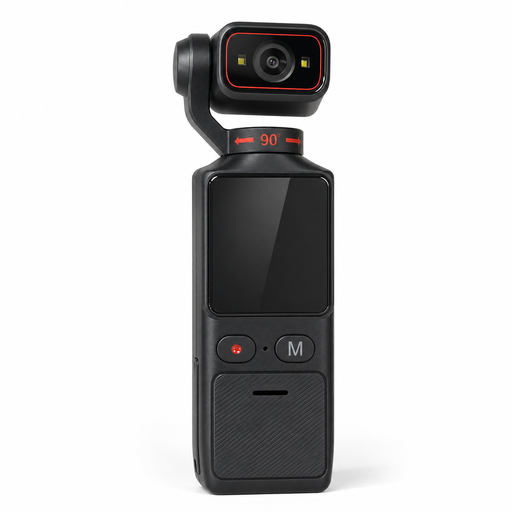
4K Pocket Camera with 180° Swivel Lens
This camera may be worth considering if you want a straightforward set-up with adjustable white balance; check the results on your panel.
The product description lists adjustable white balance and exposure, as well as a 1/4-inch tripod thread. The product title also mentions electronic image stabilisation, Wi-Fi and a 1.69-inch touchscreen.
View on Joybuy
 No image available
Sony Alpha 6100 APS-C Mirrorless Camera with 16–50 mm Power Zoom Lens
The 16–50 mm power zoom may be worth considering if you want flexibility with framing; check the corners of your panel in a test shot.
The product description lists RAW as a photo format, as well as a tilting screen and autofocus.
View on Joybuy
 No image available
KOMERY X9 Digital Camera, Black
If you’re considering a straightforward digital camera to start with, compare a test shot with your intended use.
The product title lists 64 MP, autofocus, 18× zoom and a flash. Check your test image to see whether the edges, colours and details you want to show are clear on your panel.
View on Joybuy
Frequently asked questions about collage photography
Do I need to buy a new camera straight away to photograph the whole collage?
Not necessarily. For straightforward documentary images, guidance from the Federal Association of Artists’ Estates also mentions capable smartphones and basic digital cameras. Assess the result against your intended use and a photo of your panel.
How should I position the camera and lighting for a flat collage panel?
Position the camera centrally and parallel to the artwork. Museums in Brandenburg describes placing lights on either side for even illumination; also check whether any materials reflect light or cast shadows. A stable camera position makes it easier to take repeatable shots.
Why does the white background look yellowish or greenish?
Light sources can cause colour casts. Check that your white balance matches the lighting; Canon Europe explains that white balance can be adjusted during post-processing when you shoot in RAW.
Is a standard zoom lens enough for small collage details?
Not automatically. An overall shot won’t necessarily show small material features large enough; for separate detail shots, check the close-focusing capabilities of the specific lens and the available shooting distance. Museums in Brandenburg also highlight the importance of low lens distortion when reproducing artwork.
Can I publish a photo of a collage containing other people’s images in Germany?
Not simply because you created the collage or took the photo yourself. The German Patent and Trade Mark Office describes reproduction and making a work available to the public as exploitation rights. Whether you can publish material created by others depends on the relevant rights, permissions granted and any applicable legal exceptions. Check each element before publishing.


