Sellers whose books show signs of wear
If you need to show stains, creases or other damage, sharp close-ups and several different views can help you give buyers a clear picture of the book’s condition.


For occasional sales listings, the smartphone or camera you already own is often enough, provided the cover, text and signs of wear look sharp and true to colour in even window light. If you photograph books regularly or need to show small areas of damage clearly, compare close-focusing distance, exposure control and practical camera positioning first. A new camera body alone won’t guarantee better book photos.
If you need to show stains, creases or other damage, sharp close-ups and several different views can help you give buyers a clear picture of the book’s condition.
When you have lots of books to photograph, a repeatable approach to angles, exposure and framing matters. A movable screen and suitable equipment can make it easier to check your shots.
If you only sell books now and then, start by testing the equipment you already own to see whether the cover, spine and any flaws are clear enough in window light.
Suitable if: you only need sales photos occasionally and your device captures sharp overall and close-up views in good window light.
Consider: check close-focusing distance, image review and consistency of framing with your own device.
Suitable if: you want a dedicated camera without having to change lenses, and its focusing range suits your shooting distance.
Consider: for the Sony RX100 VII (DSC-RX100M7A), Sony gives an AF focusing range of around 8 cm at the wide-angle end and around 100 cm at the telephoto end, measured from the front of the lens in each case.
Suitable if: you photograph books and small details of their condition regularly, and want more control over framing or lens choice.
Consider: what you can photograph also depends on the specific lens; a kit zoom isn’t automatically a macro lens.
When photographing books by a window, your buying priorities will mainly depend on whether you value clear detail, control over lighting, a repeatable process or keeping extra costs to a minimum.
| Buying criterion | What to look for | Who is it important to? |
|---|---|---|
| Signs of wear and text | Use one of your own books to check whether the specific lens captures the spine, corners and any damage sharply from your shooting distance. Zoom in on the images to check them. | If you want to show damage and readable text clearly, the right focusing distance is especially important. Around 31% of consumers put clearly visible details of a product’s condition first. |
| Colours in window light | Photograph light and dark areas of a book in the place you plan to use, and check the white balance and exposure again if the daylight changes. | If you want the cover and paper colours to look true to life in your photos, pay particular attention to lighting and colour reproduction. Around 25% of consumers put this control first. |
| Consistent shots | Check that you can reach the screen and controls when shooting from your preferred overhead angle, and that a tripod will fit in your chosen spot. | If you photograph lots of books from similar angles, consistent framing can make the process easier. Around 25% of consumers prioritise repeatable shots. |
| Additional equipment | Start by taking the same set of photos with the device you already own. Then compare only features that solve a specific problem, and check what’s included in the kit. | If you only sell books occasionally, you’ll want to take good photos without buying unnecessary new equipment. Around 19% of consumers put keeping extra costs down first. |
The focusing range can change significantly depending on the zoom setting. So a short minimum distance doesn’t automatically tell you how close you can focus while getting the framing you want.
Check the focusing distance and framing together, and test the smallest flaw you want to show.
The supplied lens matters too when you’re photographing details in books. The Canon RF-S 18–45 mm kit lens has different focusing ranges at different focal lengths; according to Nikon, the Z50II kit doesn’t include a charger.
Check the exact kit name and what’s included before you decide.
For the Canon EOS R50 kit considered here, Canon lists a charger as included, while Nikon explicitly excludes one from the Z50II kit documented here. Check what’s actually included with each offer.
Lighting, shooting angle, multiple views and careful image editing still matter, even with a better-equipped camera.
First take a complete set of photos with the equipment you already own. Only buy something new if you identify a specific problem you need to solve.
The EOS R50 kit with the RF-S 18–45 mm is an interchangeable-lens camera and lens combination with a vari-angle screen.
The documented Z50II kit pairs an interchangeable-lens camera body with the NIKKOR Z DX 16–50 mm f/3.5–6.3 VR.
The RX100 VII, model DSC-RX100M7A, is a compact camera with a built-in zoom lens.
The X-M5 kit with the XC15–45 mm F3.5–5.6 OIS PZ is another interchangeable-lens camera and lens combination.
This selection includes compact and interchangeable-lens cameras for different framing and shooting positions when photographing books.
 No image available
An interchangeable-lens camera option if you want to use different angles of view and check your framing on the tilting screen.
24.2 MP, Sony E-mount and a 16–50 mm power zoom lens; autofocus and a tilting screen are listed. Check whether the lens captures the details you want from your shooting distance.
 No image available
A digital camera option if you want to try different framings; test the close-up view with one of your own books.
Autofocus and manual focusing via the lens ring are listed. Check whether you can achieve the focus you want from your intended shooting distance.
 No image available
A camera with zoom and autofocus. Before buying, check that it’s suitable for close-ups at your intended shooting distance.
The product name lists 64 MP, autofocus, 18× zoom and a built-in flash.
 No image available
This product is aimed at vlogging and video; compare its controls and image composition with the fixed set-up you plan to use for book photos.
A 1-inch CMOS sensor, mechanical 3-axis stabilisation and a rotating 2-inch touchscreen are listed. The product name also mentions 4K/120fps video.
 No image available
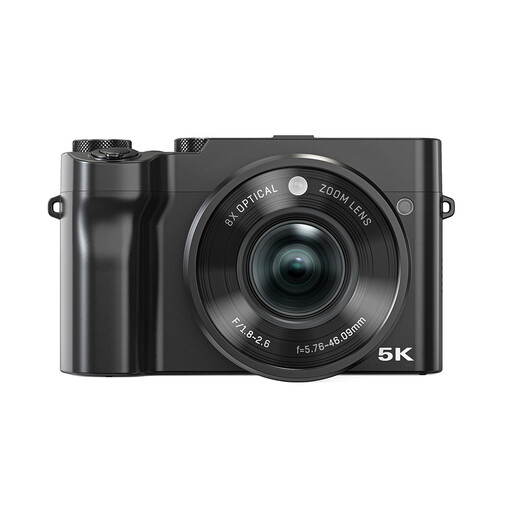
A digital camera option for different framings; test beforehand whether the focus and framing work for the details you want to show.
The product name lists an 8× optical zoom lens.
Use even light where possible, and take both overall shots and close-ups. Check for shadows and bright areas of paper. Keeping the camera in a fixed position can help you take a consistent set of photos; zoom in on the screen to check the results.
No. If the paper or cover takes on a colour cast, compare the automatic setting with a suitable manual setting or a reading from a grey card. Nikon’s examples point out that automatic white balance doesn’t produce the same colours in every lighting condition.
Check what comes with the specific kit: according to Nikon, the documented Nikon Z50II kit with 16–50 mm doesn’t include a charger. Your statutory rights against the seller and a voluntary guarantee are different things; the Verbraucherzentrale explains your statutory rights when buying from a retailer.
European Union consumer information lists electrical and electronic equipment as a product category for which CE marking may be required; product safety regulations also apply to goods sold online. Check the marking and manufacturer information for the specific offer. A CE mark isn’t a quality test for book photos.