What should you look for when buying?
When photographing invitations in window light, key things to consider include colour control, the level of detail you want to capture and a stable set-up. Canon Germany notes that the colour of natural light can change with the conditions.
| What you need |
What to check when buying |
Who is this important to? |
| Accurate paper and print colours |
Check the white balance settings and, if you plan to edit images later, RAW support for the specific model. |
If I want better control over paper whites and print colours as window light changes, I look for suitable settings. Around 33% of consumers put colour reproduction first. |
| Legible lettering and paper details |
Test both a full view and a detail shot; check the lens’s magnification and focusing conditions. |
If small lettering or embossing needs to be visible, I check the detail shot with the lens I plan to use. Around 27% of consumers prioritise fine print details. |
| Consistent results across a series |
Check whether you can position the camera or smartphone securely and easily reproduce the same composition. |
If I want to show several cards side by side, a consistent composition matters to me. Around 20% of consumers prioritise consistent results across a series. |
| Minimal extra equipment |
Try the equipment you already own first. With a mirrorless camera, check exactly what’s included, including the lens. |
If I only photograph cards occasionally, I want to avoid buying lots of extra accessories. Around 20% of consumers prioritise keeping equipment to a minimum. |
Joybuy products for invitation photography
This selection includes cameras for one-off photos and regular set-ups. For each option, check that the composition, lens and what’s included suit your invitations.
 No image available
KINSI Mini Vlog Camera 4K
This could be a compact option for one-off photos of cards. First, check that the rotating lens can capture the lettering and composition you want.
The product title lists 64 MP, a 330° rotating lens and a 1.72-inch touchscreen. The description also mentions a mini tripod.
Joybuy
 No image available
Sony Alpha 6100 with 16–50 mm power zoom lens
This kit could suit regular shoots if you want a tilting screen and RAW files. Check the composition with the specific lens.
The product details list 24.2 MP, RAW and a tilting screen.
Joybuy
 No image available
KOMERY G7 5K digital camera
For one-off photos, check whether the point-and-shoot design suits the way you want to work. Assess the lettering and paper details using a test photo of your own.
The product title lists an 18x zoom and 80 MP.
Joybuy
 No image available
DJI Osmo Pocket 3
The product description also mentions still photos. Before buying, check that its compact design suits the position you want to use above the invitation.
The product title lists a 1-inch CMOS sensor and a rotating 2-inch touchscreen; the description specifies 3-axis mechanical stabilisation.
Joybuy
 No image available
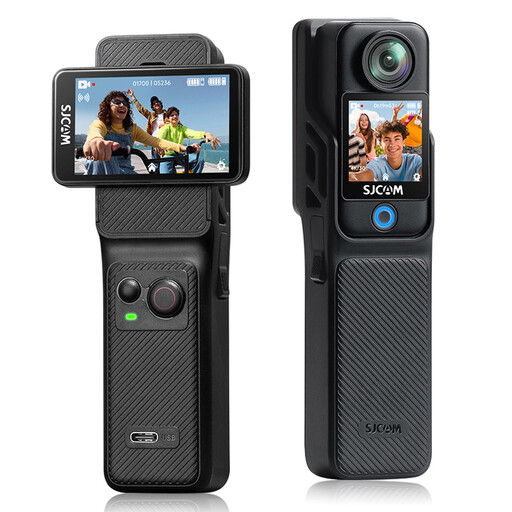
SJCAM C400 4K action camera
If you’re considering it for invitation cards, test the composition and colour reproduction using one of your own cards before relying on the wide-angle view.
The product details list 16 MP photos, a 154° wide-angle lens, two touchscreens and white balance presets.
Joybuy
Frequently asked questions
How do I get started with window-light photography?
First, decide on the composition and background, then keep the camera in as similar a position as possible for each card. Check the white balance as the daylight changes, and avoid adding light sources with a different colour cast if you can. Canon Germany describes a tripod as a useful way to keep the composition consistent.
Do I need a macro lens straight away for small embossed details?
Not necessarily. Start by photographing a detail at the size you actually want to use it. If it doesn’t look large or sharp enough, check the magnification of a suitable lens that’s compatible with your camera; sensor resolution alone won’t answer the question.
What should I check when buying a camera without a lens?
Check exactly what’s included. The α7 IV version we looked at in the German Sony shop is marked as a body only, without a lens, so it isn’t a complete set-up for taking photos. Also check which accessories you already have for your set-up.
What are my rights when buying online privately in Germany?
For a consumer purchase made at a distance, you generally have the right to cancel, usually within 14 days of receiving the goods; exceptions and specific conditions for the cancellation period apply. The Verbraucherzentrale also distinguishes statutory rights for faulty goods from a voluntary guarantee.
Where can I dispose of an old camera in Germany?
The German Environment Agency lists local collection points and retailer take-back options for electrical and electronic waste. Whether a particular retailer will accept a camera without a new purchase depends, among other things, on the retailer and the size of the equipment.


