Pianists looking for a stereo sound
You want to capture the performance with a sense of space, and you’re happy to set up the microphone positions and recording chain.


For a spacious piano sound and flexible microphone positioning, a matched pair of small-diaphragm microphones with a suitable two-channel interface is a good choice. If you want less equipment to set up, consider a USB stereo microphone or a portable XY recorder. In a booth with poor acoustics, start with short test recordings and choose a position that doesn’t capture more room sound than necessary. The right position depends on the instrument and the room.
You want to capture the performance with a sense of space, and you’re happy to set up the microphone positions and recording chain.
You’re working with limited space or distracting room sound, and want to choose a position by making short test recordings.
You want to record with as few separate pieces of equipment as possible, and are choosing between connecting to a computer and using a standalone recorder.
A good choice if: You want to tailor the stereo image and microphone positions to suit the piano and the booth.
Keep in mind: A pair takes up more space and requires a recording chain with two suitable XLR inputs and phantom power.
A good choice if: You want to record on a compatible computer and adjust the stereo width using a single microphone.
Keep in mind: You can’t position the two recording capsules independently in the room; check the connection and any cables you’ll need.
A good choice if: You want to record without keeping a computer connected.
Keep in mind: The microphones are fixed to the device, so consider the recorder’s position and distance, as well as its memory card and power supply.
A good choice if: Mono is enough to start with and you already have a suitable XLR recording chain.
Keep in mind: A single microphone won’t record in stereo; the AT2020 requires 48 V phantom power.
When choosing, consider the stereo sound you want, the booth’s acoustics, how much set-up is involved and the complete recording chain.
| Consideration | What to check before buying | Who it matters most to |
|---|---|---|
| Stereo and positioning | Check whether you can set up two microphones and whether your recording chain supports two channels. | If I want to create a sense of space in a piano performance, I need to position the microphones separately and record both channels. Around 33% of consumers prioritise stereo imaging and flexible positioning. |
| Booth acoustics | Make short test recordings from several practical positions, listening for reflections, mechanical noise and notes that stand out. | In a small booth, I want to use short tests to hear whether reflections are affecting the piano sound. Around 25% of consumers focus first on booth acoustics. |
| Set-up and connections | Check computer compatibility, or the memory card and power supply. For XLR microphones, also check for a suitable input and the required phantom power. | If I want to get started without lots of set-up, I check that the computer, USB microphone or recorder suits the way I work. Around 25% of consumers prioritise a quick set-up. |
| Total cost and use | Compare the recording equipment you’ll need, such as an interface, suitable inputs, XLR cables or a memory card, and check what’s included. | I want to know in advance what extra equipment my set-up will need, rather than looking at the microphone alone. Around 17% of consumers pay particular attention to total cost and future use. |
An XLR model needs a suitable recording chain. For the Audio-Technica AT2020, this includes 48 V phantom power via XLR.
Before buying, check that you have a complete, compatible recording chain, and don’t confuse the AT2020 with the separate USB version.
Depending on the equipment you already have, you may need an interface or recorder, XLR cables and, for a pair of microphones, a second suitable input.
Stereo recording techniques and microphone positioning affect how the instrument and room are captured. Two channels won’t fix poor room acoustics.
Try practical positions with short recordings and assess the booth’s sound before making a longer recording. Shure recommends moving the microphone closer to the loudest part of the instrument or isolating the instrument when the acoustics are poor.
For a business purchase, statutory rights are held against the seller and are separate from any voluntary manufacturer’s guarantee.
Keep your proof of purchase and check any additional guarantee terms separately.
The M5 is a small-diaphragm stereo pair for recording acoustic instruments with separately positioned microphones.
The MV88+ Stereo USB offers a compact stereo recording set-up that can be adjusted on a computer.
The H1essential is a portable recorder with built-in XY microphones for recording without keeping a computer connected.
The AT2020 is a single cardioid condenser microphone with an XLR connection, designed for a mono recording chain.
The KM 184 is a small-diaphragm option for acoustic instruments, including piano; you could consider using two for separate stereo positions.
The Joybuy products below cover compact USB and wireless microphone set-ups. For piano recording, check in particular whether each design offers stereo and the positioning options you want.
 No image available
For a space-saving single USB microphone set-up; its stated supercardioid polar pattern isn’t a substitute for a stereo pair that can be positioned separately.
Features a 14 mm capsule and tilting stand. Plug-and-play operation and a USB-C cable are specified.
 No image available
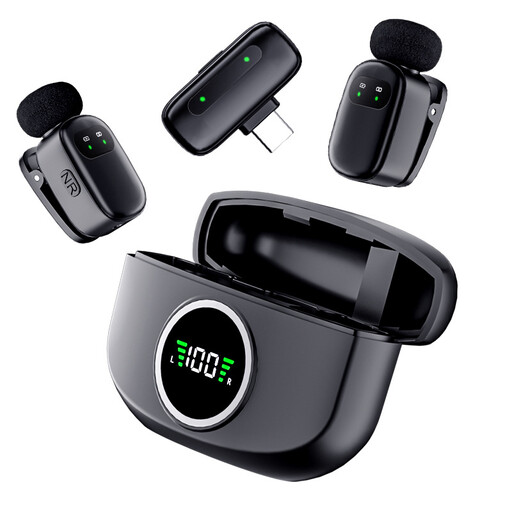
For a wireless microphone set-up with multiple components; check whether the receiver and recording device will give you the stereo piano sound you want.
The set includes two transmitters, one receiver and a charging case. Internal 32-bit float recording is specified.
 No image available
For a compact wireless microphone set-up; check first that the Type-C connection is compatible with your recording device.
Described as a dual microphone with a charging case and Type-C connection.
Start with short test recordings from positions you can reach. Shure recommends moving the microphone closer to the loudest part of the instrument or isolating the instrument if the room acoustics are poor; there’s no single position that works for every set-up. The right choice also depends on whether you’re recording an upright piano or a grand piano.
No. The AT2020 discussed here has an XLR output and requires 48 V phantom power from a suitable recording chain. The USB version is a different product.
Use a test recording to check the microphone position and the room sound you can hear. With the Zoom H1essential, you’ll also need to check the memory card and power supply before you start. Zoom also describes a playback function for checking your recording.
As a rule, the seller is responsible for statutory rights. EU consumer information sets out a minimum period of two years from receipt of the goods; a voluntary manufacturer’s guarantee does not replace your statutory rights.
No. Owning a microphone doesn’t automatically give you the right to record someone: Section 77 of the German Copyright Act (UrhG) gives performing artists the exclusive right to record their performance. Further rights relating to the musical work, recording or publication depend on the performance and intended use. Section 53 of the UrhG covers reproductions for private use under certain conditions; Section 201 of the German Criminal Code (StGB) also applies to secretly recorded private conversations.