Owners of passive speakers
If you’d like to keep using your existing stereo pair, check that its connections and permitted load are compatible with the specific amplifier.


For piano recordings in your home office, choose an amplifier that suits your existing speakers and the sources you actually use. If you have separate wired sources, a traditional integrated amplifier may be a good fit; for music services streamed directly over your network, consider a streaming amplifier or network receiver. Also think about where it will sit and how you’ll use it. Wattage figures based on different measurement conditions don’t prove that an amplifier offers a special sound advantage for piano music.
If you’d like to keep using your existing stereo pair, check that its connections and permitted load are compatible with the specific amplifier.
If you listen to piano recordings through a CD player, computer or other separate source, check which inputs you need rather than assuming you’ll use streaming.
If you’d like to use music services directly through your amplifier, check that the service, controls and network connection suit your setup.
A good fit if: you want to connect passive speakers and mainly use separate sources such as a CD player or computer.
What to consider: If you want to stream music services over your network, check whether the model you choose supports this itself or needs an additional source device.
A good fit if: you mainly want to use passive speakers with a supported network service.
What to consider: Features can vary between models with similar names: WiiM lists AirPlay 2 for the Amp, but not the Amp Pro.
A good fit if: you want to combine streaming and several traditional sources in one device.
What to consider: According to Yamaha Deutschland, the Yamaha R-N600A measures 435 × 151 × 392 mm. This model does not have HDMI ARC.
When choosing an amplifier for piano music in a home office, the main things to consider are your speakers, how you’ll connect your sources and how much space you have.
| Buying priority | What to check | Who should pay particular attention |
|---|---|---|
| Speaker compatibility | Check that the amplifier is designed for your type of speakers, and that the connections and permitted load are compatible. Compare power figures only when they use the same load and measurement basis. | If I want to keep using my existing pair of speakers, I check the connections and permitted load rather than focusing only on wattage. Around 29% of consumers make speaker compatibility their top priority. |
| Inputs for your music source | Match your source’s audio output to an input on the specific model. A turntable needs the right signal path. | If you listen to piano recordings through a computer, CD player or turntable, you’ll need the right connection for each. Around 29% of consumers prioritise connecting their existing source devices. |
| Space and listening options | Measure the width, height and depth, and allow room for cables. Check specifically for a headphone output if you’d sometimes like to listen without disturbing others. | If the amplifier needs to fit on a limited workspace and be practical to use while you work, its dimensions and listening options matter. Around 21% of consumers make suitability for their workspace their top priority. |
| Streaming and controls | Check the music service you want to use, the connection method and the signal where you plan to set up the amplifier. WiiM lists AirPlay 2 for the Amp, but not the Amp Pro. | If you want to listen to piano recordings directly through music services and control playback over your network, check the features of the exact model. Around 21% of consumers prioritise streaming and controls. |
Power figures can’t be compared directly if the load and measurement conditions are different.
First check that the amplifier suits your speakers and sources, then compare power figures only when they use the same load and measurement basis. Yamaha specifies 2 × 60 W into 8 Ω across 20 Hz–20 kHz at 0.019% THD for the A-S301.
Bluetooth and network streaming are different ways to play music. Denon lists Bluetooth for the PMA-600NE; WiiM documents network streaming for the Amp.
Before you buy, decide which connection method and music service you want to use. If the device doesn’t support your preferred option, you may need an additional network source device.
An additional source device also needs a suitable connection and space on your desk.
WiiM lists AirPlay 2 for the Amp, but not the Amp Pro.
Before you decide, check that the feature you want is available on the full model name.
Height, depth and room for cables also affect whether an amplifier will fit properly in your chosen workspace.
Compare all three dimensions with the available space and follow the setup instructions for the device. Yamaha specifies dimensions of 435 × 151 × 387 mm for the A-S301 and 435 × 151 × 392 mm for the R-N600A.
The A-S301 is a traditional integrated amplifier, while the R-N600A is a network stereo receiver for streaming and multiple sources.
The PMA-600NE may suit passive speakers and traditional sources, with Bluetooth connectivity.
The PM6007 is designed for a stereo system with several analogue and digital sources.
The Amp and Amp Pro are streaming amplifiers for passive speakers; compare their features individually.
According to the manufacturer, the nuConnect ampXL combines streaming, additional sources and extra sound settings in one device.
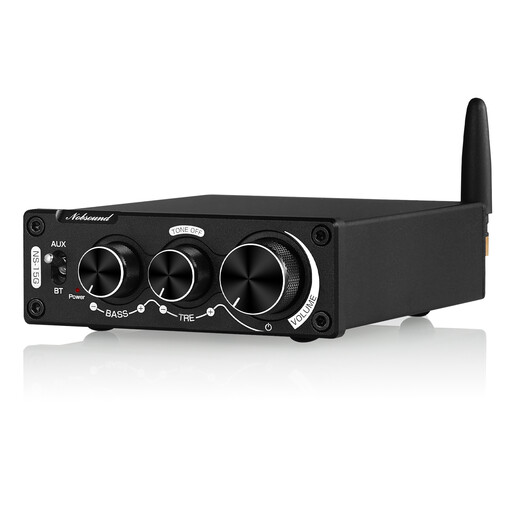
The selection below features a compact Bluetooth stereo amplifier for a space-saving setup with compatible speakers and source devices.
 No image available
This compact Bluetooth amplifier may suit a space-saving setup. Before you buy, check that the connections on the specific device are compatible with your speakers and sources.
The product name specifies 200 W and bass and treble controls. Use only the correct power supply; according to the safety warning, an incompatible adapter may cause overheating, a fire risk or damage to the device.
Not without first checking that the connection is designed for that type of speaker. The WiiM Amp’s documented speaker outputs are for passive speakers. For active speakers, check their intended audio input and make sure you have a compatible output.
Match the source’s actual audio output to an input on the specific amplifier model. Yamaha Deutschland lists optical and coaxial digital inputs for the A-S301; the WiiM Help Center documents line-in, an optical input and HDMI ARC for the Amp. Having an HDMI port on your computer alone doesn’t guarantee a suitable connection.
In Germany, consumers can generally claim their statutory rights against the seller for a newly purchased faulty product within two years of delivery or receipt. Verbraucherzentrale notes that this is separate from a manufacturer’s guarantee.
No. The EU explains that CE rules may apply to certain product groups, and that by using the marking, the manufacturer declares the product meets the applicable requirements. There is no central EU body that issues a blanket CE certificate. Check the marking and relevant product documentation for the specific device.