What should you look for when buying?
Mini PC
A good fit if: you want to keep using a suitable monitor and need to save desk space that would otherwise be taken up by a computer case.
Things to weigh up: a monitor and input devices aren’t automatically included; ports and specifications vary by version.
All-in-one
A good fit if: you want to choose the computer and monitor together and prefer an integrated solution.
Things to weigh up: the monitor and computer are chosen as a package, so check the software, ports and specific configuration.
Expandable desktop
A good fit if: internal storage options for a growing photo archive matter more than having the smallest possible case.
Things to weigh up: specifications for a product range don’t necessarily apply to every version on sale; you’ll also need to allow for a monitor and extra desk space.
The proportions below refer to consumers choosing a computer for a shared plant-observation workspace. Each row describes their main purchasing priority.
| Purchasing priority |
What to check |
Who is it important to? |
| Review photos and observation details |
Check the software you use and its system requirements, as well as the monitor and suitable video ports. |
When I compare images with details of where they were found, I want to know that the display and image software are right for the job. For around 36% of consumers, reviewing images comes first. |
| Keep accounts and files separate |
Check that the operating system supports multiple user accounts, then agree on shared storage and access permissions. |
When several people use the computer, I need separate personal spaces and a clear location for shared observations. For around 29% of consumers, keeping accounts separate is the top priority. |
| Save space when setting up the workspace |
Take into account your existing monitor, ports, stand, input devices and available desk space. |
With limited space at a shared desk, I want to know which parts of the workspace are already there and which will take up more room. For around 21% of consumers, desk space comes first. |
| Transfer and archive observations |
Make sure the export method, ports, specific storage options and backup plan suit your files. |
As my photo archive grows, I want to transfer observation data reliably and plan where it will be stored later. For around 14% of consumers, storage and data transfer are the main concerns. |
Joybuy products
These mini PCs are for a workspace with a separately chosen monitor. Before choosing one, check that the operating system, ports and storage suit the software you use and the file transfers you have planned.
 No image available
SOYO Y5Pro Mini PC, Intel Core i5-8250U/8350U, 8 GB DDR4, 256 GB SATA SSD
Worth considering if you want to use a separate monitor; check that the specific version is compatible with your software.
Specifications listed in the product name: Intel Core i5-8250U/8350U, 8 GB DDR4 and 256 GB SATA SSD.
Joybuy
 No image available
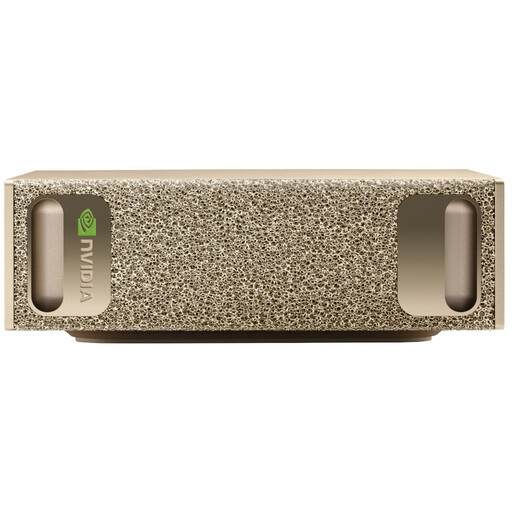
NVIDIA DGX Spark Founders Edition, GB10, 128 GB RAM, 4 TB SSD
Its compact design could work if you’re planning to use a separate monitor; check that the operating system is compatible with the software you need.
Specifications listed in the product name: NVIDIA GB10, 128 GB RAM, 4 TB SSD and NVIDIA DGX OS.
Joybuy
 No image available
Thunderobot AI Max+ 395 Mini PC, 128 GB LPDDR5X 8000 MT/s, 1 TB SSD
This mini PC is designed for a workspace with a separately chosen monitor; check the exact specifications against your workflow.
Specifications listed in the product name: 128 GB LPDDR5X memory at 8000 MT/s and a 1 TB SSD.
Joybuy
 No image available
MaxMini B3 Mini PC, Intel N4100, 8 GB LPDDR4, 256 GB SSD
Could be worth considering for a workspace with a separate monitor; check that the specific version is compatible with the software you need.
Specifications listed in the product name: Intel N4100 up to 2.4 GHz, 8 GB LPDDR4 and 256 GB SSD.
Joybuy
 No image available
BMAX B6 Mini PC, Intel Core i3-8109U, 12 GB RAM, 256 GB SSD
This mini PC could be worth considering if you already have a separate monitor; take the requirements of your specific software into account.
Specifications listed in the product name: Intel Core i3-8109U up to 3.6 GHz, 12 GB RAM and 256 GB SSD.
Joybuy
Frequently asked questions
Can a desktop computer identify plants directly with Flora Incognita?
According to Flora Incognita, the automatic identification process described starts with a photo taken on a smartphone or tablet. You can then transfer observations to a computer, for example as a CSV or GPX file; this does not demonstrate that the software can identify plants on a desktop computer.
How do we set up a computer for several people?
Windows supports separate user accounts with their own settings and documents, as Microsoft explains. You should also agree which observations will be worked on together and where those files will be stored.
Does everyone need at least 16 GB of RAM?
No, this isn’t a general minimum for plant observation. Adobe lists 8 GB as the minimum for Photoshop 27.x on Windows and recommends 16 GB or more; the requirements of the software you actually use are what matter.
Who is responsible for the statutory guarantee if a computer bought for work is faulty?
For a consumer purchase from a business seller in the EU, your legal claims are against the seller. EU consumer information specifies a minimum period of two years from receipt; an additional manufacturer’s guarantee does not replace these rights. These consumer rules do not necessarily apply to purchases made solely for business purposes.
What are the rules in Germany for product safety and working with screens?
For a device placed on the EU market, check for the CE marking if it falls under the relevant EU harmonisation legislation; Germany’s Federal Network Agency also lists product identification and manufacturer details as points to check. If the shared desk is a workstation for employees, the ASR A6 rules issued by the Federal Institute for Occupational Safety and Health apply to display screen workstations within their scope. This is not a blanket requirement for every home desk.
How can we dispose of an old computer?
In Germany, the Electrical and Electronic Equipment Act governs the collection and disposal of old electrical equipment. Whether a retailer must take back a particular old device depends on factors including how it was bought and its size, so check local return options too.


