For platform games played with headphones, first make sure the controller is right for your console or PC and the game. Then decide whether you want audio through the controller’s headphone socket or directly from the gaming device. Nintendo specifies a four-pole 3.5 mm CTIA socket on the Switch 2 Pro Controller, while PowerA describes the socket on the Enhanced Wired Controller covered here as intended for use with the Switch docked. If you use headphones with a PC or connect them to the console via Bluetooth, check the audio connection and game mode separately. Nintendo notes that Switch Bluetooth audio has usage restrictions.
Who this controller comparison is for
Console gamers with a wired headset
If you want to connect your headset to the controller rather than the console, first check that the console is compatible with the specific controller and its socket. Nintendo, PowerA and Sony each specify a controller socket on the models covered here.
PC gamers who prioritise the D-pad
If you play platform games on PC and mainly use the D-pad, consider its layout and feel. 8BitDo describes the D-pad on the Ultimate 2C Wired as redesigned, and lists Windows and Android as compatible platforms.
Switch gamers with Bluetooth headphones
If you want audio to come directly from the Switch, check the audio restrictions before playing together or in local multiplayer. Nintendo notes that Bluetooth microphones are not supported and Bluetooth audio is disabled in local mode.
What to look for when choosing
First check that the controller suits your platform and game. Then decide how you want to connect your headphones, and consider the D-pad, button layout and cable routing for the way you play.
| Consideration |
What to check before buying |
Who it matters to most |
| Platform and game |
Check the console generation, full model name and supported connection. |
If I’m looking for a controller for my existing console or PC, it also needs to work with the specific game. Around 33% of shoppers put compatibility first. |
| Headphone audio connection |
Check where you’ll connect your headphones, the socket type, and whether the game supports audio and, if needed, chat. |
If you want to plug your headphones straight into the controller, make sure audio and any chat features you need work through that connection. Around 27% of shoppers prioritise the headphone socket and audio connection. |
| D-pad and buttons |
Compare the D-pad and grip shape, and check that the button layout suits the game. |
If I mostly use the D-pad in platform games, directional input and button layout matter to me. Around 20% of shoppers look at these controls first. |
| Wired or wireless |
Consider how far you sit from the screen, where the cable will run and how the controller is designed to connect to your gaming device. |
If you need more freedom to move where you sit or need to plan around a cable, choose a connection that suits your gaming setup. Around 20% of shoppers make this a priority. |
Common assumptions to avoid when buying
-
A headphone socket doesn’t automatically mean that audio and voice chat will always work
The connection, platform support and game support are separate requirements. PowerA notes that only some software titles support microphone or chat features.
Check the audio connection and the chat features you need for your specific console, connection and game.
-
The Switch Pro Controller and Switch 2 Pro Controller are different models
Details about the Switch 2 Pro Controller, such as its headphone socket, cannot simply be applied to the older Switch Pro Controller.
Before buying, check the full model name and console generation.
-
A wired Switch controller isn’t automatically suitable for handheld mode
PowerA describes the Enhanced Wired Controller covered here as intended for use with the Switch docked.
If you want to play on the go or in handheld mode, check that the specified connection supports it.
-
Bluetooth headphones aren’t suitable for every local Switch gaming session
Nintendo states that Bluetooth audio is disabled in local mode. While Bluetooth audio is playing, you can also connect a maximum of two wireless controllers; Bluetooth microphones are not supported.
Check which game mode you’ll be using in advance and, if necessary, plan an alternative audio connection.
Brands and suitable controller ranges
Nintendo
The Switch 2 Pro Controller is for Switch 2 players who want to connect headphones to the controller and assign functions to additional buttons.
- Nintendo specifies a four-pole 3.5 mm CTIA socket on the Switch 2 Pro Controller.
- The details for the Switch 2 Pro Controller should not be assumed to apply to the older Switch Pro Controller.
PowerA
The Enhanced Wired Controller covered here is a wired option for playing on a docked Switch in TV mode.
- PowerA lists a 3.5 mm socket, a 3 m cable and assignable extra buttons for this version.
- The version covered here does not have HD Rumble, motion controls or amiibo NFC. Microphone and chat features also depend on the game.
Sony
DualSense is a range of PS5 controllers for players who want to connect a headset to the controller.
- Sony lists a 3.5 mm headset socket, haptic feedback and adaptive triggers on the DualSense model covered here.
- Whether a game uses additional controller features depends on the game. PS5 compatibility does not mean that the controller works with other consoles.
Microsoft
The Xbox Wireless Controller is an option for supported Xbox devices and Windows PCs.
- Microsoft lists Xbox Wireless, Bluetooth, a hybrid D-pad and a 3.5 mm socket.
- When using it with a PC, check audio output for your specific connection rather than assuming that a socket guarantees headset audio will work.
8BitDo
The Ultimate 2C Wired is a wired option for Windows gamers who want to compare D-pads and extra buttons.
- 8BitDo describes the D-pad as redesigned and lists Windows and Android as compatible platforms.
- Plan to get headphone audio through your PC, and don’t assume the controller has a headset socket. The platforms listed do not indicate support for Xbox or PlayStation.
Joybuy controllers for the platforms covered
Joybuy controllers for wired and wireless play on the consoles covered here and on PC. Before buying, check that the platform and audio connection you want suit your setup.
 No image available
Razer Wolverine V3 Tournament Edition White
For Xbox Series S/X or PC, if you want extra assignable buttons and are planning to use a wired connection.
The product description lists four rear paddles, six assignable buttons and a 3 m USB-C cable. Check that the headphone audio connection suits your setup.
Joybuy
 No image available
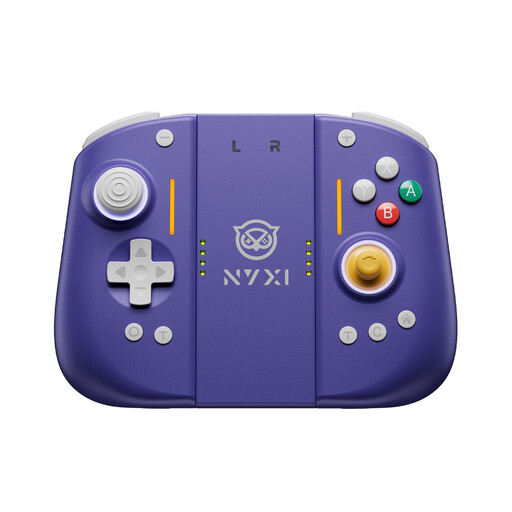
NYXI Hyperion 3 Wireless Controller for Switch 2, lilac
For Switch 2, if you want to play wirelessly and assign functions to extra rear buttons.
The product details list Hall Effect joysticks, mechanical buttons, two programmable rear buttons, a 9-axis gyroscope and adjustable vibration. Decide in advance whether you want audio to come through the controller or the console.
Joybuy
 No image available
BIGBIG WON Rainbow 2 Pro Wired Controller
For wired play on PC, Nintendo Switch, Switch Lite or PS4, if you want to use customisable buttons.
The product details list a 6-axis gyroscope, macro and turbo functions, vibration, RGB lighting and customisable buttons. Consider where the cable will run and check the audio connection you want to use with your platform.
Joybuy
 No image available
Nintendo Switch Pro Controller, black
For wireless play on Nintendo Switch, if you want to use motion controls and HD Rumble.
The product description lists motion controls, HD Rumble and a rechargeable battery. Make sure you distinguish this model from the Switch 2 Pro Controller, and check the headphone audio connection you want to use.
Joybuy
 No image available
Nintendo Switch 2 Pro Controller
For Switch 2, if you want to plug wired headphones directly into the controller and assign functions to extra buttons.
Nintendo specifies a four-pole 3.5 mm CTIA socket. The product description lists assignable GL and GR buttons, HD Rumble 2 and motion controls.
Joybuy
Frequently asked questions
Is Bluetooth on the Switch enough for headphones and several controllers at once?
Not in every gaming situation. Nintendo lists a maximum of two connected wireless controllers while Bluetooth audio is playing. Bluetooth microphones are not supported, and Bluetooth audio is disabled in local mode. If you’re playing with others, check the game mode and audio connection in particular.
How do you connect headphones to a wired PowerA controller?
PowerA says to connect the controller to a USB port on the Switch dock, then fully insert the 3.5 mm headphone plug. Turn the volume down before connecting. Microphone and chat features are supported only by some games.
Are a warranty and statutory consumer rights the same thing?
No. The Verbraucherzentrale distinguishes statutory rights against the seller from a voluntary warranty. In its information dated 28 September 2026, it explains that for newly purchased goods, retailers are generally responsible for ensuring they are free from defects when handed over for two years. Check the terms of any voluntary warranty separately.
Can you return a controller bought online if it doesn’t feel right to use?
According to the Verbraucherzentrale, online purchases generally come with a 14-day right to cancel. Tell the retailer that you wish to cancel and check the terms that apply to your purchase. This is separate from your rights if the product is faulty.


