Which controller might suit you?

Players on a particular platform

If you play on Switch, PS5, Xbox or a Windows PC, make sure the controller is explicitly listed as compatible with your device and the game in question. Nintendo, Microsoft Xbox and PlayStation each set out device- or platform-specific requirements.

D-pad fans

If you prefer to use the D-pad to change direction in platform games, check its layout and how easily you can reach the action buttons. Nintendo, Microsoft Xbox, 8BitDo and PowerA provide information about the D-pads on their respective controllers.

Players in daylight

If bright light or reflections make it hard to see the game, assess your screen and setup separately from your controller. Nintendo explains how to adjust brightness on Switch and Switch 2 in Handheld and Tabletop modes.

What should you look for when buying?

Nintendo Switch or Switch 2

A good fit if: You want to play on one of these consoles with a separate gamepad and use a D-pad.

Worth noting: Nintendo says the Switch 2 Pro Controller only works with Switch 2. Also check whether your game requires Joy-Con features.

Windows PC or Xbox

A good fit if: You play on Windows or Xbox and prefer a hybrid D-pad. Depending on the model, Microsoft lists USB, Bluetooth or Xbox Wireless as connection options for Windows.

Worth noting: Compatibility with a PC doesn’t automatically mean the controller will work with a Nintendo or PlayStation console.

PlayStation 5 or a compatible PC game

A good fit if: You play on PS5 or want to use a DualSense with a supported PC game.

Worth noting: According to Sony, haptic feedback and adaptive triggers depend on the game and may require a USB connection. The Chroma Indigo version described does not include a cable.

Third-party controllers

A good fit if: You’re looking for a specific model clearly listed for your device, such as a Windows or Switch version.

Worth noting: Models with similar names may support different platforms and connections. Check the full model name and the features your game requires.

Buying priority What to look for Who it matters to most
Platform and game Check the console model or operating system, exact controller version, connection type and game support. If I want to play on the console or PC I already own, the controller needs to work with that device and the specific game. Around 36% of consumers put compatibility first.
D-pad and buttons Check the D-pad’s position, button layout and accessibility; if possible, try how they feel to use too. If I often change direction in platform games, I want a D-pad I can reach easily and action buttons that suit me. Around 29% of consumers prioritise how a controller feels to use.
Screen visibility Check the lighting, setup and available screen settings. Nintendo explains how to adjust brightness on Switch and Switch 2 in Handheld and Tabletop modes. If the game is hard to see in daylight, I want to adjust my screen and surroundings first rather than expect a controller to solve the problem. Around 21% of consumers prioritise screen visibility.
Connection and power Check the connection type, any receiver you need, and whether the exact version uses a rechargeable battery or disposable batteries. If I want more freedom of movement while playing, the right connection and power source are essential. Around 14% of consumers prioritise flexible use.

Avoid these buying mistakes

  • Assuming similarly named versions are identical

    8BitDo lists different platforms for the Ultimate 2C Wireless and the Ultimate 2C Bluetooth. One version is therefore not automatically suitable for the same devices as the other.

    Before buying, compare the full model name, listed platform and connection options.

  • Buying a new controller to fix a hard-to-see screen

    A controller won’t change your screen’s brightness. Nintendo describes brightness adjustment as a screen setting for Switch and Switch 2 in Handheld and Tabletop modes.

    First check your setup, lighting and the brightness settings available on your device. This doesn’t guarantee that every reflection will disappear.

  • Expecting extra features to work without game support

    According to Sony, using certain DualSense effects depends on whether the game supports them. PowerA notes that its Wireless Controller for Nintendo Switch 2 has limitations with HD Rumble and amiibo NFC. It also isn’t suitable for games that require Joy-Con.

    Only factor in features supported by the specific game and exact controller version.

Brands to consider

Nintendo

Pro controllers for Switch and Switch 2 if you play on one of these consoles.

  • Nintendo lists a D-pad, rechargeable battery and HD Rumble for the Switch Pro Controller. Nintendo says the original Switch Pro Controller can be used wirelessly with Switch 2.
  • Nintendo says the Switch 2 Pro Controller only works with Switch 2. For games that require Joy-Con features, check controller support.

Microsoft Xbox

Xbox Wireless Controllers for Xbox consoles and Windows PCs.

  • Microsoft lists a hybrid D-pad and several connection options for Windows, including USB and Bluetooth.
  • The platforms listed aren’t proof of compatibility with a Nintendo or PlayStation console.

Sony PlayStation

DualSense Wireless Controllers for PS5 and specified supported devices.

  • Sony lists haptic feedback and adaptive triggers as DualSense features.
  • The effects require game support and may need a USB connection. The Chroma Indigo version described does not include a cable.

8BitDo

Different Ultimate 2C versions, each with specified platforms and connection options.

  • For the Ultimate 2C Wireless, 8BitDo lists a redesigned D-pad and a 2.4 GHz receiver for Windows.
  • The separately listed Ultimate 2C Bluetooth version is designed for Switch. Similar names don’t guarantee the same compatibility.

PowerA

Third-party controllers for specific Nintendo platforms.

  • PowerA lists a full-size D-pad, motion controls and two AA batteries included with its Wireless Controller for Nintendo Switch 2.
  • According to PowerA, the model does not support HD Rumble or amiibo NFC and isn’t suitable for games that require Joy-Con.

Joybuy products for platform games

The Joybuy products below include controllers and input devices for Nintendo Switch and Switch 2, with some also suitable for PC. For each model, check the listed platform against the features your game supports.

Nintendo Switch 2 Joy-Con 2, two-piece set in blue and light yellow

Nintendo Switch 2 Joy-Con 2, 2-piece set (Blue/Light Yellow)

For Switch 2 players who want to use left and right Joy-Con 2 controllers; the product description says they can also be used separately.

The description lists motion controls, HD Rumble 2 and Mouse Mode in compatible games.

According to the product description, this is designed for Nintendo Switch 2.

Joybuy

NAXSIR wireless Bluetooth gamepad for Switch, T4-14707098 version

NAXSIR Wireless Gamepad for Switch, T4-14707098

For Switch players looking for a gamepad listed in the title as a Bluetooth controller.

The product title lists vibration feedback, 7-Color LED and 10m Range.

Before buying, check that the stated version is supported by the specific game you want to play.

Joybuy

Gaming controller with dual vibration and gyro for Switch and PC

Gaming Controller with Dual Vibration & Gyro for Switch & PC

For the Switch and PC platforms listed in the product title; also check that the game you want to play supports it.

The product description lists a 6-axis gyroscope, two vibration motors and a turbo function.

Joybuy
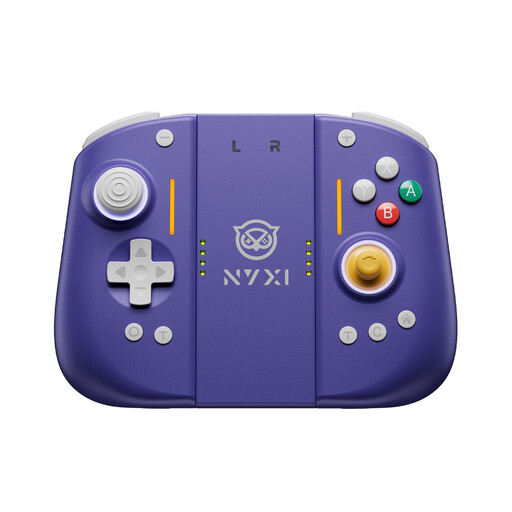
NYXI Hyperion 3 Wireless Controller for Switch 2, lilac

NYXI Hyperion 3 Wireless Controller for Switch 2, lilac

For players looking for a wireless controller explicitly listed in the product title for Switch 2.

The product details list Hall Effect joysticks, a 9-axis gyroscope, mechanical buttons and two programmable rear buttons.

According to the product details, the vibration can be adjusted.

Joybuy

BIGBIG WON Rainbow 2 Pro wired controller for PC and Nintendo Switch

BIGBIG WON Rainbow 2 Pro Wired

For PC or Nintendo Switch players looking for a wired controller with customisable button mapping.

The product description lists macro and turbo functions, a 6-axis gyroscope and vibration feedback.

The product title identifies this model as wired.

Joybuy

Frequently asked questions

Does a backlit controller make the game easier to see in a bright room?

No, a controller won’t change how visible the screen is. Check your screen and lighting separately. Nintendo describes brightness settings for Switch and Switch 2 in Handheld and Tabletop modes, but that doesn’t guarantee every reflection will disappear.

Does the Switch 2 Pro Controller work with the original Switch?

No. Nintendo says the Switch 2 Pro Controller can only be used with Switch 2. Conversely, Nintendo says the original Switch Pro Controller can be used wirelessly with Switch 2.

What do I need to connect a controller to a Windows PC?

It depends on the exact version. Microsoft lists USB, Bluetooth or, where applicable, Xbox Wireless for the Xbox Wireless Controller. For the 8BitDo Ultimate 2C Wireless, the manufacturer lists a cable or 2.4 GHz receiver for Windows. Also check that your game supports it.

Does every DualSense version come with a charging cable?

No, the Chroma Indigo version described by Sony does not include a cable. Check what’s included with the version you choose; Sony recommends a suitable USB cable for connecting or charging it.

What rights apply when buying a controller online?

For an eligible distance purchase, the European Union generally provides a 14-day cancellation period. Under EU rules, you also have legal rights against the seller if the goods are faulty; these are separate from any voluntary manufacturer’s warranty. The applicable requirements depend on the purchase in question.