Start by choosing the platform games you actually want to play, then decide whether you’ll play on a handheld’s built-in screen or on a TV. If reflections are a problem, you can reposition a handheld more easily; with a TV console, the television itself also matters in a bright room. OLED, HDR or a high resolution alone don’t guarantee that a screen will be easy to see in daylight.
Which gaming setup is right for you?
Handheld players in bright rooms
If you play on the built-in screen, you can change where you sit to limit reflections. Valve specifically lists anti-glare etched glass for the 1 TB Steam Deck OLED. This feature isn’t confirmed for every handheld model, and it doesn’t guarantee a reflection-free view.
Platform game players using a TV
If a particular game will determine your choice of console, first check which platforms it’s available on. With a TV console, how easy the screen is to see in a bright room also depends on the television connected to it.
Households that play in different places
If you sometimes play on a built-in screen and sometimes together on the TV, check the play modes supported by the specific model. Nintendo Switch OLED supports handheld, tabletop and TV modes; Switch Lite doesn’t support TV mode.
What should you look for when buying?
For platform games in a bright room, the main things to consider are which games you want, which screen you’ll actually use, and whether you want to switch between handheld and TV play. An OLED or HDR label alone doesn’t tell you how much a screen will reflect light in your room.
| What matters when buying |
What to check |
Especially important if |
| Visibility in daylight |
Check the screen in your usual lighting and, for handhelds, look at the finish on the exact version you’re considering. |
You play on the move and want to limit reflections while keeping the picture clear. Around 33% of consumers put daylight visibility first. |
| Games you want to play |
Check the platform, edition and, where applicable, compatibility status for each title. |
A particular platform game will determine your choice. Its platform matters more than general hardware features. Around 27% of consumers prioritise the availability of the games they want. |
| Switching between handheld and TV play |
Check the play modes supported by the specific model and whether you can use an external screen. |
You want to switch between playing on the built-in screen and playing together on the TV, so you need a device that supports both modes. For around 20% of consumers, this is their top buying consideration. |
| Total cost and expandability |
Compare the games you want and the storage you need with the card format and disc-drive version. |
You want to keep using your existing discs or storage, so check the exact console version and which card standard it supports. Around 20% of consumers focus first on total cost and expandability. |
Common console-buying mistakes
-
Assuming OLED, HDR or high resolution means anti-glare
These screen features don’t tell you whether a window or lamp will cause distracting reflections in your room.
Check the TV in your usual room lighting. For a handheld, ask about the finish on the exact model version.
-
Choosing a console before deciding which games you want
Some games are tied to a particular platform. Nintendo notes that some older Switch games may not be compatible, or may not be fully compatible, with Switch 2. Steam games also have different compatibility ratings on Steam Deck.
Make a list of the games you want and check the system, edition and, where applicable, compatibility status for each one.
-
Choosing a memory card or Digital Edition without checking the exact version
To expand game storage on Switch 2, you need a microSD Express card. A console without a disc drive also won’t suit you if you want to play discs you already own.
Match the card standard and disc drive to your storage needs and game collection.
Key brands at a glance
Nintendo
A good fit if you want to play Switch games or switch between handheld, tabletop and TV modes.
- Nintendo lists a 7.9-inch LCD screen for Switch 2 and a 7-inch OLED screen for Switch OLED.
- These screen specifications don’t prove that the displays are easier to see in bright light. Switch Lite doesn’t support TV mode.
Sony PlayStation
A good fit if the game you want is available on PS5 and you’ll be using an external screen.
- PlayStation Germany lists ASTRO BOT as a PS5 game.
- The console doesn’t replace a screen suited to a bright room. A version without a disc drive can’t play game discs like a disc edition can.
Microsoft Xbox
A good fit if you want to play platform games such as Ori and the Will of the Wisps on a TV or monitor.
- Xbox describes Ori and the Will of the Wisps as optimised for Series X and Series S.
- An Xbox Series X Digital Edition without a disc drive is a different purchase option from a Series X with a disc drive.
Valve
A good fit if you want to play compatible games from your Steam library on a built-in portable screen.
- Valve lists anti-glare etched glass for the 1 TB Steam Deck OLED.
- The anti-glare finish doesn’t guarantee visibility in every bright room. Check the compatibility rating for your games; the stated battery life depends on what you’re playing.
Joybuy products for platform games in a bright room
This selection ranges from portable and HDMI-based retro gaming devices to Nintendo Switch hybrid consoles. Before buying, check that the platform supports the specific platform games you want to play.
 No image available
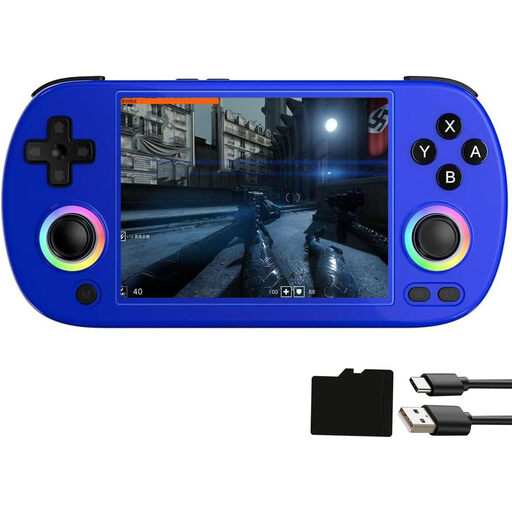
Airuidas RG40XXH handheld games console
A portable option if you want to play on the built-in screen and also connect the device to a TV via HDMI.
The product name lists a 4-inch IPS screen, 5G Wi-Fi, Bluetooth and HDMI TV output. The description says it supports more than 30 emulator formats; check whether the games you want are included.
The description says the device contains a lithium battery; don’t leave it unattended while charging.
View at Joybuy
 No image available
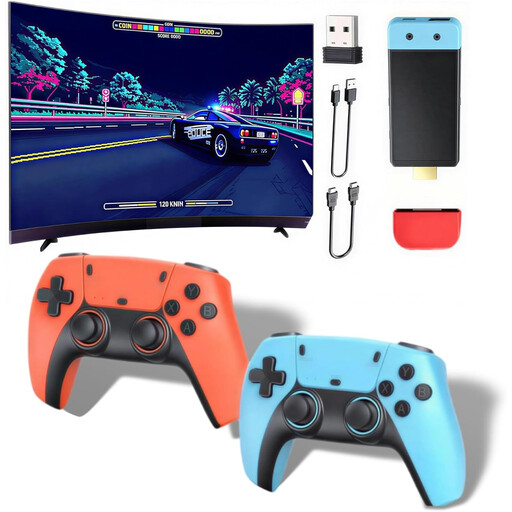
Retro games console, HDMI, 20,000+ games
A TV-focused option if you’re looking for an HDMI console with two wireless controllers. Check beforehand that the platform games you want are available on the device.
The product name lists 20,000+ games, support for more than 28 emulators, and 1080p/720p output. The description says the controllers require four AAA batteries, which aren’t included.
View at Joybuy
 No image available
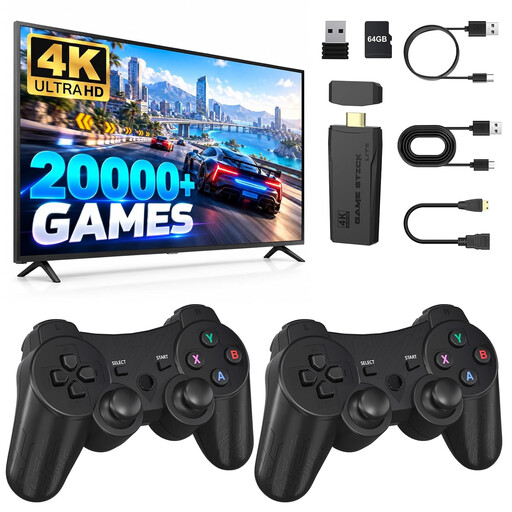
Retro gaming stick, 4K HDMI
An HDMI gaming stick is a compact option for connecting to a TV; check whether it supports the games you want to play.
The product name lists 4K HDMI output and two 2.4 GHz wireless controllers.
View at Joybuy
 No image available
Nintendo Switch OLED, White
Suitable for Switch games and for switching between handheld, tabletop and TV modes. Nintendo lists a 7-inch OLED screen for this model, but that doesn’t guarantee low reflections in a bright room.
According to the product details, the model has 64 GB of internal storage. Nintendo lists Super Mario Bros. Wonder as a Nintendo Switch game.
View at Joybuy
 No image available
Nintendo Switch 2, EU
A good fit if you want to play Switch 2 games such as Donkey Kong Bananza and switch between the built-in screen, tabletop and TV modes.
Nintendo lists a 7.9-inch LCD screen; the product details list 256 GB of internal storage. You’ll need a microSD Express card to expand storage for game data. Some older Switch games may be limited or not fully compatible.
View at Joybuy
Frequently asked questions
Is OLED automatically better for playing platform games in daylight?
No. An OLED label alone doesn’t tell you how much a screen reflects light. Check the finish on the specific version and how easy it is to see in your usual lighting. With a TV console, this means checking the television.
Can I connect a Switch Lite to a TV later?
No. Nintendo says that Switch Lite doesn’t support TV mode. If you want to play on a TV later, choose a model that supports TV mode.
Can I use my existing microSD card for games on Switch 2?
Switch 2 supports microSD Express for game data and digital games. A standard microSD card can’t be used to save, load or download them. Nintendo says you’ll need to update the system over the internet before using the card for the first time.
How do I check whether a Steam game will work on Steam Deck?
Check the compatibility rating for the specific game. Valve uses the ratings ‘Verified’, ‘Playable’, ‘Unsupported’ and ‘Unknown’. Games rated ‘Playable’ may need some manual adjustments.
What should I check if children will be using the games?
Check the German USK age rating for each game and look for information about features such as purchases or communication. The USK notes that an age rating doesn’t indicate whether a game is educationally suitable.


