For an archive that grows mainly at a fixed workplace, a desktop HDD is likely to be the better fit. If several people need to move the drive between compatible computers, a portable HDD is more practical, while an SSD may be worth considering for frequent transfers of large files. Whatever drive you choose, keep a separate copy and check that you can restore files from it: a single archive drive is not a backup.
Which drive is right for you?
Teams with a growing episode archive
If recordings, works in progress and finished episodes stay at a fixed workplace, you’ll need enough space and a separate backup. The Federal Office for Information Security stresses that backed-up data must also be restorable.
Teams using different computers
If several people access the archive from different computers, make sure the connections and file system suit the devices you actually use. A portable HDD can make it easier to move the archive around; back up any existing files separately before formatting the drive.
Teams that frequently transfer files
If you regularly transfer large project folders or take the drive with you, a portable SSD may be worth considering. However, the transfer rate you can achieve also depends on the computer, connection and cable.
What should you look for when buying?
If your team archives episodes, project files and exports at a shared workplace, start by working out how much storage you need and how you’ll back everything up. Then make sure the connection, file system and file-copying process all work together.
| Priority |
What to check before buying |
Who will find this especially important? |
| Room for a growing archive |
Allow for existing recordings, future episodes and versions you need to keep; check the capacity of the specific model. |
As our archive and older project versions keep growing, I don’t want to keep moving files elsewhere. Around 33% of consumers prioritise space for episodes and versions. |
| A restorable backup |
Decide which folders and versions to copy and where to keep the separate copy; test restoring a file. |
If we lost recordings or project files, our team would have to repeat the work. I want to be able to reliably restore a separate copy. Around 27% of consumers put recovery first. |
| Access at a shared workplace |
Check the USB connections, cables, operating systems and file systems on the computers you use; confirm write access and access management. |
When several people work on different computers, I need reliable access to the same files. For around 20% of consumers, compatibility with their computers is their main concern. |
| File transfer times |
Consider the size and frequency of file transfers; check the drive, computer connection and cable together. |
When we regularly hand over large project folders, I want to avoid unnecessary waiting. Around 20% of consumers prioritise file transfer times. |
Common selection mistakes
-
Assuming the archive drive is a backup
If you move the originals to an external drive and then delete them, you’re left with only one copy. The Federal Office for Information Security recommends planning for recovery as well.
Decide which originals and project versions to keep, store an additional copy separately and test that you can restore files from it.
A separate copy needs another storage location, and backing up and restoring files also takes time.
-
Assuming an SSD’s advertised maximum speed is its file-copying speed
Samsung quotes sequential read speeds of up to 1,050 MB/s for the 2 TB T7 Shield, but only under certain conditions relating to the host device, cable and UASP mode. This doesn’t guarantee that speed when transferring your podcast files.
Check the entire connection path and weigh up whether speed matters more to your workflow than extra archive capacity.
-
Formatting the drive before the team’s first use without backing it up
Formatting a drive or volume deletes the files stored on it. This could affect existing recordings before you’ve set up all the team’s computers.
Back up existing data separately and check that the file system works with the computers and backup methods you use before formatting.
Setup takes time. If files are lost without a separate copy, you may have to recreate or replace them.
-
Assuming access protection is a complete data protection plan
Verbatim has issued a security update for its Fingerprint Secure model. If the GDPR applies to your processing of personal data, you also need to assess safeguards in the context of that specific processing.
Check user access, responsibilities and how updates are handled rather than relying solely on a claim about encryption or fingerprint access.
Managing users and security updates adds to the administrative workload.
Brands to consider
Seagate
The Expansion Desktop range includes desktop drives for archives that mostly stay in one place.
- COMPUTER BILD ranked the Expansion Desktop Drive 16TB first in its 3.5-inch best-of list, published on 10 July 2026. This result applies to that model.
- According to Seagate, its Toolkit backup software is only available for Windows and excludes certain file types. Check that it includes your podcast project folders.
Western Digital
My Book and WD_Black D10 are desktop drive ranges included in an independent comparison.
- In its 3.5-inch best-of list dated 10 July 2026, COMPUTER BILD ranked the WD_Black D10 second and the 14 TB My Book fourth.
- The differences in speed, size and features described in the comparison apply to the models tested. You’ll still need a separate copy for a complete backup.
Toshiba
Canvio Flex 2024 is a portable HDD range for use with compatible devices.
- Toshiba lists models with capacities of up to 4 TB, USB-A and USB-C cables, and exFAT for the range.
- Compatibility depends on the specific devices and requirements. Check the model you’re considering and the computers your team uses.
Samsung
The Portable SSD T7 Shield is an SSD range designed for mobile use and frequent file transfers.
- For the German 2 TB model, Samsung quotes sequential read speeds of up to 1,050 MB/s, provided the stated requirements for the host device, cable and UASP are met.
- This maximum speed isn’t a guaranteed copying speed for podcast files. Samsung also states that liquid and dust damage aren’t covered by the warranty.
Verbatim
Fingerprint Secure is a specialist portable hard drive for teams that want to manage access to the drive.
- Verbatim lists hardware encryption and up to eight authorised users, including an administrator, for the Fingerprint Secure Portable Hard Drive 1TB.
- The manufacturer has issued a security update for this model. An encryption claim alone doesn’t tell you whether your team’s overall data protection measures are adequate.
Drives for podcast archives
The Joybuy selection includes portable and desktop HDDs, as well as an external SSD for archiving and file transfers.
 No image available
WD Elements Portable 5TB USB-C
This portable HDD may suit an archive that needs to move between compatible computers.
Capacity: 5 TB. Connection: USB-C.
A single archive drive is no substitute for a separate backup; plan for a second copy and test that you can restore it.
View at Joybuy
 No image available
WD Elements 2TB Portable External Hard Drive, USB-C, USB 3.2 Gen 1, 2.5", exFAT, Black
This portable HDD with exFAT is an option for transferring files between compatible computers.
Capacity: 2 TB. Form factor: 2.5". Connections: USB-C, USB 3.2 Gen 1. File system: exFAT.
According to the product description, an adapter may be needed for USB 3.0 or USB 2.0 connections; check the connections at your workplace.
A single archive drive is no substitute for a separate backup; plan for a second copy and test that you can restore it.
View at Joybuy
 No image available
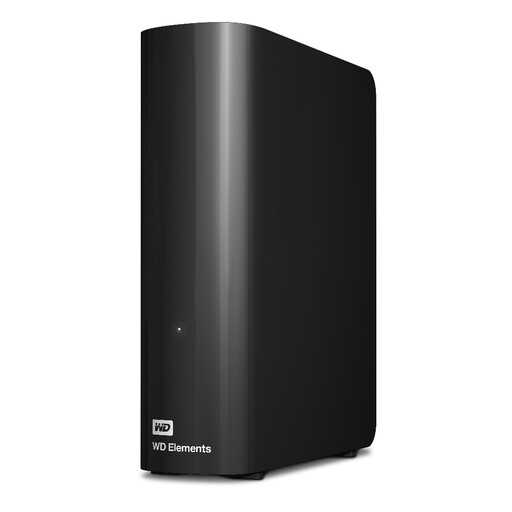
WD Elements 8TB Desktop External Hard Drive
This desktop HDD may suit an archive that grows mainly at a fixed workplace.
Capacity: 8 TB. Connection: USB 3.0. Form factor: 3.5". Pre-formatted with NTFS.
You may need to reformat it to use with macOS. This will delete any existing files, so back them up separately first.
A single archive drive is no substitute for a separate backup; plan for a second copy and test that you can restore it.
View at Joybuy
 No image available
Western Digital WD Elements Desktop Hard Drive 20TB
This desktop HDD may suit a large archive kept at a fixed workplace.
Capacity: 20 TB. Type: Desktop drive.
A single archive drive is no substitute for a separate backup; plan for a second copy and test that you can restore it.
View at Joybuy
 No image available
Samsung Portable Solid State Drive T7 4TB, USB Type-C 3.2 Gen 2, Titanium Grey
This portable SSD may suit frequent transfers of large project files or use on the move.
Capacity: 4 TB. Connection: USB Type-C 3.2 Gen 2.
Actual copying speed depends on the computer and connection you use. Remember to plan for a separate backup and test that you can restore it.
View at Joybuy
Frequently asked questions
Is it enough to move finished episodes and raw recordings to an external drive?
No, not if there isn’t another copy. Keep a separate backup of the files you need and check that you can restore a file from it.
What should we check before using the drive with Windows and Mac computers?
Check the drive’s connections, cables and file system against the computers you use. Reformatting can delete existing files, so back them up separately first.
Will a bundled backup app automatically back up all our podcast project files?
Not necessarily. Seagate says its Toolkit backup software is limited to Windows and excludes certain file types. Check which files are actually copied and restored using one of your own project folders.
What’s the difference between statutory rights and a manufacturer’s warranty?
According to EU consumer information, when you buy as a consumer from a trader in the EU, you have a statutory guarantee against the seller of at least two years from the date you receive the goods. A manufacturer’s warranty is separate; these consumer rights do not necessarily apply to business purchases.
Is a drive advertised as encrypted enough to protect data in podcast recordings?
There’s no blanket answer. If your team processes personal data and the GDPR applies, you need to assess safeguards in the context of that specific processing. An encryption claim alone does not determine access rights on a shared computer or whether the overall processing is lawful.


