Solo speakers recording a short intro
If you only want to record your own voice, a recorder with built-in microphones can keep your setup simple. The key is whether you can position the device suitably where you record.


For a short podcast intro spoken by one person, a handheld recorder with built-in microphones is often enough, provided you can position it securely where you record and listen back to a test recording. If you want to use a studio microphone or record separate voices, suitable XLR/TRS inputs matter more. A podcast console is most useful when you want to trigger jingles or control other audio sources while recording. Before you buy, check the microphone connection, power requirements, file workflow and any accessories you’ll need for the specific model.
If you only want to record your own voice, a recorder with built-in microphones can keep your setup simple. The key is whether you can position the device suitably where you record.
If you already have, or plan to buy, an external microphone, check that its connector type and any power requirements match the recorder’s inputs.
If you want to record several sources separately or trigger intro sounds while recording, suitable inputs, tracks and controls are important.
For a podcast intro recorded in a German home studio, your choice mainly depends on whether you’re speaking alone, connecting external microphones, editing your takes afterwards or playing jingles live. The percentages refer to consumers choosing an audio recorder for this use.
A good fit if: You want to record a short solo intro without a separate XLR microphone and can position the recorder suitably.
The trade-off: The position of the built-in microphones affects how much room sound you hear in the recording. In its review of the Zoom H1essential, Bonedo reports noticeable handling noise and a lack of accessories.
A good fit if: You want to use an external microphone or connect several sources. Zoom lists two XLR/TRS inputs for the H4essential, as does Tascam for the DR-40XP.
The trade-off: Your microphone, cable and any phantom power must suit your setup. Extra connections also mean more cables.
A good fit if: You want to include guests, several sources or sound effects you can trigger in your recording. Zoom describes the PodTrak P4next as having four XLR inputs and sound pads; RØDE lists two combo inputs and pads for the RØDECaster Duo.
The trade-off: Extra channels and controls can add unnecessary complexity if you’re only recording a single spoken line.
| Buying priority | What to check before buying | Who is it important to? |
|---|---|---|
| Clear solo voice | Position the recorder securely; record quiet and emphatic passages, then listen back where you plan to record. | If I’m recording a short intro on my own, I want to position the recorder suitably without a complicated setup and listen back to a test recording. Around 36% of consumers give top priority to a clear solo voice in their recording space. |
| External microphones and separate sources | Check the connector type, number of inputs needed at the same time, phantom power and separate tracks on the specific model. | If you want to connect a studio microphone or a second voice, you’ll need suitable inputs and should check the power requirements. Around 29% of consumers prioritise external microphones or separate voices. |
| Recording and file workflow | Test the storage media, power supply, monitoring and transfer to your editing computer; compare recording times only in the format you need. | If I want to record several takes and edit them afterwards, I want the file to be available in the format I need without extra steps. Around 21% of consumers prioritise a recording and file workflow they can control. |
| Jingles and mixing sources | Check whether pads, microphone inputs, monitoring outputs and separate tracks suit your workflow. | If you want to control jingles or other sources while recording, look for the controls you’ll need. Around 14% of consumers prioritise live jingles and mixing sources. |
The recording format doesn’t replace checking how your voice and room sound from the microphone’s actual position.
Before you buy or make your first recording, record a short test in your own room and listen back where you plan to record.
XLR inputs are only useful if their connector type and power requirements suit your microphones. A basic handheld recorder may also lack accessories you need.
Before choosing, make a note of which sources you want to record at the same time and which accessories you already have.
A sound pad doesn’t give you the rights to use the music. For using works in its repertoire in podcasts, GEMA lists tariff VR-OD 14.
Check the rights for the specific piece of music and how you plan to use it before publishing.
The range includes the H1essential, with built-in microphones; the H4essential, with XLR/TRS inputs; and the podcast-focused PodTrak P4next. Zoom’s product specifications describe different setups, rather than providing an independent comparison of sound quality.
According to Tascam, the DR-40XP combines adjustable built-in microphones, two XLR/TRS inputs and USB-C audio interface functionality for different recording setups.
The RØDECaster Duo is a production console for setups using microphones, pads and other audio sources.
The PCM-A10 is a compact recorder with a built-in stereo microphone and internal storage for a straightforward file workflow.
This selection includes portable voice recorders for recording your own intros. If you want to use an external studio microphone or several separate sources, check the connections on each model carefully.
 No image available
Worth considering if you’re looking for a portable voice recorder to record your own intro.
Listed in the product name: 64 GB storage, 30 hours of recording and four MEMS microphones.
 No image available
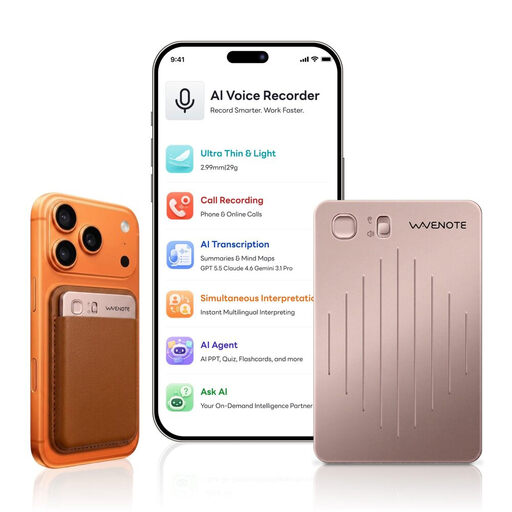
A possible option if you’re looking for a portable voice recorder to record your own intro.
The product name specifies 64 GB of storage and the Rose Gold colour.
 No image available
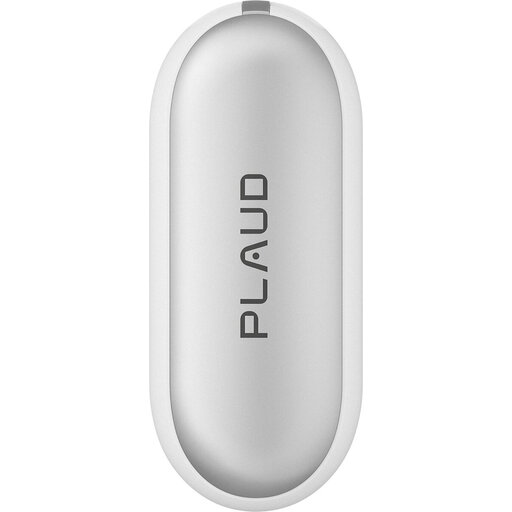
A wearable recording device for recording your own intro, if this style suits the way you plan to use it.
Listed in the product name: 64 GB of storage and up to 20 hours of recording time.
 No image available
Could be suitable for a simple solo intro recording.
Listed in the product name: 16 GB and an LCD screen.
 No image available
A possible choice for recording your own intro if you’re looking for a digital voice recorder with one-button recording.
Listed in the product name: 64 GB of storage and one-button recording.
Record a short test with a quiet passage and a more emphatic one, listen back where you plan to record, then check that the file reaches your editing computer in the format you want. If you’re using an external microphone, its connection and power requirements must suit the specific recorder.
Check the requirements for your specific model and back up any existing files before formatting a card. RØDE recommends a high-quality microSD card with at least 100 MB/s for recordings made with the RØDECaster Duo; formatting deletes the files stored on the card.
For consumer purchases in the EU, you’re generally entitled to a minimum two-year legal guarantee from the date you receive the goods. This applies against the seller and is separate from any voluntary warranty. If a product is faulty, free repair or replacement may be available in the first instance. Check the terms of any additional manufacturer’s warranty separately.
You must not secretly record another person’s private conversation onto an audio recording without authorisation; this is a criminal offence under § 201 Abs. 1 StGB. Get consent from everyone involved before recording. This provision does not cover every question about subsequent publication.
No. A sound pad doesn’t give you the rights to use music. For works in the GEMA repertoire, GEMA sets out podcast tariff VR-OD 14. Check whether it applies to the specific track and your planned use, and whether you need any other rights.