What to look for when buying
Handheld recorder with built-in microphones
A good fit if: You’re recording a short intro on your own and can position the recorder close to your voice.
The trade-off: If the microphone is further away, you may hear more room reflections in the recording.
Portable recorder with XLR/TRS inputs
A good fit if: You want to position an external microphone close to the speaker, or connect separate microphones for multiple speakers.
The trade-off: An external microphone, and possibly cables or a stand, add to your setup.
The following figures group consumers by their main priority when buying a recorder for a podcast intro in an untreated room.
| Priority |
What to check before buying |
Who it matters most to |
| Clear speech despite room echo |
Check whether you can position the built-in or connected microphone close to you and keep it free from vibration; listen back to a test recording. |
If I’m recording a solo intro in an echoey room, I want to capture my voice from as close as possible. Around 40% of consumers would prioritise reducing room echo. |
| Connecting microphones and additional speakers |
Count the separate inputs you need, then check that the connectors – and any phantom power requirements – are compatible with your microphone. |
If I want to include guests or use an external microphone, the number and type of inputs need to suit my setup. Around 30% of consumers would prioritise adding microphones and speakers to their setup. |
| Quick, standalone recording |
Check the controls, how securely the recorder can be positioned and which memory card the specific model requires. |
If I want to record a short intro without a computer and take the recorder with me, I value a simple process and built-in microphones. Around 20% of consumers would prioritise hassle-free mobile recording. |
| Monitoring levels and recordings |
Compare the supported recording mode, monitoring options and workflow that best suits your editing process. |
If my speaking level varies between takes, I want to listen back to the recording and have some flexibility when editing. Around 10% of consumers would prioritise level and recording control. |
Shure explains that a microphone can’t separate direct speech from room reflections after recording. The manufacturers’ specifications for the H4essential and DR-40XP each list two XLR/TRS inputs. The Zoom H1essential has a documented 3.5 mm microphone/line input, which is not a substitute for those two inputs.
Joybuy products for mobile voice recording
This selection includes voice recorders with built-in microphones for recording on the go. In an untreated room, positioning the microphone close and keeping it steady remains essential.
 No image available
PLAUD Note Pro Voice Recorder, 64 GB
For short voice recordings on the go, with built-in microphones and recording started using the device button or app.
64 GB storage; four MEMS microphones; USB-C; 30 hours of continuous recording; 30 g.
View at Joybuy
 No image available
Mobvoi TicNote Lite AI Voice Recorder, 4 GB
For mobile voice recording with a built-in triple-microphone system and button-operated recording.
4 GB storage; 29 g; Bluetooth; vibration and omnidirectional microphones.
View at Joybuy
 No image available
Mobvoi TicNote Standard AI Voice Recorder, 64 GB
For voice recording with a built-in microphone array and button-operated controls.
64 GB storage; OLED display; 20–25 hours of continuous recording; 29 g; one vibration microphone and two omnidirectional microphones.
View at Joybuy
 No image available
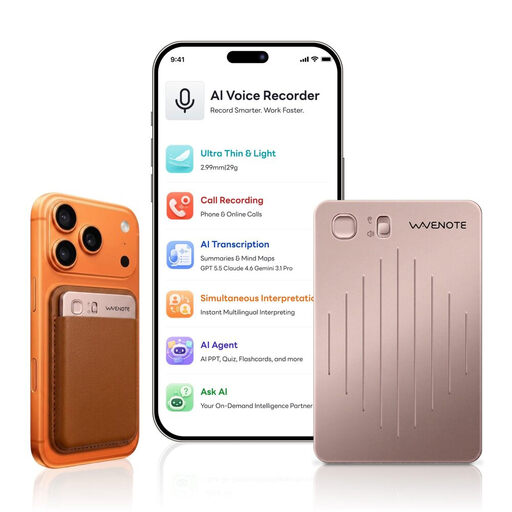
WaveNote AI Voice Recorder, 64 GB, Rose Gold
For mobile voice recording with built-in sensors and WAV recording.
64 GB storage; WAV; up to 36 hours of continuous recording; 29 g; vibration and air-conduction sensors.
View at Joybuy
 No image available
32 GB AI Voice Recorder with Case
For voice recording with built-in microphones and one-button recording.
32 GB storage; four MEMS microphones; up to 30 hours of recording time.
View at Joybuy
Frequently asked questions
Does 32-bit float help with echo in a room?
No. 32-bit float gives you more headroom for recording levels, but it doesn’t separate room reflections from your direct voice. Start by positioning the microphone closer, then check the sound with a test recording. Shure points out that a microphone can’t separate these sound components after recording.
How do I start and check a short solo recording?
Place the recorder securely, make a test recording where you plan to record, then listen back before the final take. Zoom lists a headphone output for monitoring and SD card recording for the H1essential; check the storage requirements for the specific model.
Do I need to check the connection when using an external microphone?
Yes. Zoom lists two XLR/TRS inputs for the H4essential, as does Tascam for the DR-40XP. The Zoom H1essential has a 3.5 mm microphone/line input instead. Check that the connectors – and any required phantom power – are compatible with the specific microphone.
Can I secretly record someone else for an intro?
Section 201 of the German Criminal Code (StGB) concerns the unauthorised recording of another person’s non-public speech. If other people will be speaking, make sure you discuss the recording with them beforehand. For recorded phone calls, the German Conference of Independent Data Protection Authorities generally points to the need for the other person’s consent.
Can I use someone else’s music as an intro?
Not simply because you record the music yourself. GEMA offers a podcast licence for works in its repertoire, but that doesn’t provide a blanket answer on whether you need additional rights for a particular track and the way you plan to publish it.


