If you’re working at a shared desk, a directional microphone that you can position securely close to your mouth is a sensible choice. Test the recording with the sounds you actually hear there. A microphone like this won’t reliably block out other voices or keyboard clicks. USB gives you a direct connection for short recordings on your computer, while an XLR-only model requires a suitable interface and cable.
Who records at a shared desk?
Recording alongside others
If other people are working at the same desk, a stable microphone position close to your mouth and a test recording with the usual background noise are important. RØDE recommends a speaking distance of around 5–10 cm for the PodMic USB.
Quick USB recording
For short intros recorded straight to your computer, it’s worth checking that the connection and controls suit your needs. The models described here from RØDE, Audio-Technica and Samson include features such as USB connections and headphone monitoring.
Podcasters with an interface
If you already have a suitable audio interface or are planning an XLR setup, check the connections and cable requirements for the specific model. RØDE says the XLR-only PodMic needs an XLR cable and an audio interface for computer recordings.
What should you look for when buying a microphone?
First, check that you can position the microphone securely and close to your mouth, then choose the right connection. After that, consider the space it takes up, what’s included and whether you can monitor your recording straight away.
| Consideration |
What to check before buying |
Who is this important to? |
| Voices and desk noise |
Polar pattern, speaking direction and mount; test with the usual keyboard and conversation sounds. |
If people are talking or typing at the same desk, I want to record my voice clearly and close up, and test it with the usual background noise. Around 36% of consumers put the noise environment at the top of their list when buying. |
| Easy computer connection |
Check that the USB connection and cable are compatible with your computer, and confirm the exact model. |
For short intros, I want to record straight to my computer without needing a separate interface. Around 29% of consumers prioritise an easy computer connection. |
| Positioning and monitoring |
Check what’s included, the space needed for a stand or arm, and whether there’s a headphone socket and level control. |
When I share a desk, I need a practical position for the microphone and want to check a short recording straight away. Around 21% of consumers put positioning and monitoring first. |
| XLR connection |
Check that the interface input, required cable and connections on the specific model are compatible. |
If I already have an interface or am planning an XLR setup, I want to know whether the microphone and other connections will work with it. Around 14% of consumers prioritise XLR expandability. |
Which common assumptions should you avoid?
-
Assuming noise reduction means a silent workspace
Shure points out that the MV7+ denoiser doesn’t remove background voices or keyboard clicks.
Test the microphone with realistic background noise, and first adjust the distance and direction of your voice.
Depending on the recording, you may need another take or to reposition the microphone.
-
Confusing the PodMic with the PodMic USB
The two RØDE models have different connections: according to RØDE, the XLR-only PodMic needs an XLR cable and an audio interface for computer recordings.
Before buying, check the full model name and make sure its connections suit your planned recording setup.
For computer recordings with the XLR-only PodMic, you’ll also need a suitable interface and XLR cable.
-
Assuming every microphone comes with a desk stand or pop filter
What’s included and how the microphone is mounted vary by model. Shure’s listed contents for the MV7+ include the microphone and a USB-C cable, but no stand.
Check what’s included with the specific version and whether you can position the microphone securely and close to your mouth at your desk.
Depending on the model and setup, you may need to buy a separate mount.
An overview of relevant microphone brands
RØDE
The PodMic USB has USB-C and XLR connections; the separately named PodMic is an XLR-only model.
- RØDE lists a level-controlled headphone output, internal pop filter and swivel mount for the PodMic USB.
- RØDE recommends a speaking distance of around 5–10 cm for this model. The PodMic USB doesn’t output audio over USB and XLR simultaneously. Computer recordings with the XLR-only PodMic require an XLR cable and interface.
Shure
The MV7+ is a USB-C/XLR podcast microphone with on-mic controls and headphone monitoring.
- Shure lists automatic level adjustment and a switchable real-time denoiser.
- According to Shure, the denoiser doesn’t remove background voices or keyboard clicks. The listed contents include the microphone and a USB-C cable, but no stand.
Audio-Technica
The ATR2100x-USB is a dynamic handheld microphone with USB-C and XLR outputs.
- Audio-Technica lists a headphone socket with level control, as well as a desk stand and USB/XLR cables in the box.
- The desk stand needs enough space and won’t position the microphone close to your mouth by itself.
Samson
The Q2U is a dynamic USB/XLR microphone bundle designed for one voice.
- Samson lists headphone monitoring, a mute switch, desk stand, windscreen and USB and XLR cables. According to the manufacturer, the Q2U can use both connections at the same time.
- The manufacturer’s claims about noise reduction aren’t based on measurements at a shared desk.
Sennheiser
The Profile USB is a USB-C condenser microphone with a cardioid polar pattern and controls for desk recording.
- Sennheiser lists gain, mix and headphone controls; the Profile set described also includes a desk stand and USB-C cable.
- Check that the stand fits on your shared desk. A cardioid polar pattern doesn’t guarantee noise-free recordings when people are talking nearby.
Microphones for desk recordings
This Joybuy selection includes microphones for voice and podcast recordings at your desk. When choosing, pay particular attention to the connection and whether a desk stand or microphone arm will fit your space.
 No image available
FIFINE K688CTW USB/XLR microphone with boom arm, white
For recordings at your computer with flexible positioning, the product description lists USB/XLR connectivity and a boom arm.
It also lists a mute button, volume control and headphone socket. An XLR cable is required for the XLR connection and isn’t included in the listed contents.
View at Joybuy
 No image available
FIFINE AM8 dynamic USB/XLR microphone
If you prefer a desk stand, the product description lists USB/XLR connectivity and a desktop stand.
It also lists a mute button and headphone socket. An XLR cable and microphone arm aren’t included.
View at Joybuy
 No image available
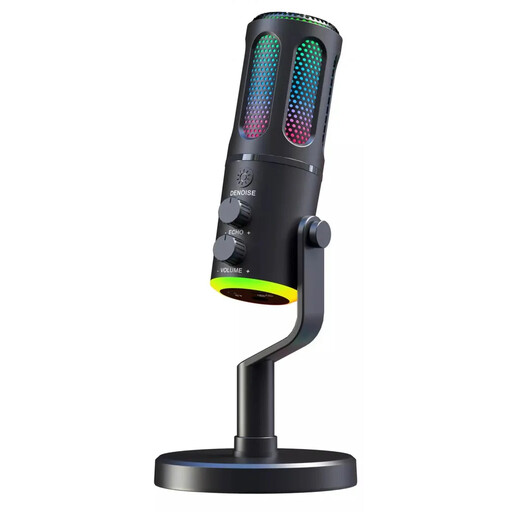
The G-Lab K-MIC-NEON gaming microphone
The product description specifies a wired microphone with a cardioid polar pattern; check that its connection works with your recording device.
RGB lighting and ENC are also listed. These terms alone don’t tell you how the microphone will perform with the sounds at your desk.
View at Joybuy
 No image available
Dynamic USB/XLR microphone set with desk stand
For recordings via USB or XLR, the product description lists both connection types and a desk stand.
It also lists a gain control, mute function, echo and RGB lighting. Check that the desk stand will fit in your workspace.
View at Joybuy
 No image available
USB condenser microphone with mute button
For short recordings on your computer, the product description specifies a USB condenser microphone.
It lists a mute button, headphone socket, Type-C adapter and a 7-piece set. Check that the adapter is compatible with your device.
View at Joybuy
Frequently asked questions
Is a cardioid polar pattern enough if people are talking or typing nearby?
No. A cardioid polar pattern picks up sound from the front more strongly, but it won’t completely filter out other noise. Shure points out that even the MV7+ denoiser doesn’t remove background voices or keyboard clicks. Point the microphone towards your mouth and test it with the usual background noise.
How can I check the recording level before an intro?
Practise the loudest part you plan to record and watch the input level meter. The Audacity manual recommends a maximum peak of around −6 dB to leave headroom and avoid clipping. This is a recommendation for recordings made with Audacity, not a microphone specification.
Can I connect an XLR-only microphone straight to my computer via USB?
Not with the XLR-only RØDE PodMic: RØDE specifies an XLR cable and an audio interface for computer recordings. The separately named PodMic USB also has a USB connection; check the full model name before choosing your connection.


