For a solo poetry reading with an XLR microphone, an interface with one microphone preamp, a headphone socket and direct monitoring is a sensible starting point. If two voices need to be recorded separately at the same time, you’ll need two microphone preamps. An interface won’t eliminate conversations or echo at a shared desk, so microphone placement and recording time matter too. Also check that the microphone, computer connection and items included are right for your setup.
Who records at a shared desk?
Solo speakers at a shared desk
You’re recording your voice while room noise, other people and limited desk space all affect your setup. An interface connects and controls the microphone, but it won’t improve the room’s acoustics, as Shure also points out.
Two people recording together
You want to record two voices at the same time through separate microphone inputs and adjust their levels individually. For that, two microphone preamps are essential.
Speakers who want precise monitoring
You want to hear yourself through headphones as you record and check changes in volume before you start. Manufacturer information for models such as the Focusrite Scarlett 2i2 describes level-monitoring features; check which controls suit your workflow.
What should you look for?
First, decide whether you’ll record solo or with two separate voices. Then consider the room, monitoring and the space available on your shared desk.
| Consideration |
What to check before you buy |
Who will find this most important? |
| Clear vocals despite room noise |
Plan a quiet time to record and find a suitable microphone position. Test your setup in the room you’ll actually use. |
If I want to pick up as little room noise as possible at a shared desk, it’s important to test in the actual environment. Around 36% of consumers put room noise first. |
| Number of microphone inputs you can use at once |
Count the voices you want to record at the same time and check how many microphone preamps there are. Two general inputs don’t automatically mean two microphone inputs. |
If we want to record two voices separately, each microphone needs its own microphone preamp. Around 29% of consumers prioritise recording two voices at once. |
| Headphone monitoring and level control |
Check for a headphone socket, direct monitoring or a monitor mix, as well as a gain control and level meter. Test a louder passage too. |
I want to be able to monitor quiet and loud passages as I record, rather than only noticing clipping later. Around 21% of consumers pay particular attention to monitoring and level control. |
| Desk space and complete setup |
Compare the device’s dimensions and USB connection, and check the supplied cable against your desk and computer. Confirm whether you already have a microphone, XLR cable and headphones. |
If there’s limited space on my desk, the device needs to fit into my existing setup and connect to my computer. Around 14% of consumers prioritise compact size and an easy setup. |
Common buying misconceptions
-
A second socket automatically means a second microphone input
According to the manufacturers, the Focusrite Scarlett Solo and PreSonus AudioBox GO each have just one microphone preamp. An additional instrument input isn’t a second microphone input.
If you want to record two XLR microphones separately at the same time, make sure you check the number of microphone preamps.
-
A high sample rate will fix a noisy or echoey room
A supported digital resolution won’t change the acoustics at a shared desk. Shure points out that a microphone can’t improve a room’s acoustics or reliably separate speech from echo.
Before comparing top digital specifications, try a suitable microphone position and a quieter time to record in the room you’ll actually use.
-
An interface automatically gives you everything you need to record speech
The manufacturers’ information for the devices mentioned describes interfaces and connections, but doesn’t promise a complete setup for every speaker.
Check what’s included with the specific version and compare it with the equipment you already have.
Depending on the equipment you already own, you may also need a microphone, XLR cable, headphones or a microphone stand.
Brands to consider
Focusrite
The Scarlett Solo 4th Gen is designed for one XLR voice, while the Scarlett 2i2 4th Gen has two microphone preamps.
- Focusrite lists an XLR microphone input, 48V phantom power, a headphone output and direct monitoring for the Solo.
- The Solo isn’t suitable for recording two XLR microphones at the same time. The Auto Gain and Clip Safe features described by the manufacturer for the 2i2 don’t guarantee a successful recording.
Arturia
The MiniFuse 2 has two inputs and an adjustable mix of input signal and computer playback.
- Arturia lists two inputs, 48V phantom power, a headphone control and a monitoring mix.
- MIDI and hub features may be unnecessary for recording poetry alone. The manufacturer’s description isn’t an independent sound comparison.
RØDE
According to the manufacturer, the AI-1 is designed for one microphone input with headphone monitoring.
- RØDE lists a microphone preamp, direct monitoring and 48V phantom power.
- The device is designed for one microphone input at a time. The manufacturer’s claims about sound quality aren’t based on independent measurements.
PreSonus
According to the manufacturer, the AudioBox GO combines a microphone/line combo input with a separate instrument input.
- PreSonus also describes a mix control and a USB-powered design.
- The instrument input isn’t a second microphone preamp. Claims about portability and sound come from the manufacturer.
Steinberg
According to the manual, the UR22C has two D-PRE microphone preamps and DSP-powered monitoring.
- The manual describes dspMixFx monitoring and a supported operating mode of 32 bit/192 kHz.
- The resolution alone doesn’t prove an audible benefit when recording poetry. Steinberg says compatible drivers and software are required for the 32-bit integer format.
Joybuy products
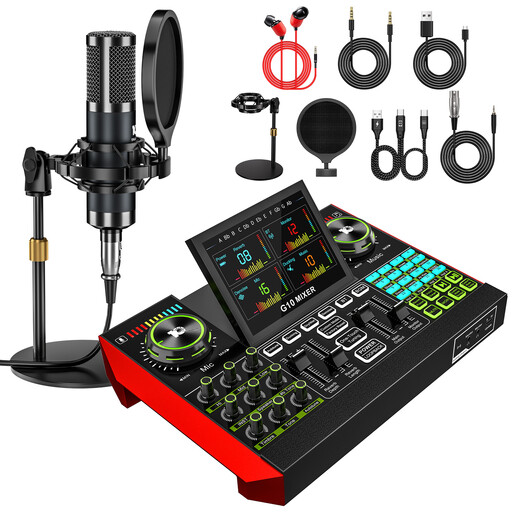
The products listed are microphone kits for recording speech and podcasts at a desk. Before buying, check that the microphones and connections included suit the recording setup you have in mind.
 No image available
Yinkaer G10-P15 podcast microphone kit
This could suit you if you’re looking for a microphone kit with an audio mixer and desk stand for recording speech or podcasts.
The product title lists a 3.5 mm condenser microphone and an audio interface with effects. The description mentions PC, Mac and mobile devices; check the connections for your specific device.
View on Joybuy
 No image available
Yinkaer G10-P17-P17 podcast kit with two microphones
This could be worth considering if you’re recording a poetry reading with someone else and want a kit with two microphones and desk stands.
The product title lists two 3.5 mm condenser microphones, an audio mixer and a sound card. The description mentions PC, Mac and mobile devices; check that the connections match your recording device.
View on Joybuy
Frequently asked questions
Do I need 48V phantom power for a condenser microphone?
Only if your specific microphone requires it. Check its specifications; 48V on an interface isn’t a general setting for every microphone. RØDE recommends switching on phantom power only when the microphone you’re using requires it.
How can I avoid echo and other people’s voices in my recording?
Try recording at a quieter time and positioning the microphone suitably close to you. Shure says a microphone can’t improve room acoustics or reliably separate speech from echo; changing the interface alone won’t solve the problem.
What should I check when connecting and monitoring the interface?
Check that the USB connection and supplied cable work with your computer, connect an XLR microphone to the microphone input, then listen to a test recording through headphones. Set the input level using the loudest part of your reading; Focusrite says a level that’s too high can cause distortion.
Can I simply record other people’s conversations at a shared desk?
Not without restriction: § 201 StGB covers the unauthorised recording of another person’s non-public spoken words. If other people might be audible in your recording, discuss it with them beforehand and avoid recording them unintentionally. Whether a particular conversation is non-public and whether you have permission depends on the circumstances.
Can I publish a recording of someone else’s poem?
Not simply because you’re the one performing the poem. § 19a UrhG sets out the right to make a work available to the public. Whether you need permission to use a particular poem or a legal exception applies can’t be determined in general without knowing the work and how you plan to use it.


