In a booth with noticeable untreated room sound, a dynamic microphone may be a good choice for controlled close-miking. In a quiet, treated booth, a condenser microphone may also suit you if you want to capture subtle vocal nuances. Musikhaus Thomann describes these different recording conditions as a guide, not a guarantee of a particular result. Then choose between USB and XLR to suit your recording setup, and check the connections, power requirements and accessories needed for the specific model.
Who records poetry in a small booth?
People who can hear the booth in their recordings
If ventilation, reflections or noise from outside the booth can be heard in your recording, assess a test recording at your actual speaking distance. Musikhaus Thomann describes dynamic microphones as one possible option for loud or acoustically untreated environments, but they do not eliminate room noise.
People with a quiet, treated booth
If you want to capture quiet lines and changes in vocal dynamics in detail, you could consider a condenser microphone, provided the booth is genuinely quiet when you listen back. Musikhaus Thomann lists quiet rooms as a possible setting for detailed voice recordings.
People without an audio interface
If you want to record directly on your computer, check the connections on the specific model: according to RØDE, the PodMic needs an XLR cable and an audio interface for computer recording. Shure lists USB-C and XLR as connection options for the MV7+.
What should you consider when choosing a microphone?
First, make a test recording to check whether room sound or background noise is an issue. Then choose the right connection type and make sure the setup works with the equipment you already have.
| Criterion |
What to check before buying |
Who should pay particular attention |
| Room sound and background noise |
Record a quiet passage and an emphatic one at your planned speaking distance; listen for ventilation, reflections and plosives. |
If I can hear ventilation or reflections in the booth, I want to know how much will come through in the recording. Around 37% of consumers focus primarily on room sound and background noise. |
| Vocal nuances |
Record quiet and emphatic lines with the microphone in the same position, then listen back for room sound and clipping. |
If quiet lines and changes in delivery are especially important to me, I want to be able to assess them in a test recording. Around 27% of consumers put vocal nuances first. |
| Connection to a computer |
Check the full model name, USB or XLR connection and the interface you already have; check for headphone monitoring if needed. |
If I want to record directly on my computer without an audio interface, the connection needs to work with my device. Around 18% of consumers prioritise computer connectivity. |
| Complete recording setup |
Check what’s included and compare it with the cables, interface, mount and plosive protection you already have. |
If I want to put together a ready-to-use setup, I need to know which parts I already have. Around 18% of consumers focus primarily on having a complete setup. |
Which mistakes should you avoid?
-
Assuming a small booth is automatically acoustically quiet
Ventilation and sound reflections can still be audible in a booth recording. The size of the room alone doesn’t tell you how quiet a recording will sound.
Test the room at your intended speaking distance before settling on a microphone type.
Depending on the results, you may need to spend extra time adjusting the room or re-recording.
-
Assuming similarly named microphone models are the same
According to RØDE, the RØDE PodMic has an XLR output. Don’t assume it has the same connections as variants with different model names.
Check the full model name, connections and included items for the specific variant on offer.
For computer recording with the standard PodMic, RØDE specifies an XLR cable and an audio interface as part of the required setup.
-
Choosing an XLR condenser microphone without checking the power supply
The manufacturer’s datasheet states that the Audio-Technica AT2020 requires 48 V phantom power. This requirement doesn’t automatically apply to USB models with different names.
If you choose the AT2020 specifically, check before buying that the intended XLR input supplies the power it needs.
If your existing equipment can’t provide this power, your recording setup will need a suitable phantom power supply.
Which microphone brands are worth considering?
The following brands and models are included as a guide to different connections and recording situations; their recording performance in any particular booth has not been compared.
RØDE
The dynamic PodMic with XLR and the NT1 5th Generation condenser microphone with USB and XLR are different options for voice recording.
- RØDE lists an integrated pop filter and internal shock mounting for the PodMic.
- For computer recording with the PodMic, RØDE specifies an XLR cable and an audio interface. The NT1 5th Generation’s features don’t mean it is equally suited to a booth with noticeable untreated room sound.
Shure
According to Shure, the MV7+ is a voice microphone with USB-C and XLR; the SM58 is a separate dynamic vocal microphone that should be assessed on its own merits.
- Shure lists a headphone socket and digital processing features for the MV7+. For the SM58, the manufacturer lists a cardioid polar pattern and an integrated windscreen and pop filter.
- The manufacturer’s information doesn’t show how these models will sound in a particular booth. The SM58 isn’t listed as having the MV7+’s USB features.
Audio-Technica
The AT2020 is an XLR condenser microphone for a setup with a quiet booth and a suitable power supply.
- The manufacturer’s datasheet lists a cardioid polar pattern for the AT2020.
- This specific model requires 48 V phantom power according to its datasheet; that requirement shouldn’t be assumed to apply to other USB models.
Sennheiser
According to Sennheiser, the e 835 is a dynamic XLR microphone for speech and singing.
- Sennheiser lists a cardioid polar pattern and a three-pin XLR connection for the e 835.
- The manufacturer’s information about stage use doesn’t provide a comparison of poetry recording in a small booth.
USB microphones at Joybuy
The following Joybuy models are USB microphones for recording directly on a computer. For models with an additional XLR connection, check which extra items you’ll need to use it.
 No image available
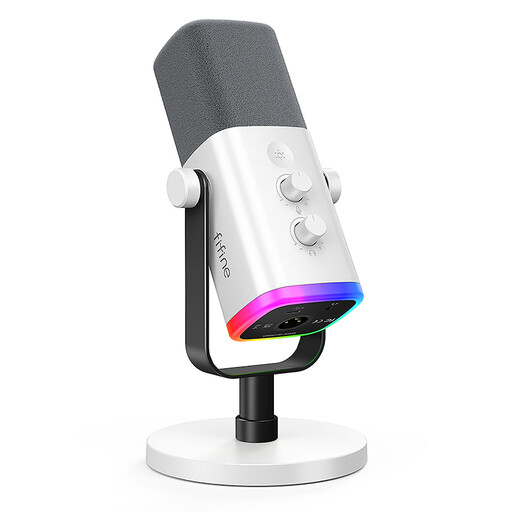
FIFINE AM8 White (AM8W), XLR/USB
Its dynamic, unidirectional design and USB connection make it an option for close-miked computer recording with controlled positioning.
USB-C; stated recording distance: 2 to 6 inches. A USB cable and desktop stand are listed as included. An XLR cable and microphone arm are not included for XLR use.
View at Joybuy
 No image available
FIFINE K688CT USB/XLR microphone kit
This dynamic, unidirectional microphone is an option for positioned voice recording on a computer via USB.
USB-C; recommended speaking distance: 2 to 6 inches. A USB cable, boom arm and desk clamp are listed as included. An XLR cable is not included.
View at Joybuy
 No image available
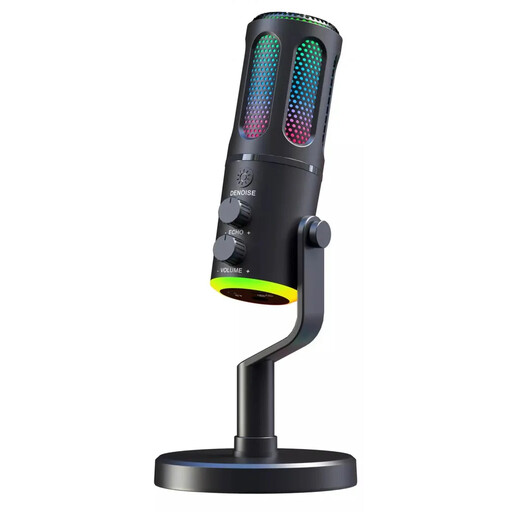
The G-Lab K-MIC-NEON RGB
Its wired USB connection is designed for plugging directly into a computer; the cardioid polar pattern focuses recording towards the front.
A headphone socket with monitoring and a desktop stand are listed as included.
View at Joybuy
 No image available
Stream 410 HD USB microphone
Its USB connection is designed for plugging directly into a computer. If reflections or background noise are audible, the stated omnidirectional polar pattern is an important factor to consider, as it doesn’t focus directionally on the speaker.
Condenser design, pop filter, mute function and USB cable are listed as included.
View at Joybuy
Frequently asked questions
Does every condenser microphone need a 48 V power supply?
No, the power requirements depend on the model. The manufacturer’s datasheet specifically states that the XLR Audio-Technica AT2020 needs 48 V phantom power; don’t assume this applies to USB models without checking.
What should I test in the booth before recording?
Record quiet and emphatic passages as a test, and listen for ventilation, reflections, P and B sounds, and vibrations. This helps you assess the actual recording conditions without assuming a particular sound result.
What should I check when choosing a microphone to connect to a computer?
Check that the connection on the specific model works with the equipment you already have. For the RØDE PodMic, RØDE specifies an XLR cable and an audio interface; according to its manufacturer, the Shure MV7+ offers USB-C and XLR.
What are the returns rules for online purchases?
For a qualifying distance purchase from a trader, the EU consumer portal generally describes a 14-day withdrawal period from delivery, subject to applicable exceptions. It also explains that you have a legal guarantee of at least two years from receipt of the goods; this is separate from a manufacturer’s warranty.


