Players with limited mouse space
If you want to keep room free for your mouse, compare the actual dimensions of the specific model. The Keychron V1 Max ISO and CHERRY MX 8.2 TKL Wireless are examples of compact 75% and TKL layouts.


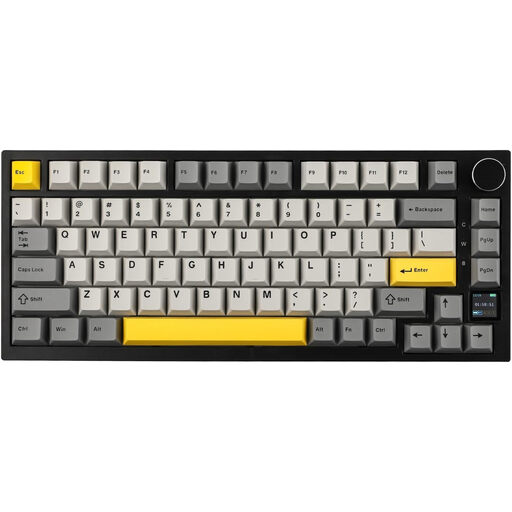
For political simulations when space is tight, a 75% layout is a sensible starting point if you want the function and arrow keys within easy reach. TKL is a good fit if you’d prefer a less crowded layout and your desk has room for the extra width. The product specifications for the Keychron V1 Max ISO and Razer BlackWidow V4 75% describe compact 75% models, while the CHERRY MX 8.2 TKL Wireless and Logitech G PRO X TKL are examples of TKL keyboards. First, check your in-game key bindings and the keyboard’s dimensions, including where the cable or receiver sits. Paradox Interactive documents rebindable keys for Victoria 3, but that doesn’t mean every political simulation offers the same option.
If you want to keep room free for your mouse, compare the actual dimensions of the specific model. The Keychron V1 Max ISO and CHERRY MX 8.2 TKL Wireless are examples of compact 75% and TKL layouts.
If you want frequent commands to be accessible without extra key combinations, check the function row, arrow keys and your game’s key bindings. Paradox Interactive documents rebindable keys for Victoria 3; this doesn’t tell you what other games allow.
If you also work at the same desk or want to avoid disturbing others, check the specific switch option and available connection types. Specifications for models from Keychron, Razer and CHERRY vary by version.
A good fit if: you want to save space while keeping the function and arrow keys readily available.
The trade-off: The keys are closer together, and the models considered don’t have a number pad.
A good fit if: you can do without a number pad and prefer a less crowded key layout.
The trade-off: TKL isn’t automatically narrow enough for your desk, so compare the dimensions with the space you have available.
A good fit if: space is particularly limited and you can access your most-used commands using the available keys or a rebind option supported by the game.
The trade-off: Without a dedicated function row, extra key combinations can make controls more cumbersome.
Measure your desk’s width and depth, and make a note of the commands you use frequently in-game. The percentages in the table show the main buying priority for each group when choosing a keyboard for political simulations on a small desk.
| Priority | What to check when buying | Who is it important to? |
|---|---|---|
| Desk space and room for the mouse | Compare the available desk width and depth with the dimensions of the exact model, including the position of the cable or wrist rest. | If I need room for my mouse next to the keyboard, the actual width matters more than the layout label. Around 33% of consumers put available desk and mouse space first. |
| Direct access to in-game commands | Make a note of frequently used commands and compare them with the keyboard layout and the key-binding options in the specific game. | If I often use function keys or arrow keys, I want to access important commands without extra key combinations. Around 27% of consumers prioritise direct access to in-game commands. |
| Typing feel and noise | Check the switch type and what’s included with the specific version; don’t treat the manufacturer’s sound descriptions as independent noise measurements. | If I share a desk with others, I want to choose a switch feel and typing sound that suit the environment. Around 20% of consumers put these features first. |
| Connectivity and switching between devices | Check the USB connection, wireless receiver, Bluetooth and whether you can use the specific model while it’s charging. | If I use different devices or want to switch between connections, the right connectivity matters more than a particular form factor. Around 13% of consumers prioritise connection type and switching between devices. |
| Customisation and what’s included | Check the difference between the assembled version and the barebones version, as well as compatibility and which switches or keycaps you’ll need. | If I want to change switches or customise key bindings, the version I choose needs to offer those options. Around 7% of consumers put customisation and what’s included first. |
Razer offers a barebones version of the BlackWidow V4 75%, which comes without switches, keycaps or a wrist rest.
Before you buy, check what’s included with the exact version.
With a barebones version, you’ll need to buy compatible switches and keycaps separately if you want to use it.
An especially compact layout is of little use if it then makes frequently used commands awkward to access. Rebinding is only helpful if your specific game supports it.
First, compare your in-game key bindings with the space on your desk. Only plan to rebind keys for a game that actually offers this feature.
CHERRY explicitly limits its under-1 ms latency claim to Gaming mode; it doesn’t apply to Bluetooth or indicate a particular advantage for political simulations.
Read the specifications for the connection mode you actually plan to use, and choose the layout based on your key requirements and available space.
The V1 Max ISO is a 75% model for buyers comparing a German ISO layout with different connection options.
The documented BlackWidow V4 75% model combines a compact format with function and arrow keys.
The MX 8.2 TKL Wireless is a TKL option for buyers who prefer separate connection modes to a 75% layout.
The SKILLER SGK50 S3 is a wired 75% model with switch-swapping and key customisation features.
The PRO X TKL is another TKL option if programmable keys and wireless connections matter to you.
This selection includes 75% models and TKL keyboards for compact gaming setups. Layout, connectivity and available keys vary by model.
 No image available
The 75% layout may suit you if you want to keep space free for your mouse and use a German ISO layout.
Features listed in the product name: ISO-DE, Tri-Mode, hot-swap, VIA compatibility and Creamy Rye switches.
The name also mentions an aluminium case and 8000 mAh.
 No image available
The compact format and ISO-DE layout are a good fit if you want to save space and use a German key layout.
Features listed in the product name: V3 Pro Cream Yellow switches, Bluetooth, 2.4 GHz, USB-C and hot-swap.
 No image available
The 75% format is a compact option; before choosing it, compare the explicitly stated US-QWERTY layout with the key layout you want.
Features listed in the product name: wired connectivity, Bluetooth, 2.4 GHz and hot-swap.
 No image available
TKL may suit you if you’re happy to go without a number pad and have enough room for its larger size compared with a 75% keyboard.
The product name describes a tenkeyless gaming keyboard with a German layout.
 No image available
This wired TKL option may suit you if you want a German layout and can do without a number pad.
Features listed in the product name: Cream Yellow switches, hot-swap and RGB.
Don’t choose based on an advertised polling rate alone. First, compare the keys you need and how easily you can reach them. Manufacturers’ speed claims don’t in themselves prove a particular benefit for political simulations.
First, check the key bindings in the specific game. Paradox Interactive documents a system of rebindable keys for Victoria 3; check the game itself to see whether and how this works in your game and its version. The keyboard you choose must also support macros if you want to use additional keyboard macros.
It depends on the model and version. Razer lists hot-swap sockets for compatible 3- or 5-pin switches on the BlackWidow V4 75%; Sharkoon lists this compatibility for the SKILLER SGK50 S3. Before replacing switches, check the manual and the exact version.
According to Verbraucherzentrale, online consumer purchases generally come with a 14-day withdrawal period from the date the contract is concluded or the goods are received. Verbraucherzentrale explained this on 13 August 2026. According to the German Environment Agency, an old keyboard must not go in household rubbish; it should be taken to a separate collection point for electrical and electronic equipment.
For market surveillance, the Bundesnetzagentur lists the CE marking, product traceability and correct manufacturer details among the points to check. This general checklist doesn’t confirm that a specific keyboard model complies with the requirements.