What to prioritise when buying for a small desk
First, check whether you can move the mouse around in the available space. Then consider the inputs you need, how well the mouse fits your hand and which connection type you prefer.
| What matters |
What to check before buying |
Who is this important for? |
| Room to move |
Measure the clear space beside your keyboard. Think about whether you can move the mouse there or would prefer to try a stationary control option. |
If there’s very little free space, I’d prioritise being able to control the cursor without moving the mouse. Around 36% of consumers say available room to move is their most important buying consideration. |
| Commands and scrolling |
Make a note of the game commands you use most often and check whether you can reach and customise the buttons assigned to them. Check whether scroll modes require software setup. |
If I want to trigger frequently used commands quickly or scroll through long views, the buttons and scroll wheel need to fit the way I play. Around 29% of consumers prioritise accessible commands and scroll controls. |
| Fit |
Try the shape, grip and reach of the controls for yourself if possible. A manufacturer’s ergonomic claims are no substitute for a mouse that fits you personally. |
If I play for longer periods, I want a shape that suits my hand and grip, rather than relying on an ergonomic label alone. Around 21% of consumers put fit and feel first. |
| Connection and power |
Check which USB ports are available and which connection mode you want. Decide whether you’d prefer a battery, rechargeable power or a cable. |
If a suitable connection and straightforward upkeep matter more to me than other features, I check the power source and cable routing before buying. Around 14% of consumers prioritise connection type and ongoing upkeep. |
Wireless products from Joybuy
This selection features wireless gaming mice with extra buttons or different scroll and connection options. They’re worth considering if you want to avoid a mouse cable, but you’ll still need clear space to move the mouse around.
 No image available
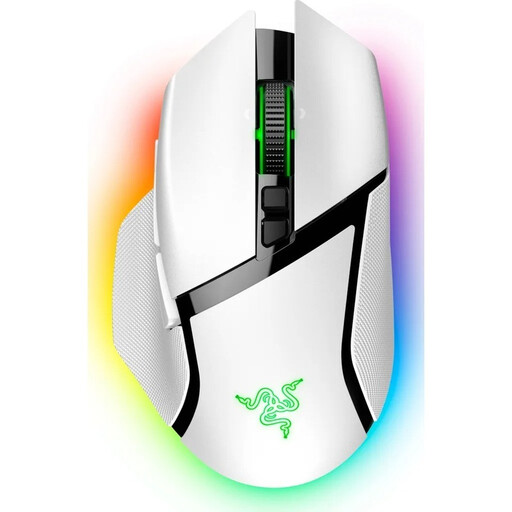
Razer Basilisk V3 Pro Wireless, White
A good fit if you’re looking for a wireless gaming mouse with programmable buttons and different scroll modes.
11 programmable buttons; HyperScroll with tactile and free-spinning scroll modes.
As a wireless mouse you move around, it still needs clear space for movement.
View at Joybuy
 No image available
Razer Naga V2 HyperSpeed
Could be a good fit if you want quick access to frequently used game commands directly from the mouse buttons.
19 programmable buttons; 2.4-GHz wireless and Bluetooth.
Requires an AA battery and, as a wireless mouse you move around, still needs clear space for movement.
View at Joybuy
 No image available
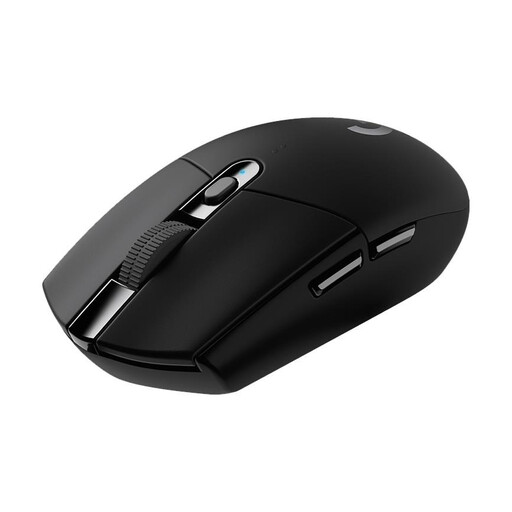
Logitech G305 LIGHTSPEED
An option if you’re looking for a wireless gaming mouse with programmable buttons and still have room to move it around.
HERO sensor with 12,000 DPI; six programmable buttons; LIGHTSPEED wireless connection.
As a wireless mouse you move around, it still needs clear space for movement.
View at Joybuy
 No image available
AULA SC620, White
Could be a good fit if you want programmable buttons and a choice of connection types.
Seven programmable buttons; BT 5.0, 2.4G and USB-C; 67 g; 400 mAh battery.
As a wireless mouse you move around, it still needs clear space for movement.
View at Joybuy
 No image available
AJAZZ AJ159 APEX
An option if you’re looking for a wireless mouse with a symmetrical shape for small to medium-sized hands.
PAW3950 sensor; customisable button assignments.
As a wireless mouse you move around, it still needs clear space for movement.
View at Joybuy
Frequently asked questions
Do I need the highest possible DPI for political simulations?
No, not just because of the genre. Set the pointer speed so that you can reach buttons on your screen comfortably and accurately, without constantly running out of room to move the mouse. Logitech lists a DPI range of 200 to 12,000 for the G305. This is an adjustable range; the maximum setting doesn’t prove that it offers any particular benefit for political simulations.
How should I set up extra buttons?
Start with the commands you use repeatedly in each game and check whether you can reach the buttons without changing your grip. Razer describes the Basilisk V3 as having programmable buttons and profiles. Check in the game and on your system that the specific button assignment works as you expect.
What should I know about wireless receivers, batteries and disposal?
Before buying, check the connection type and power source for the specific model. According to Logitech, the G305 requires an AA battery; CHERRY lists several connection types for the M50 Wireless. Germany’s Federal Environment Agency advises that electrical appliances must not be disposed of with household rubbish, and removable batteries should be handed in separately.
What are my rights when buying online in Germany?
For online purchases made by consumers, you generally have a 14-day right to cancel, starting from the day you receive the goods. You must notify the seller that you wish to cancel. If new goods are faulty, you may have statutory rights against the seller for up to two years after they are handed over or received. The Verbraucherzentrale (German Consumer Advice Centre) points out that statutory rights and a voluntary guarantee are separate entitlements.
How can I tell if a wireless mouse is being sold in compliance with the rules?
The Bundesnetzagentur (German Federal Network Agency) lists checks for market surveillance that include correct CE marking, identifiable manufacturer details, German-language instructions and a valid declaration of conformity. CE marking is not an independent assessment of a mouse’s performance, and it alone cannot confirm that a specific product listing is compliant.


