
Lieferung heute & morgen

Qualitätsgarantie

Willkommens-Angebote freischalten: KOSTENLOSE Lieferung | Bis zu 80 % RABATT | Kostenlose 30-Tage-JoyPlus-Testphase
App herunterladen
A portable Bluetooth printer can come in handy when you’re travelling, studying, managing family life or working in a small office. The key is to choose a device that’s suited to the type of print you need. A mini photo printer won’t replace a portable document printer, and a portable label printer isn’t designed for A4 contracts.
Before you buy, focus less on general marketing claims and more on printing technology, paper size, app compatibility and power supply.
An ink-free printer often uses thermal printing, with thermal paper or ZINK photo paper, for example. This means there are no conventional ink cartridges or toner cartridges to replace. You’ll still need consumables, though: the specialist paper must be compatible with your model and can cost more per print than standard paper.
Before placing your order, check:
A wireless printer usually needs a compatible app. It’s not enough to check whether Bluetooth is included: you also need to know whether the app works with your iPhone, iPad or Android device. Features such as templates, image editing, QR codes and OCR may also depend on the app.
Before you buy, check which operating systems are supported and find out the name of the required app. A Bluetooth printer for smartphones is only easy to use if pairing, app installation and print permissions all work with your devices.
A small mobile printer is easy to carry, but it often won’t take A4 paper. Photo printers use small formats, label printers use narrow rolls, and note printers use specially coated paper.
So first consider whether you’ll mainly be printing:
This will help you narrow down the right type of printer.
For documents, clear text is important. Thermal printing uses heat to create the image. With ZINK systems, heat activates special crystals in the photo paper. Both methods work without conventional ink cartridges, but they do require compatible consumables.
For a mobile printer, check the actual print width too. A device that uses narrow paper is suitable for labels or short notes, but not for lengthy documents.
Battery capacity isn’t always reported consistently. A specific estimate of how many sheets the printer can produce on a single charge is more useful. The actual number will depend on factors including the print content, paper and battery charge level.
For a printer you’ll use on the go, look for:
For example, the Phomemo A282U is rated for up to 150 sheets per charge. Treat this as a guide from the manufacturer, rather than a guarantee for every use.
A compact printer for home and office should take up little desk space. For travel, weight and protection from moisture or extreme temperatures matter more. A lightweight casing can make a printer easier to carry, but it doesn’t mean it can hold more paper.
Also check whether the printer is ready to use without any extra assembly, and whether its paper feed can handle the amount you typically print.
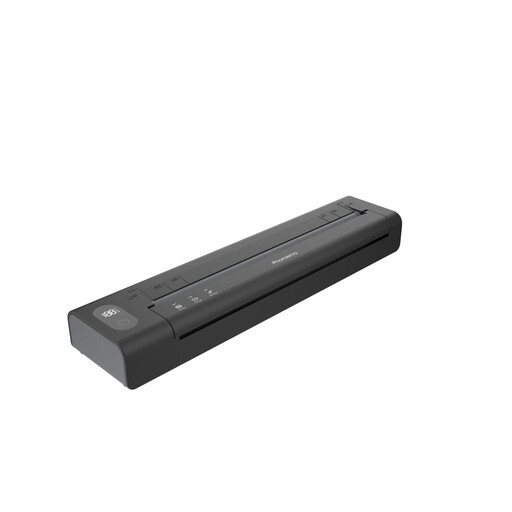
Why it suits this type of user: Weighing a stated 600 g and connecting via Bluetooth through the Phomemo app, this model is designed for printing mobile documents such as invoices, contracts or boarding passes from iOS and Android devices.
According to the product details, its printing technology requires no ink or toner. The required app compatibility for iOS and Android is also clearly specified.
Weighs 600 g, has a rechargeable battery and is rated by the manufacturer for up to 150 sheets per charge.
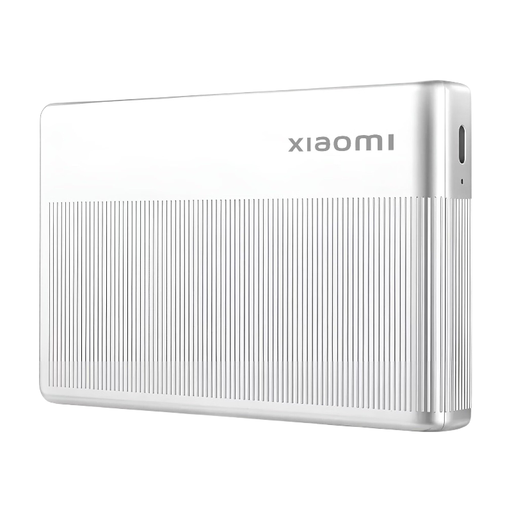
Why it suits this type of user: This mobile photo printer is designed for 2 × 3-inch ZINK photos and supports multiple Bluetooth users. It’s a good fit for families, travellers and creative projects involving small prints.
The specified photo size of 50 × 76 mm and maximum input capacity of up to 10 sheets make its limitations clear.
Weighs 180 g, uses ZINK technology without an ink cartridge, and supports iOS and Android through the Xiaomi Home app.

Why it suits this type of user: This portable label printer is designed for home and office use. Its app supports features including symbols, borders, barcodes, QR codes, images, tables and Excel imports.
The specified label width of 0.59 inches makes its intended use clear and avoids any confusion about printing A4 documents or photos.
Pocket-friendly mini design, Bluetooth connectivity and a built-in rechargeable battery.
As its name suggests, the Phomemo T02-WH Portable Mini Printer for Study Notes and Stickers is designed for study notes and stickers. This kind of compact printer could be a good choice for students, families or creative projects. Before you buy, check which paper size it uses and whether the app supports the templates you want. Shop the Phomemo T02-WH
We’ve put together a complete, regularly updated list of products that meet these strict selection criteria and fully comply with the safety regulations in force across the EU.
First, install the app for your printer model. Turn on Bluetooth on your smartphone, switch on the printer and select it in the app. You’ll usually need to approve printing within the app. If there are several printers switched on nearby, check the model name before confirming the connection.
Battery life depends on the model, print content, paper and charge level. A figure such as ‘up to 150 sheets’ is an estimate provided by the manufacturer. If you’re travelling for a long time or working a full day, it’s a good idea to charge the battery fully beforehand and take a compatible charging cable with you if needed.
An ink-free printer still needs consumables. The ongoing costs mainly come from thermal or ZINK paper. Compare the cost per sheet, not just the purchase price of the printer. If you print documents frequently, a model that takes larger paper may be more economical, while small photo printers are designed for occasional prints.