For writing longer speeches in a shared workspace, a familiar key layout and enough room for the keys you need matter more than choosing the smallest possible keyboard. A compact Bluetooth keyboard can make it easier to switch between compatible devices and carry it around. A wired keyboard is an option if you can avoid wireless connections and have a suitable port. Claims about quiet or comfortable typing come from the manufacturers of the models mentioned and are no substitute for trying out the typing feel for yourself.
Which keyboard is right for you?
Speechwriters in shared offices
If you write longer passages alongside other people, start by checking how loud the keys are and whether the main key area feels comfortable to use. Manufacturers’ claims about quiet typing are not independent noise measurements.
Writers who move between workspaces
If you regularly pack away your keyboard, a compact design can be useful. If you switch between a laptop and tablet, the ability to pair with multiple devices may also matter.
Writers who can’t use a wireless connection
If you can’t or don’t want to use a wireless connection at your workspace, consider a compact wired keyboard and check whether your device has the right port.
What should you look for when buying?
First, check that the layout and keys you need suit the way you write. Then compare noise levels, portability and connectivity for your workspace.
| What matters |
What to check before buying |
Especially important if |
| Typing noise |
Try to compare the key mechanism and noise for yourself; don’t treat manufacturers’ claims as standardised measurements. |
I write longer passages alongside other people, so I want to take the sound of the keys into account. Around 36% of consumers prioritise typing noise. |
| Familiar layout |
Check the exact DE-QWERTZ or DE-ISO version, as well as the arrow and special keys. |
When writing and editing a speech, I need letters, punctuation and the keys I rely on to be where I expect them. Around 28% of consumers focus primarily on typing comfort and layout. |
| Portability and desk space |
Check the dimensions, how well it’s protected in transit and which keys you need; factor in the cable for wired models. |
I often change where I work, so I want the keyboard to fit in my bag and sit comfortably on the desk. Around 22% of consumers prioritise portability and space requirements. |
| Device connectivity |
Check Bluetooth support, operating system compatibility and available USB ports. If you’re using a wireless receiver, check your workplace rules too. |
I first need to make sure I can connect the keyboard to my work device, so the connection type is crucial. Around 14% of consumers consider device connectivity their top priority. |
Avoid common buying pitfalls
-
Assuming ISO means a German layout
ISO alone doesn’t tell you which language is printed on the keys. The Keychron B1 Pro ISO collection includes several language variants; the product page had a Portugal ISO version selected by default.
Before ordering, check the exact version selected and the key labels.
-
Treating “quiet” as a comparable measurement
Claims that CHERRY and Logitech models make little typing noise are manufacturers’ descriptions, not standardised noise measurements.
If possible, compare the feel and sound of the keys for yourself – especially if other people work right beside you.
-
Focusing only on size and overlooking connectivity
A compact wired keyboard needs a suitable port. Bluetooth and USB wireless receivers each require you to be able to use them with your device and at your workplace.
Before choosing, check your devices’ ports and the conditions at your workplace.
Depending on your device, you may need an adapter to connect the keyboard.
Brands to consider
CHERRY
The KW 7100 MINI BT is a compact Bluetooth option that comes with a carry case; the STREAM KEYBOARD TKL is a compact wired alternative.
- CHERRY describes both models as quiet. The manufacturer says the KW 7100 MINI BT can connect to three Bluetooth devices.
- The STREAM KEYBOARD TKL needs a cable. The noise claims are manufacturers’ descriptions, not independent measurements.
Logitech
The MX Keys Mini is a compact Bluetooth keyboard for writers who want backlit keys.
- Logitech lists smart backlighting as a feature.
- Claims about typing comfort and reduced noise come from the manufacturer. Check the exact layout version when viewing the offer.
HP
The HP 350 is a compact Bluetooth keyboard with full-size keys and multi-device pairing.
- HP lists Bluetooth 5.2 and connection to up to three devices.
- The product page gives different battery-life figures, so it’s not possible to make a reliable recommendation about battery life.
Keychron
The B1 Pro ISO collection is for writers who want to choose between Bluetooth, a 2.4 GHz receiver and a cable.
- Keychron offers a DE-ISO version and lists three connection options: Bluetooth, a 2.4 GHz receiver and a cable.
- ISO doesn’t automatically mean German key labels. Check the language version selected before buying.
Keyboards at Joybuy
This selection includes compact keyboards for people who work in different places, from folding Bluetooth models to wired TKL and ultra-compact versions. Check the layout, keys you need and connection type for each specific model.
 No image available
Inateck N0153BK folding mini keyboard with touchpad
The folding design is useful if you regularly move between workspaces; the product name also specifies a touchpad.
The product name lists a QWERTZ layout, three Bluetooth channels and compatibility with iPadOS, Android and Windows.
View at Joybuy
 No image available
Akko 5087S V1 TKL, ISO-DE-QWERTZ
The TKL format is worth considering if you want a German layout but need less desk space than a keyboard with a number pad.
Wired with a USB-C connection; described as a mechanical keyboard with Akko V3 Pro Cream Yellow switches and RGB lighting.
View at Joybuy
 No image available
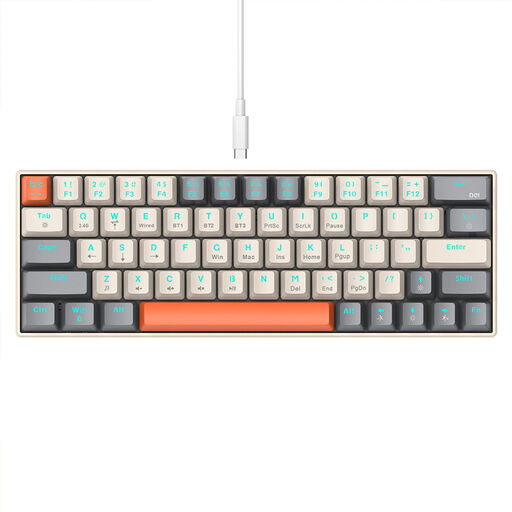
KINSI compact 63-key mini keyboard
The compact 63-key format is an option if you want a small keyboard for moving between workspaces.
The product name lists Bluetooth and 2.4 GHz wireless connectivity, as well as RGB lighting.
View at Joybuy
 No image available
Folding Bluetooth keyboard with mouse
The product name says the keyboard folds for transport; a mouse is also included.
The scissor keys are described as quiet. The listed features include three connection options, pairing with up to three devices and USB-C charging. Compatibility information lists Windows, Android and iOS.
View at Joybuy
 No image available
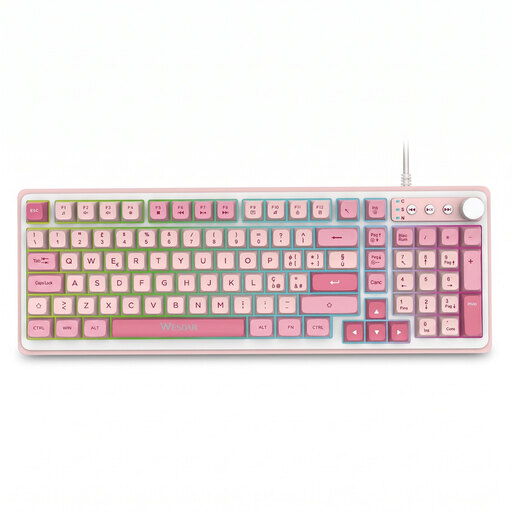
AYCLIF MK656 backlit keyboard, pink
Backlighting may be useful when writing in low light.
Suggested uses include working on documents and office tasks.
View at Joybuy
Frequently asked questions
How can I check that a keyboard has the right German layout before buying?
Check the product version selected, not just the “ISO” label. CHERRY explicitly identifies one version of the KW 7100 MINI BT as DE/QWERTZ; the Keychron B1 Pro is available in several language versions as well as DE-ISO.
How can I use a keyboard when switching between devices?
First check that each device supports the connection you plan to use. CHERRY says the KW 7100 MINI BT has three Bluetooth channels and can switch between them using F1 to F3; the manufacturer notes some limitations for Android and Chrome OS. A wired keyboard, on the other hand, needs a suitable port each time you use it.
What should I bear in mind when packing it away and writing for longer periods?
Make sure you can reach the keys you need comfortably, and protect the keyboard while carrying it. CHERRY says the KW 7100 MINI BT comes with a carry case. The German Social Accident Insurance (DGUV) explains that an ergonomic assessment can help improve work equipment and workplace layout; choosing a particular model won’t automatically prevent discomfort.
What rights apply to private online purchases in Germany?
Online consumer purchases generally come with a 14-day right to cancel. The Verbraucherzentrale explains that the period usually starts when the contract is made or when you receive the goods you ordered. This is separate from your statutory rights against the retailer if goods are faulty: the German Federal Government states that the statutory warranty period is generally two years. Check how the rules apply in your particular case, for example if the purchase is for business use.


